web
You’re offline. This is a read only version of the page.
close
Skip to main content

Announcements

No record found.

News and Announcements icon
Community site session details

Community site session details

Session Id :
Microsoft Dynamics AX (Archived)

Auto Populate Reason Codes in Fixed asset Journals

(0) ShareShare
ReportReport
Posted on by 435

Hello!,

I am using ax 2012.

On creating new fixed asset journal lines by clicking new or even by using proposals in the toolbar (i.e Acquisition Proposal, Depreciation Proposal etc), I want the reason codes to be auto populated based on the Journal Name. 

I have created a new Field in the LedgerJournalSetup form(i.e Ledger JournalName Datasource) which contains the Default Reason Code for the particular journal Name. Based on that field I want the Fixed asset journal line to be updated.

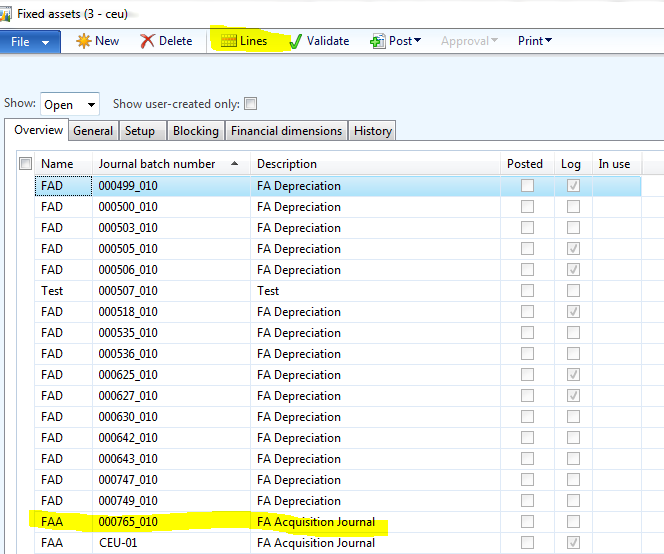
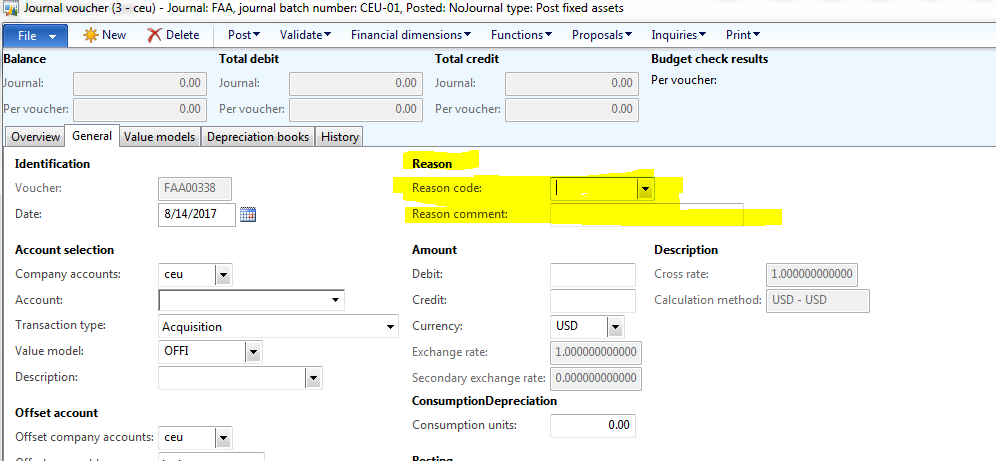
Please see the following Images for more clarification,
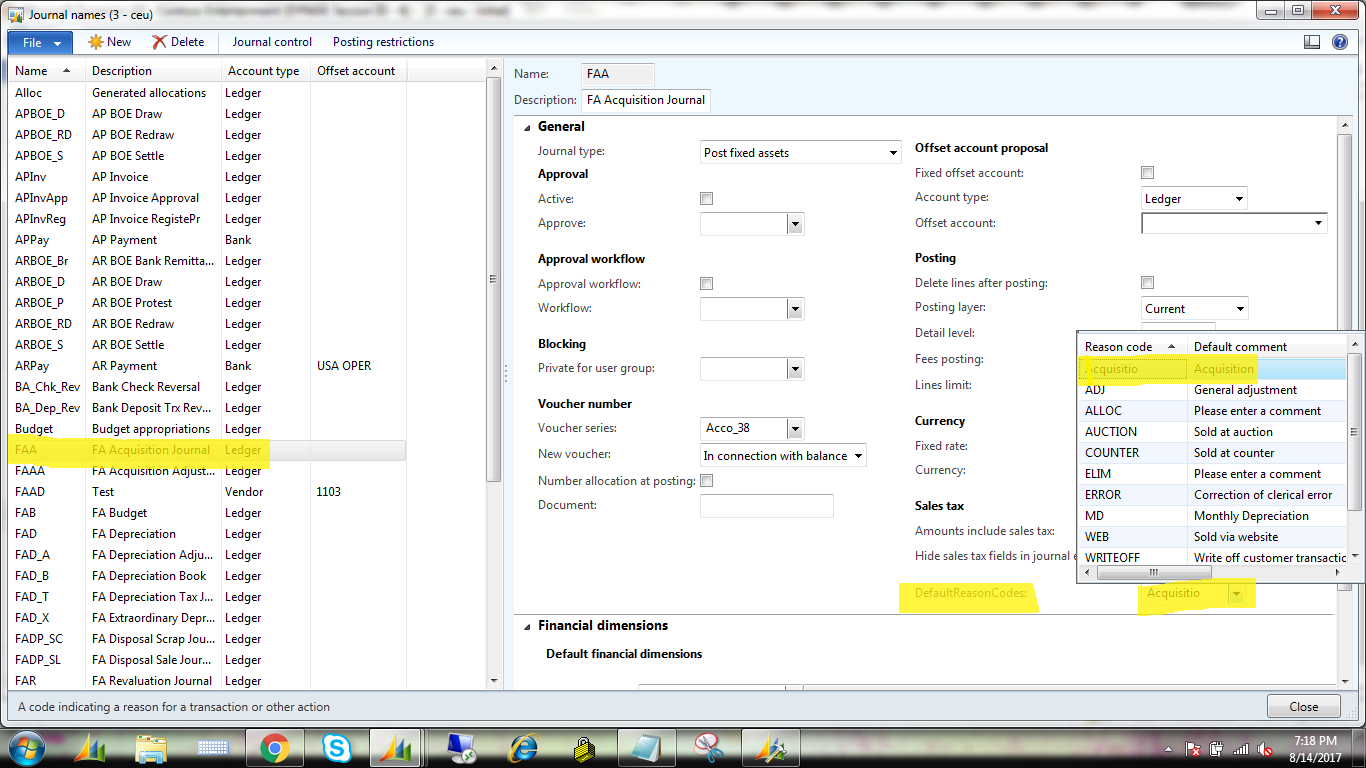
FAA-c.png

Faa-c1.PNG

Faa-c2.PNG

I wrote the following code in classes/ledgerJournalEngine/initValue as well as classes/ledgerJournalEngine/ledgerJournalTableUpdateTotals for proposal purpose,

while select ledgerJournalName
where ledgerJournalName.JournalName ==ledgerJournalTable.JournalName &&
ledgerJournalTransOrig.JournalNum == ledgerJournalTable.JournalNum
{
ledgerJournalTransOrig.ReasonRefRecID = ledgerJournalName.ReasonRefRecID;
reasonCode = ReasonTableRef::find(ledgerJournalTransOrig.ReasonRefRecID).Reason;
ledgerJournalTransOrig.editReasonCode(false,reasonCode);
}

But its not working. The recID is kept varying in the ReasonTableRef datasource. Please suggest alternate solutuions.

Thanks.

*This post is locked for comments

I have the same question (0)
  • Ludwig Reinhard Profile Picture
    Microsoft Employee on at

    Hi Edselv Evert,

    What is the value added through this adjustment?

    AX automatically assigns a posting type (acquisition, depreciation, etc.) to those transactions that are recorded together with the ledger account and financial dimensions.

    From your screenprints provided, I can't see a difference to those standard posting types.

    Best regards,

    Ludwig

  • Edselv Evert Profile Picture
    435 on at

    Hello Ludwig,

    Thanks for your reply.

    Its not about the transaction type. I am totally fine with the type but for every line I need to select reason codes the user would need to enter this in line by line each month which in some cases could be thousands of lines. So I want to auto populate the reason code automatically on creating a new line depending the reason code value given in the ledgerJournalSetup for each type as I provided in the above screenshots.

    Thanks.

  • Ludwig Reinhard Profile Picture
    Microsoft Employee on at

    Hello Edselv Evert,

    Thank you for your reply.

    What I wanted to question is whether the reason codes and the transaction types don't track the same information?

    If this is the case then you don't need the reason codes and the adjustment.

    Best regards,

    Ludwig

  • Edselv Evert Profile Picture
    435 on at

    Hello Ludwig,

    No they dont track the same information. Reason codes varies for us for different types.

    Thanks.

  • Verified answer
    Chaitanya Golla Profile Picture
    17,225 on at

    Hi,

    Reasoncode and ReasonComment fields on the form LedgerTransAsset are driven by editMethods and its not a bound control. So, please use the following code in the method create of datasource LedgerJOurnalTrans on form itself after statements  super(append);

                                                isInCreate = false;

    (Path: \Forms\LedgerJournalTransAsset\Data Sources\LedgerJournalTrans\Methods\create)

    if ((LedgerJournalTrans_Asset.TransType == AssetTransTypeJournal::Acquisition)  // This ensures its gets

                                                                            populated only for AcquistionProposal and DepreciationPropoasl

    || (LedgerJournalTrans_Asset.TransType == AssetTransTypeJournal::Depreciation))

    {

    LedgerJournalTrans.editReasonCode(true, LedgerJournalName::find(LedgerJournalTable.JournalName).Reason); // Here Reason is the assumed field, use your custom field

    }

    ReasonComment gets populated based on ReasonCode.

    Thanks,

    Chaitanya Golla

  • Edselv Evert Profile Picture
    435 on at

    Hello Sukrut and Chaitanya,

    Thanks both for your replies. Both the methods worked. I ll alter based on my requirement and get back to you if I face any problems. Thanks for your help.

    Thanks.

  • Edselv Evert Profile Picture
    435 on at

    Hello  Sukrut and Chaitanya,

    Can you guys please tell me to implement the same process in AX7.

    Thanks.

  • Edselv Evert Profile Picture
    435 on at

    In formdatasource table or directly in the data source?

Under review

Thank you for your reply! To ensure a great experience for everyone, your content is awaiting approval by our Community Managers. Please check back later.

Helpful resources

Quick Links

Introducing the 2026 Season 1 community Super Users

Congratulations to our 2026 Super Stars!

Meet the Microsoft Dynamics 365 Contact Center Champions

We are thrilled to have these Champions in our Community!

Congratulations to the April Top 10 Community Leaders

These are the community rock stars!

Leaderboard > 🔒一 Microsoft Dynamics AX (Archived)

#1
CP04-islander Profile Picture

CP04-islander 24

#2
Michel ROY Profile Picture

Michel ROY 14

#3
Jagadabi Profile Picture

Jagadabi 6

Last 30 days Overall leaderboard

Featured topics

Product updates

Dynamics 365 release plans