web
You’re offline. This is a read only version of the page.
close
Skip to main content

Notifications

Announcements

No record found.

Community site session details

Community site session details

Session Id :
Small and medium business | Business Central, N...
Answered

Extra Entries on GL Entries Preview when reporting currency is enabled

(0) ShareShare
ReportReport
Posted on by 72

Dear Community ,

i have been using BC 365 for a year now and i have made a lot of payment entries to vendor with and without application , which never any impact on the GL register entries 

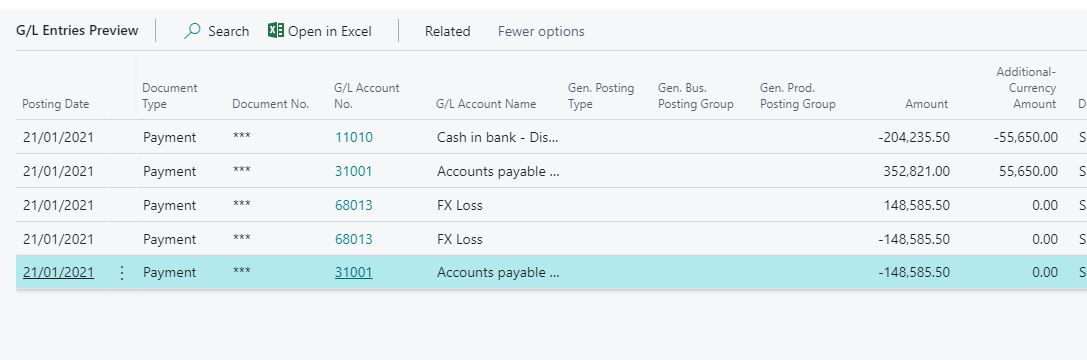
today one of my customer asked me to enable reporting currency and when i tried to enter payment to vendor i got 5 GL Entries instead of 2 entries which usually come 

the invoice  and the payment are same currency , not local currency , but Reporting currency

if i don't apply the document it will be as normal 

the GL entries seems fine from financial entries , but i am trying to understand the concept behind these extra entries , so i can explain it to the my customer

thanks
GL-Entries.JPG

I have the same question (0)
  • Verified answer
    Dirk Profile Picture
    on at

    Hello,

    Without looking at the entries and the setup in detail I can only assume that you see 5 entries, 3 with the same amount, because before posting this payment 

    - the foreign currency invoice has been registered
    - the "Adjust Exchange Rate" batch has been used - unrealized gain/loss has been posted for the invoice
    - there is no difference in the exchange rate at the time the currency has been adjusted and the posting date of the payment (postign date of the application for the invoice)


    In this case, when you apply the open invoice by the payment two things happen

    - the unrealized gain/loss from the "Adjust Exchange Rate" gets reversed (this gives you 2 of the 5 entries)
    - the invoice gets applied and the realized gain/loss gets registered with it (this gives you 3 of the 5 entries)


    It would be easier to understand hwat happens if you would use different G/L Accounts for

    - unrealized gains
    - unrealized losses  

    - realized gains
    - realized losses  

    - realized G/L gains 
    - realized G/L losses  

    - residual gains
    - residual losses  

    at least for testing purposes.


    I hope this helps
    Kind Regards
       Dirk

  • Verified answer
    Community Member Profile Picture
    on at

    Hello,

    Adding to Dirk's reply... I concur with his statement that keeping the G/L Accounts different will help with analyzing the impact of Realized and Unrealized Gain or Loss on FX Currency. When you make a payment you are checking the Currency Exchange Rate, for the Payment Posting Date (or active one), and recording the Realized Gain or Loss. In your example, you can see the breakdown of:

    Debit - A/P - 352,821.00

    Credit - Cash - (204,2335.50)

    Credit - FX (Gain)/Loss - 0

    Credit - A/P - (148,585.50)

    Now, given this entry was booked all at once, you get 5 entries. I would separate the G/L Accounts as this would have appeared better. Based on your entry I think you did not run the Adjust Exchange Rate functionality, which would have recorded this entry:

    Credit - A/P - xxx,xxx.xx ( Based on the Currency Exchange Rate for the month-end or date the routine ran)

    Debit - FX (Gain)/ Loss - xxx,xxx.xx

    The above Debit and Credit is based on your example.

    I hope you can follow the Accounting entries and process.

    Thanks,

    Steve

    pastedimage1611609853407v1.png

  • OlaQ Profile Picture
    72 on at

    Dear Steven,

    i have followed yours and Dirk reply and changed the Account For each of the residual , gain and loss account as well as the credit rounding account from vendor posting group 

    the entry as seen below have realized Loss and credit Rounding account from vendor posting group

    GL-Entries_2D00_-after-account-change.JPG

    Detail-Vendor-Ledger-entry.JPG

    i am actually trying to understand why this is happening (why the system have recorded a loss ), because the exchange rate is fixed not changed between the invoice and payment 

    is is because i have added an additional reporting currency 

    if i don't choose the applying option the following as usually will be the entries

    GL-Entries_2D00_No-applying.JPG

    thanks

  • Suggested answer
    Community Member Profile Picture
    on at

    Hello,

    Can you do me a favor so I can reply back...  The actual Invoice you entered for the Vendor in EUR can you tell me the EUR Amount, which based on what I am guessing was 352,821.00. What was your FX Rate so I can play with your entry.

    Thanks,

    Steve

  • OlaQ Profile Picture
    72 on at

    Dear Steve , 

    My local Currency is AED , my Invoice and Payment currency is USD =55,650 , while 204,235.50 is LCY equivariant for the transaction

    the FX Rate was not change = 3.67

    as u can see in below

    thanks 

    invoice.JPG

  • Suggested answer
    Community Member Profile Picture
    on at

    Hello,

    OK, I entered your example into my Cronus database. My LCY = USD and I created a Samsung Vendor with Currency = AED. Here are my screen shots:

    1. Currency Exchange

    pastedimage1611838716689v2.png

    2. Purchase Invoice showing AED at 204,235.50

    pastedimage1611838658051v1.png

    3. Preview Posting and then posted

    pastedimage1611838757816v3.png

    4. Vendor List and Balance

    pastedimage1611838779104v4.png

    5. Payment Journal to pay

    pastedimage1611838794706v5.png

    6. Preview Posting 

    pastedimage1611838811723v6.png

    My entries posted and balance with ZERO FX transactions. Are you sure the Bank Account chosen when making the payment was correct. I am thinking that say I picked a Bank Account that was EUR or another Currency, that is NOT AED, then when posting I have to convert the USD amount to the other currency and make payment using that currency and their would be an FX impact if different. I am thinking outside the box on a possible reason.

    Hope this helps.

    Thanks,

    Steve

  • OlaQ Profile Picture
    72 on at

    Dear Steven,

    Good morning ,

    this is exactly what expected and what I usually get when I open GL Preview

    and bank is the same as the invoice and payment currency

    the only difference , is i have assigned USD as my Reporting currency , will that effect the situation

    pastedimage1612078690802v1.png

    regards

  • Suggested answer
    Community Member Profile Picture
    on at

    Hello,

    The Additional Reporting Currency will only show the LCY and additional reporting currency on each G/L Entry and other entries. The entries in your screen shot are actual entries and not related to the additional reporting currency setup.

    Has this happened more that once? I tested another example and cannot get your results. Have you tried testing in a Cronus database?

    Thanks,

    Steve

  • OlaQ Profile Picture
    72 on at

    Dear Steven,

    thanks again for the help , i have followed your suggestion and did the same scenario on Cronus with a reporting currency , and the out put did not have the extra GL for Exchange Loss , so i mapped same setup and still have the same information 

    so i went back to the invoice to check if the amount was correct or there were difference exchange rate 

    and i found that when i first try to make the transaction the Exchange rate was not set correctly , even after changing the exchange rate on currencies setup page 

    the exchange rate was not changed on the invoice , even though the amount was converted correctly which resulted in LOSS Entry as you have explained before 

    so i thought this was because of my reporting currency is the only change

    thanks again for the help

Under review

Thank you for your reply! To ensure a great experience for everyone, your content is awaiting approval by our Community Managers. Please check back later.

Helpful resources

Quick Links

Responsible AI policies

As AI tools become more common, we’re introducing a Responsible AI Use…

Neeraj Kumar – Community Spotlight

We are honored to recognize Neeraj Kumar as our Community Spotlight honoree for…

Leaderboard > Small and medium business | Business Central, NAV, RMS

#1
OussamaSabbouh Profile Picture

OussamaSabbouh 2,126

#2
Khushbu Rajvi. Profile Picture

Khushbu Rajvi. 744 Super User 2025 Season 2

#3
YUN ZHU Profile Picture

YUN ZHU 674 Super User 2025 Season 2

Last 30 days Overall leaderboard

Featured topics

Product updates

Dynamics 365 release plans



