web
You’re offline. This is a read only version of the page.
close
Skip to main content

Notifications

Announcements

No record found.

Community site session details

Community site session details

Session Id :
Finance | Project Operations, Human Resources, ...
Suggested Answer

Changes to purchase order 'XXX' are only allowed in state Draft when change management is Activated" re-submitting PO to workflow after editing PO

(0) ShareShare
ReportReport
Posted on by 46,625 Super User 2025 Season 2

Installed product version : 10.0.13 (10.0.569.10005)

Installed platform version : Update37 (7.0.5746.35600)

Receiving this error when attempting to resubmit to workflow after a previously approved PO has been edited.  There are a number of KBs on LCS Issue search that relate to this error message but they seem to be related to an attempt to update the Accounting date on the header, or Lines with sales tax on them, neither of which is my scenario.

This happens on only certain POs, not all of them.

Thought I'd run this by the experts before submitting a Microsoft support case.  Thanks in advance.

Submitting to workflow after edit, get this error
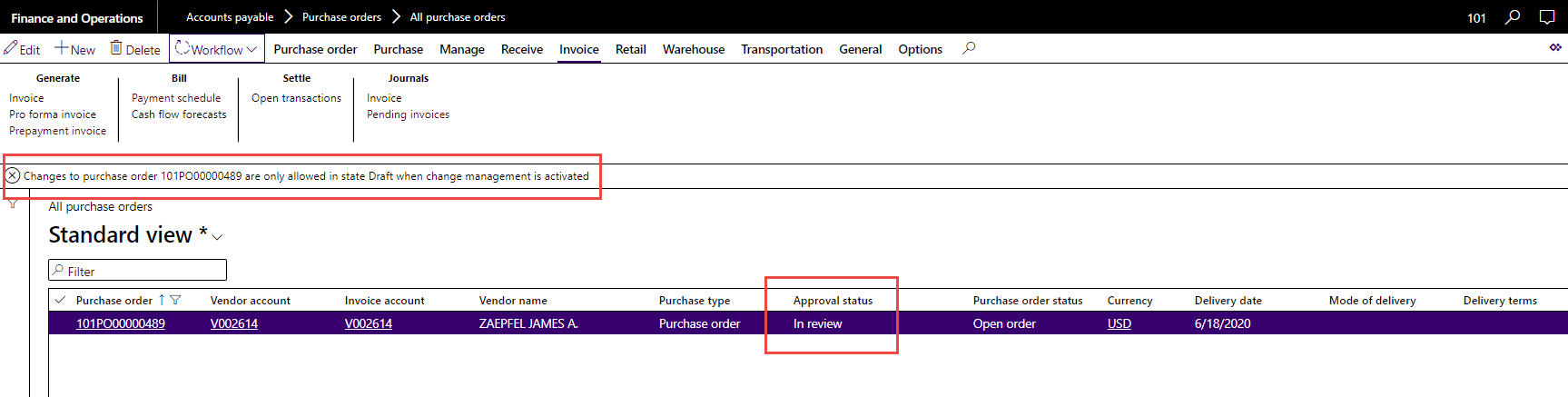
pastedimage1603205559370v1.png

Refresh the session, the PO approval reverts to Draft
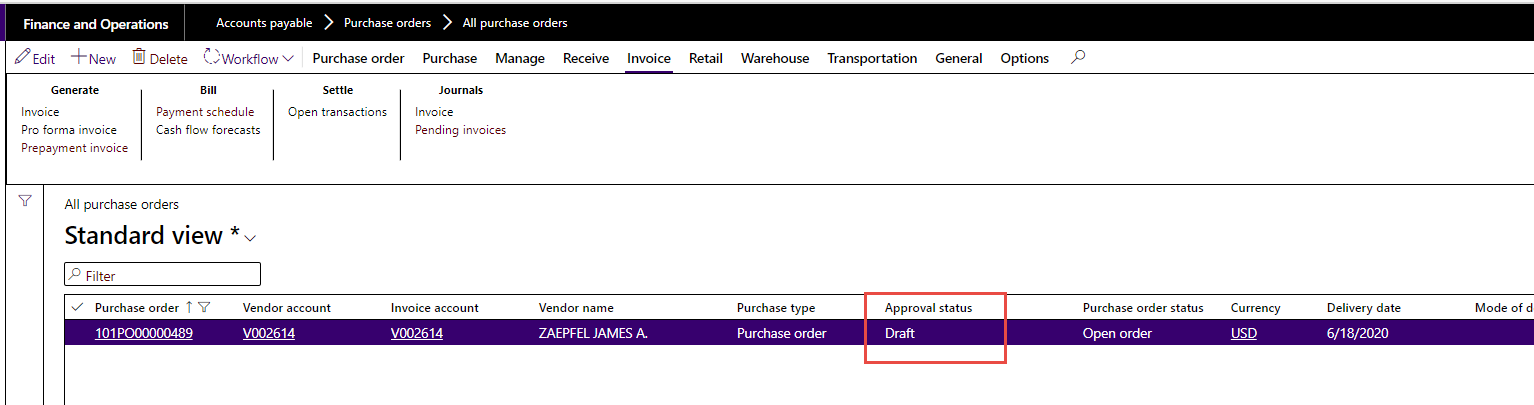
pastedimage1603205613567v2.png

I have the same question (0)
  • Ramit Paul Profile Picture
    22,799 Most Valuable Professional on at

    Hi,

    Correct our understanding with the flow.

    You have created a PO and that is already in review state (in workflow)?

    And then you are trying to change this in the "review" state?

    After that, you are refreshing the page and coming to draft state?

    Please correct the steps if misunderstood.

    We can replicate and be on top of this.

  • Frank Hamelly | MVP, MCP, CSA Profile Picture
    46,625 Super User 2025 Season 2 on at

    1. The PO has already been Approved and Confirmed

    2. User edits the PO (maybe changes line quantity or removes a line)

    3. User attempts to submit the changes to workflow - this is when the error message is received.  The PO is now in 'In review' status

    4. Close the PO, re-open it, and it has reverted back to Draft status

    Workflow submission after the edits is not successful.

  • Ramit Paul Profile Picture
    22,799 Most Valuable Professional on at

    In your step 2: I am assuming user is using the "Request change" option from the header and after then it will be in draft state- If this is the case then it is the BUG if in review state

    However, "Workflow submission after the edits is not successful." what is the error here?

  • Frank Hamelly | MVP, MCP, CSA Profile Picture
    46,625 Super User 2025 Season 2 on at

    It's the error in the first screenshot in my first post.

  • Ramit Paul Profile Picture
    22,799 Most Valuable Professional on at

    Alright.

    You mentioned after the refresh it become draft and since then dont you submit in workflow or is it still showing the state is in review?

    Have you tried to submit after it come to the draft state?

  • Frank Hamelly | MVP, MCP, CSA Profile Picture
    46,625 Super User 2025 Season 2 on at

    Has anyone else seen this behavior?  If so, what was the resolution?  Thanks

  • Suggested answer
    Ramit Paul Profile Picture
    22,799 Most Valuable Professional on at

    Hi Frank,

    Your question is still not clear and was waiting for the clarification to understand and repro in the same version.

    From the information you given I can only see the below LCS link, you may check and feedback.

    fix.lcs.dynamics.com/.../Details

  • André Arnaud de Calavon Profile Picture
    301,231 Super User 2025 Season 2 on at

    Hi Frank,

    I haven't seen this before. Usually when you select the option 'Request change', the workflow status will be reset to 'Draft'; not 'In review'.

    Can you check if there are multiple instances of the workflow message for the same PO running? Can you also tell if there are customizations in this environment or not?

  • Frank Hamelly | MVP, MCP, CSA Profile Picture
    46,625 Super User 2025 Season 2 on at

    Thanks Andre & Ramit.  Further clarification - Upon selecting 'Request change' the PO does go into Draft status.  It's only upon selecting the workflow Submit button after making the changes to the PO that it goes into 'In review' status, which is expected.  However, the workflow doesn't execute, but returns the error message below.  Note that the PO is now 'In review' even though the workflow technically didn't initiate.

    4861.Picture1.png

    If we refresh the session, the PO reverts back to 'Draft' status.  It's like the PO is almost 'In review' but not quite, and the status reverts upon refresh.

    There are dozens of customizations in this environment

  • André Arnaud de Calavon Profile Picture
    301,231 Super User 2025 Season 2 on at

    Hi Frank,

    It might be related to a customization. Possible a field value is changed as part of a workflow step. You can try a workaround by setting up reapproval rules: docs.microsoft.com/.../set-up-a-reapproval-rule-for-purchase-orders

    However, I doubt this will work here...

Under review

Thank you for your reply! To ensure a great experience for everyone, your content is awaiting approval by our Community Managers. Please check back later.

Helpful resources

Quick Links

Responsible AI policies

As AI tools become more common, we’re introducing a Responsible AI Use…

Neeraj Kumar – Community Spotlight

We are honored to recognize Neeraj Kumar as our Community Spotlight honoree for…

Leaderboard > Finance | Project Operations, Human Resources, AX, GP, SL

#1
Abhilash Warrier Profile Picture

Abhilash Warrier 669 Super User 2025 Season 2

#2
André Arnaud de Calavon Profile Picture

André Arnaud de Cal... 449 Super User 2025 Season 2

#3
Martin Dráb Profile Picture

Martin Dráb 384 Most Valuable Professional

Last 30 days Overall leaderboard

Product updates

Dynamics 365 release plans
