web
You’re offline. This is a read only version of the page.
close
Skip to main content

Announcements

No record found.

News and Announcements icon
Community site session details

Community site session details

Session Id :
Customer experience | Sales, Customer Insights,...
Answered

Security issue - WEB API executing a PATCH

(0) ShareShare
ReportReport
Posted on by 1,532

Hi,

I have a WEB API that I am using a "PATCH".  The API is working correctly.  My problem that I am having is that I am getting a field permission error message.

The field that is throwing the error message is not the field that is getting updated by the user.  The user has "Read" only permission on the field.  

My question is why is the user having a permission issue.
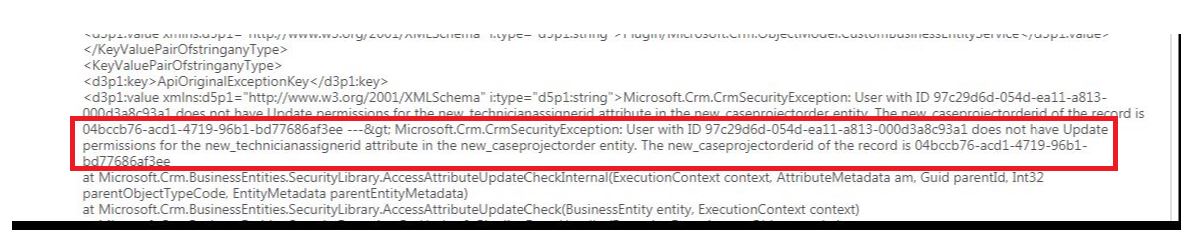
PermissionIssue-2.JPG

var entity: any = {};
entity["new_issetupcompleted"] = isSetupCompleted;
let stringUrl = UrlQueryString.postTemplateUrl(StandardUtilityFunction.FormatGuid(templateId));

Crm.CrmPatchSingle(globalContext.getClientUrl()   stringUrl, entity, (data, textStatus, xhr) => {
}

I have the same question (0)
  • a33ik Profile Picture
    84,331 Most Valuable Professional on at

    Hello,

    Do you have any plugin/realtime workflow that is get triggered on update of new_issetupcompleted field by a chance that tries to update new_technicianassignedid field?

  • rthompson Profile Picture
    1,532 on at

    Hi,

    Yes,  I do have a plugin that is doing the following. 

    if (templateEntity.Contains("new_technicianassignerid"))
    {
        technicianAssignerLookup = (EntityReference)templateEntity.Attributes["new_technicianassignerid"];
    }

    So even if the logic is never calling the above code the plugin checks all fields for security permission.  Is that correct?

  • a33ik Profile Picture
    84,331 Most Valuable Professional on at

    Does your plugin update the field? I see only assigning of the value of the field.

  • rthompson Profile Picture
    1,532 on at

    No.  I even removed the code and still get the same permission error

  • Verified answer
    a33ik Profile Picture
    84,331 Most Valuable Professional on at

    I don't believe in miracles - there should be the reason for it. Do you have anything meaningful in the full log part of which you posted in initial message?

  • Verified answer
    Marco.P Profile Picture
    2,405 on at

    Hi,

    You said that you removed the code, any chances that your plugin's Pre or Post entity contains that field and somewhere else you use that entity object to make an update?

    I told you this because i've seen It happen:)

    Hope It Helps.

  • rthompson Profile Picture
    1,532 on at

    Hi,

    I check and the field does not exist.   Question,  I have notice that when I do a post the entire entity data is being display in the API.  I thought the the only thing I should be see is the one field that I am updating.  Would that have something to do with it?

  • Verified answer
    rthompson Profile Picture
    1,532 on at

    Hi Andrew,

    After spending sometime with the code.  The plugin was using the postImageEntity to update the record rather then the actual entity.

    Thanks for your help!

Under review

Thank you for your reply! To ensure a great experience for everyone, your content is awaiting approval by our Community Managers. Please check back later.

Helpful resources

Quick Links

Introducing the 2026 Season 1 community Super Users

Congratulations to our 2026 Super Stars!

Meet the Microsoft Dynamics 365 Contact Center Champions

We are thrilled to have these Champions in our Community!

Congratulations to the April Top 10 Community Leaders

These are the community rock stars!

Leaderboard > Customer experience | Sales, Customer Insights, CRM

#1
ManoVerse Profile Picture

ManoVerse 85 Super User 2026 Season 1

#2
Muhammad Shahzad Shafique Profile Picture

Muhammad Shahzad Sh... 69 Most Valuable Professional

#3
11manish Profile Picture

11manish 64

Last 30 days Overall leaderboard

Product updates

Dynamics 365 release plans
