web
You’re offline. This is a read only version of the page.
close
Skip to main content

Notifications

Announcements

No record found.

Community site session details

Community site session details

Session Id :
Supply chain | Supply Chain Management, Commerce
Suggested Answer

Release Approved Purchase Requisitions

(0) ShareShare
ReportReport
Posted on by

Hi, 

I have generated numerous different purchase requisitions, submitted them to an approval workflow and they now have the status 'Approved'. My intent is to now navigate to the 'Release approved purchase requisitions' form to add them to consolidation opportunities before transforming them into Purchase Orders. However, I am unable to see any of my approved purchase requisitions in the Release approved purchase requisitions form. Does anybody know why this is please?

Thanks.

I have the same question (0)
  • Suggested answer
    P.k.Kaushik Profile Picture
    1,031 on at

    Hello,

    There is a purchasing policy which governs whether PR will be automatically converted to a PO on approval.

    Please review the policy which is set under Purchasing policies >> Purchase order creation and demand consolidation >> Manual Purchase order creation section.
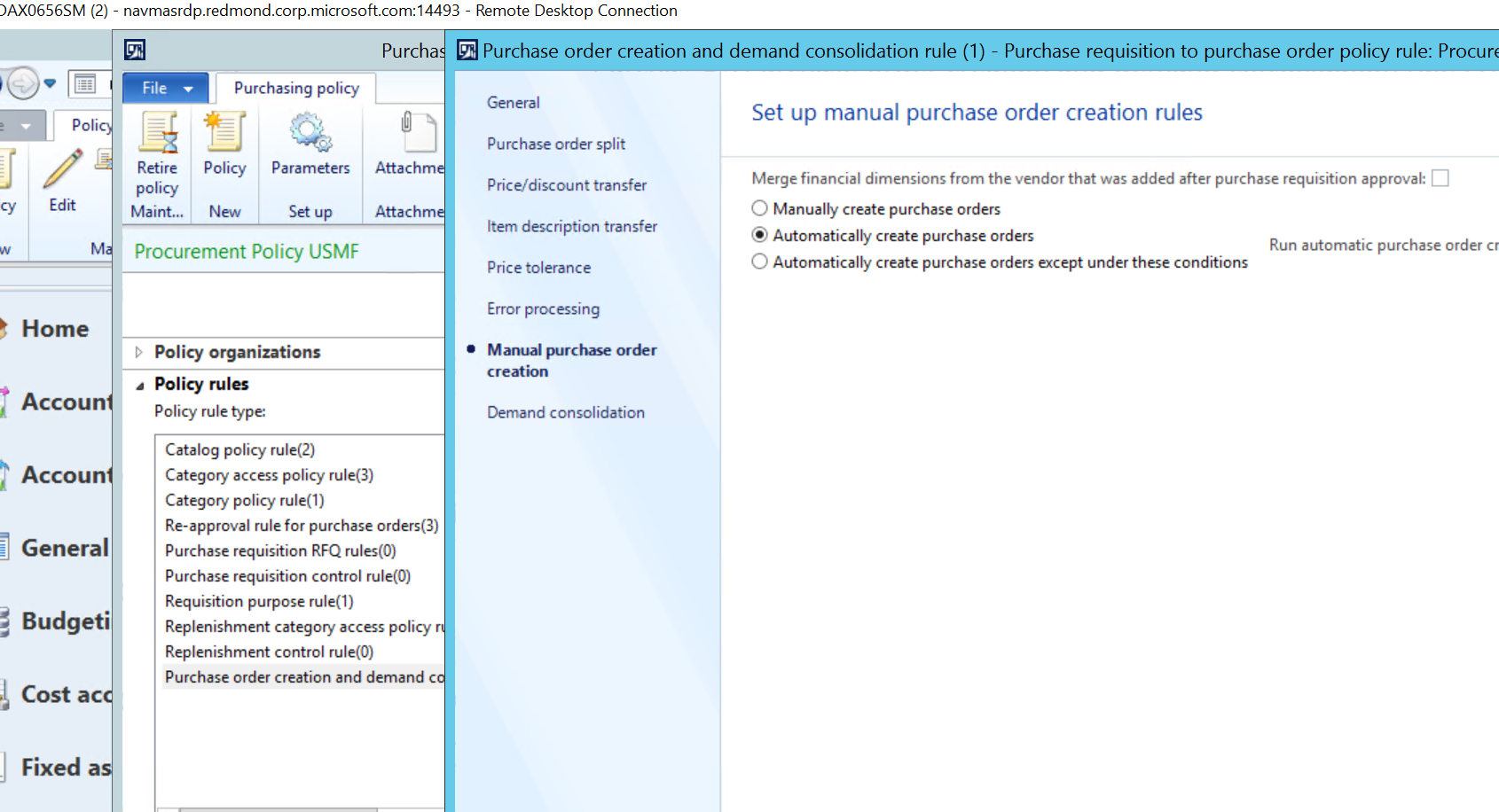
    pastedimage1593116093652v1.png

    If Automatically create purchase orders is checked then PO's will be created automatically when the PR is approved, Provide the vendor info is filled in the PR.

    Thanks, Kaushik

    This post is my own opinion and does not necessarily reflect the opinion or view of my company or Microsoft.

    P.S:- Please mark the answer as verified if it helps you in resolving the issue.

  • Community Member Profile Picture
    on at

    Hi, Thanks for your response!

    I don't actually want to create purchase orders automatically. I wanted the approved purchase requisitions to appear in the 'Release approved purchase requisitions workspace' so I can review and consolidate them into opportunities for demand consolidation and essentially group multiple purchase requisitions onto one purchase order. Is there a way to automatically consolidate the purchase requisitions using the tick option you provided or alternatively do you know how to work the functionality of the mentioned workspace?

    Thanks

  • Suggested answer
    Alina Lica Profile Picture
    on at

    Hello,

    Per my knowledge, it is not possible to automatically consolidate purchase requisitions.

    You can use consolidation opportunities to manually consolidate requisitions:

    docs.microsoft.com/.../key-tasks-consolidate-purchase-requisitions

    Thanks,

    Alina

  • Suggested answer
    Reyaz@Alfa Profile Picture
    2 on at

    Hi ,

    This is because of Budget issue, If at any stage of approval process budget check get any issue it stuck in PR windwos and it will not automatically appear into approval purchase requisition form.

    This is know issue if you search on LCS you will find some KB for this.

    Workaround suggested by MS is that - there is button reserve budget funds on PR in financial tab, you need to click for approved PR. Then it will be visible to approved PR.

    Thanks

    Reyaz Ahmed

  • Marian_H Profile Picture
    10 on at

    Thanks it solved my problem

Under review

Thank you for your reply! To ensure a great experience for everyone, your content is awaiting approval by our Community Managers. Please check back later.

Helpful resources

Quick Links

Responsible AI policies

As AI tools become more common, we’re introducing a Responsible AI Use…

Neeraj Kumar – Community Spotlight

We are honored to recognize Neeraj Kumar as our Community Spotlight honoree for…

Leaderboard > Supply chain | Supply Chain Management, Commerce

#1
Siv Sagar Profile Picture

Siv Sagar 266 Super User 2025 Season 2

#2
Laurens vd Tang Profile Picture

Laurens vd Tang 213 Super User 2025 Season 2

#3
André Arnaud de Calavon Profile Picture

André Arnaud de Cal... 140 Super User 2025 Season 2

Last 30 days Overall leaderboard

Featured topics

Product updates

Dynamics 365 release plans



