web
You’re offline. This is a read only version of the page.
close
Skip to main content

Notifications

Announcements

No record found.

Community site session details

Community site session details

Session Id :
Microsoft Dynamics 365 | Integration, Dataverse...
Suggested Answer

Custom View that Queries against another fields value

(0) ShareShare
ReportReport
Posted on by 5

I need a custom filter that returns all the cases for a branch, however i don't want to create 100 different specific views for each specific Branch. 

Example: this works for North Glendale Branches

pastedimage1683301329041v2.png

I would like the Branch Submitted by  to equal the users Team.  (we have the Team defined with the Branch names.)  In reality, we have several fields defined that could be used.  Location, Team, Branch Location, Branch.  all have valid values that I could tie to.  In SQL I would just do a nested select statement like   select cases where Branch Submitted  equales (Select  Branch Location = users team) Granted that is not valid SQL but I hope you get the idea.

These are the fields I have to choose from

Note this is not a valid query, just displaying what is available
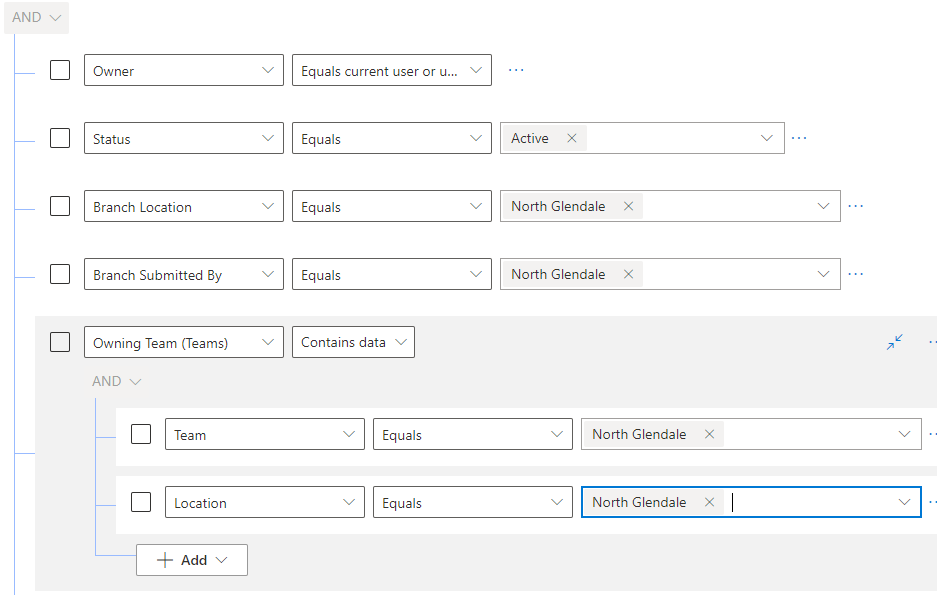
pastedimage1683301306193v1.png

ultimately, I just need a "Branch Submitted By"   Equal to      "Equals Current User or User's Team"      But I only get the values in the table so I cannot choose something like "Equal Current User or User's Team"

I have the same question (0)
  • Analyst new to D365 Profile Picture
    5 on at

    We had a vendor design the system, so I am not fully aware how it is all structured.  We are using the Incident Entity (renamed Cases) 

    I want all Incidents that were created by a specific Branch.

    I want this to be a main view that I can share publicly

    Basically the view needs to return all active incidents for a specific Branch.     And the Branch needs to be the Team obtained from the connected user (Team by default).   I don't think we need to include the location, I was just included in it the image to indicate that if we needed to use it we could.    basically the Location, branch, team all have identical data. 

  • Suggested answer
    XM-22040801-0 Profile Picture
    11 on at

    Hi,

    I'm afraid there is no out of the box solution for your problem.

    That said, it can be done with a (very technical) plugin.

    If the view is only used as a sub-grid, it can also be done in javascript (less technical) but there will be some unsupported code. I do not recommend this approach.

    Let me know if you want help on any of these approaches or if you want me to tell you more.

  • Analyst new to D365 Profile Picture
    5 on at

    What is the plugin you are suggesting, I will look into that and ask you questions when they arise.  thanks

  • Suggested answer
    XM-22040801-0 Profile Picture
    11 on at

    A solution to your problem is to modify on the fly the FetchXML (the query language used by Dynamics) of the view.

    For information, you can consult this link for an overview of the possible solutions (complicated or unsupported). This link concerns subgrids, but it is a related topic: ideas.powerapps.com/.../e6c9dcd8-99cd-4af1-8530-f2c2d32cd49c
    On this link you can also vote to have this feature implemented natively in Power Apps.

    Concerning the plugin solution:
    - Create a C# plugin that triggers on the "RetrieveMultiple" message and on the pre-operation of your entity.
    - Create a view that will contain a marker that will be used by the plugin to determine if it should modify the Fetch XML. The marker can be for example: A condition that check if a text field is equal to "MARKER FOR MY PLUGIN".
    - Add in this view a condition on the Branch Submitted By field. This condition will be used by the plugin, it is the condition that will be modified to the user's team.

    When running the plugin:
    - Check if the FetchXML contains the marker in the XML nodes.
    - Get the user's default team.
    - Change the condition of the Branch Submitted By field in the XML nodes.

    This article can help you understand how to modify the Fetch Xml of a view on the fly: https://sank8sinha.wordpress.com/2020/01/07/adding-filtered-views-in-uci-in-dynamics-365-crm-finally-achieved/

    Why this solution is not ideal:
    - It is triggered on the RetrieveMultiple, which can induce slowness.
    - It is complex to implement.
    - It uses a trick to determine the view to modify (a marker): An arbitrary condition.

Under review

Thank you for your reply! To ensure a great experience for everyone, your content is awaiting approval by our Community Managers. Please check back later.

Helpful resources

Quick Links

Responsible AI policies

As AI tools become more common, we’re introducing a Responsible AI Use…

Neeraj Kumar – Community Spotlight

We are honored to recognize Neeraj Kumar as our Community Spotlight honoree for…

Leaderboard > Microsoft Dynamics 365 | Integration, Dataverse, and general topics

#1
iampranjal Profile Picture

iampranjal 51

#2
Martin Dráb Profile Picture

Martin Dráb 39 Most Valuable Professional

#3
André Arnaud de Calavon Profile Picture

André Arnaud de Cal... 26 Super User 2025 Season 2

Last 30 days Overall leaderboard

Product updates

Dynamics 365 release plans
