web
You’re offline. This is a read only version of the page.
close
Skip to main content

Announcements

No record found.

News and Announcements icon
Community site session details

Community site session details

Session Id :
Microsoft Dynamics NAV (Archived)

Customer master to sales order

(0) ShareShare
ReportReport
Posted on by 313

Hi Friends,

I want to add a cash on filed value from customer master table to sales order, In customer Master table i am having value but sales order i can not see that value.

Customer Master Page
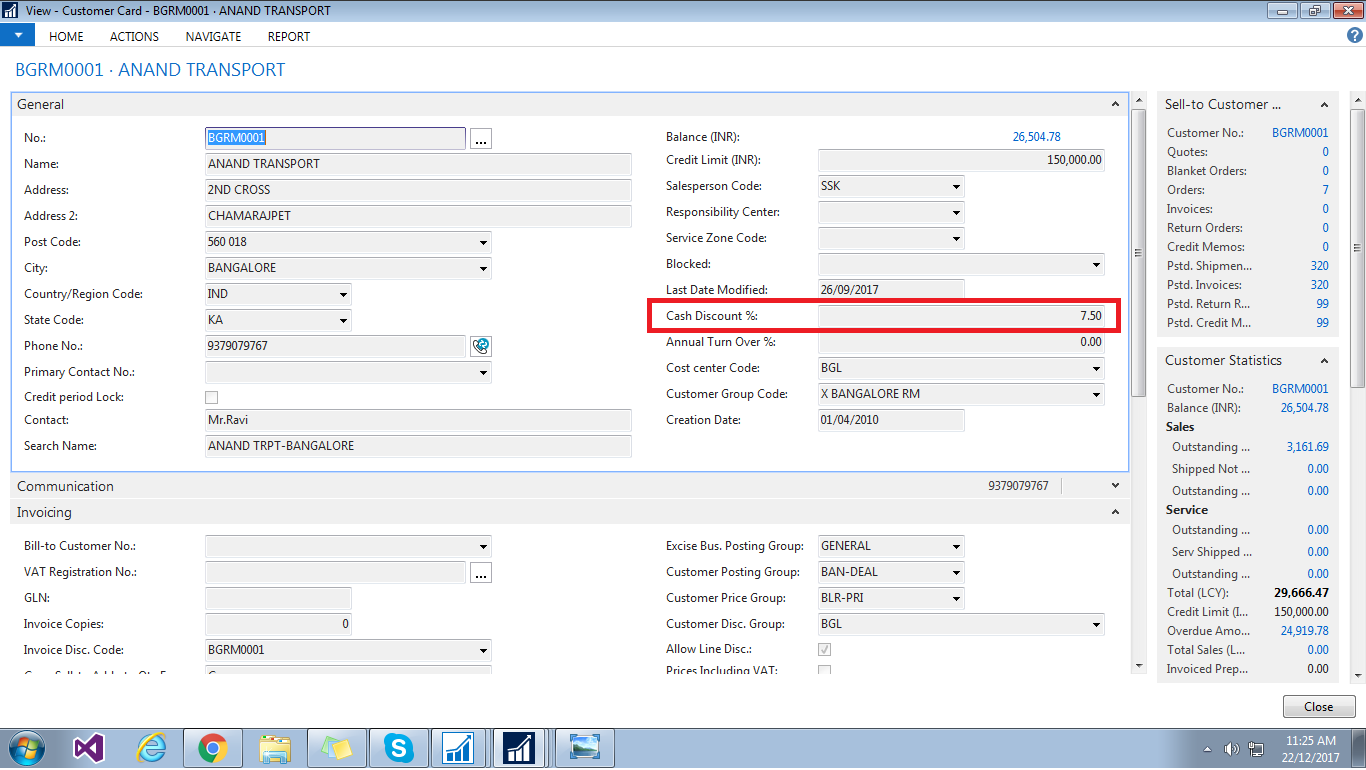
cust1.png

Sales Order Page

cust-2.png

Please help me on this issue.

Thank you

*This post is locked for comments

I have the same question (0)
  • Suggested answer
    Mohana Yadav Profile Picture
    61,204 Super User 2026 Season 1 on at

    Did you check how Customer Name and other fields are flowing automatically when you select Customer no?

    you need to add your field also in same place.

  • Prabakaran.R Profile Picture
    313 on at

    Hi mohana

    Thank You for reply  i have added the mam even though i did nt get please suggest to me to this.40523.32.png

    Thank you

  • Suggested answer
    Amol Salvi Profile Picture
    18,698 on at

    You need to write a code on Sales Header Table and on Validate trigger of Sell-To Customer No field.

    Check the existing code how data flow from customer master table to Sales Order from that field.

  • Suggested answer
    Mohana Yadav Profile Picture
    61,204 Super User 2026 Season 1 on at

    yes, you need to write the code to flow. adding fields in customer and sales header wont flow data..

  • Prabakaran.R Profile Picture
    313 on at

    Hi Mohana

    i have write this code but its taking all 1 discount amount for all customer

    RecCustomer.RESET;

    RecSalesHeader.RESET;

    RecSalesHeader.SETRANGE("Sell-to Customer No.",RecCustomer."No.");

    IF RecCustomer.FINDSET THEN BEGIN

     CashDiscAmt  := RecCustomer."Cash Discount %";

     MESSAGE('%1',CashDiscAmt);

    END;

    Thank you

  • Verified answer
    Mohana Yadav Profile Picture
    61,204 Super User 2026 Season 1 on at

    where did you write this code?

    you dont have to get customer and sales headers again.

    Please check OnValidate trigger of Sell-To Customer No field.

    and assign fields in right place

  • Verified answer
    Sunil1991 Profile Picture
    170 on at

    Hi,

    In sales header table, on "Sell-to Customer No." field validate trigger, There is code written something like below, to get the values from customer to sales order:


    "Sell-to Customer Name" := Cust.Name;
    "Sell-to Customer Name 2" := Cust."Name 2";
    "Sell-to Address" := Cust.Address;
    "Sell-to Address 2" := Cust."Address 2";
    "Sell-to City" := Cust.City;

    With this code you have to add a single line code to show the cash discount %, like below

    "Cash Discount %" := Cust."Cash Discuunt %";

    Regards,

    Sunil Kumar

Under review

Thank you for your reply! To ensure a great experience for everyone, your content is awaiting approval by our Community Managers. Please check back later.

Helpful resources

Quick Links

Introducing the 2026 Season 1 community Super Users

Congratulations to our 2026 Super Stars!

Congratulations to our 2025 Community Spotlights

Thanks to all of our 2025 Community Spotlight stars!

Leaderboard > 🔒一 Microsoft Dynamics NAV (Archived)

Last 30 days Overall leaderboard

Featured topics

Product updates

Dynamics 365 release plans
