web
You’re offline. This is a read only version of the page.
close
Skip to main content

Notifications

Announcements

No record found.

Community site session details

Community site session details

Session Id :
Small and medium business | Business Central, N...
Answered

Automatic assign dimenions to customer card

(0) ShareShare
ReportReport
Posted on by 50

Hi, 

I added field to Dimensions table checkbox with name "Customer". Now I want to auto assign Dimension Value, when i create new Customer, after assigning customer number, the system will automatically assign the Customer dimension which will be the same as customer number.

I have the same question (0)
  • Suggested answer
    THE Italian Profile Picture
    on at

    Maybe this one could be helpeful

    www.encorebusiness.com/.../

  • Suggested answer
    Inge M. Bruvik Profile Picture
    1,105 Moderator on at

    I don't think there is any out of the box functionality that does that.

    But if you use the customer template then you can define dimensions in the template. That is what is there out of the box.
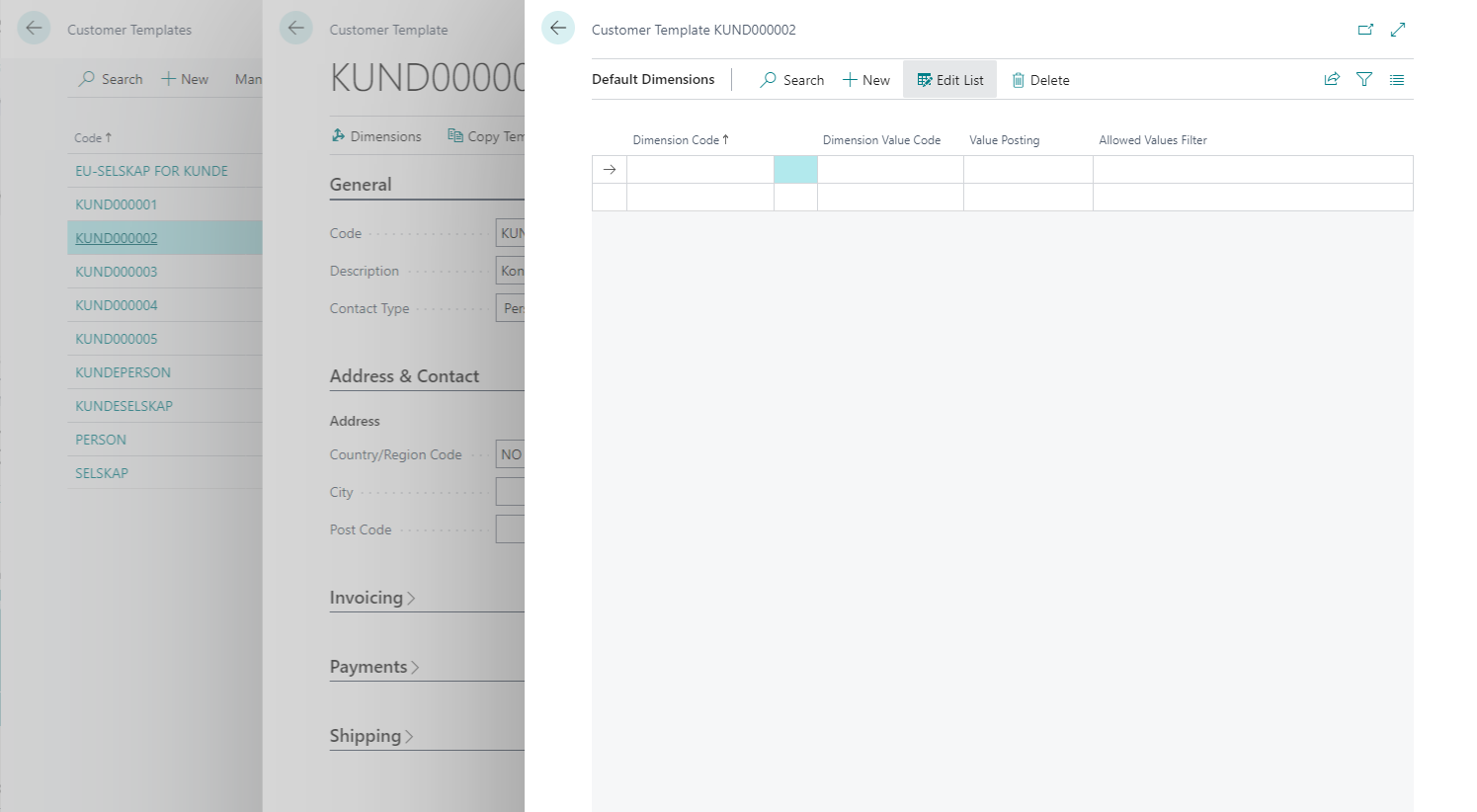
    pastedimage1659398889203v2.png

    To really do what you ask for you will have to do a customization.

    You should also be aware that the customer no. basically is on all transactions in the system that origins from a customer transactions.

    In the ledger tables you will typically find them by using the two fields source type and Source no.

    Filter on source type = customer and Source No = customer no. and you will have every transaction related to that customer.

    Basing your reporting on that could be an alternative to do a customization.

  • Suggested answer
    YUN ZHU Profile Picture
    95,331 Super User 2025 Season 2 on at

    Hi, this can be customized, and not very difficult.

    You can add your code to OnInsert (Table) Trigger of Customer table.

    More details: https://docs.microsoft.com/en-us/dynamics365/business-central/dev-itpro/developer/triggers-auto/table/devenv-oninsert-table-trigger

    In the code, you need to insert the value of Dimension Value (349) first (Customer No.), and then insert it into Default Dimension (352)

    pastedimage1659399550539v2.png

    pastedimage1659399430833v1.png

    Hope this helps.

    Thanks.

    ZHU

  • Suggested answer
    Nitin Verma Profile Picture
    21,698 Moderator on at

    Hi Tony00001 ,

    its required a customization, to create a new dimension and attach to the customer card, Please consult with your Development partner to help on this.

  • Tony00001 Profile Picture
    50 on at

    Can I ask for any code example? I'm newbie.

  • Verified answer
    YUN ZHU Profile Picture
    95,331 Super User 2025 Season 2 on at

    Hi, just a simple example, hope this helps.

    tableextension 50115 ZYDimensionExt extends Dimension
    {
        fields
        {
            field(50100; IsCustomer; Boolean)
            {
                Caption = 'Is Customer';
                DataClassification = CustomerContent;
            }
        }
    }
    
    pageextension 50115 ZYDimensionsExt extends Dimensions
    {
        layout
        {
            addafter("Filter Caption")
            {
                field(IsCustomer; Rec.IsCustomer)
                {
                    ApplicationArea = All;
                }
            }
        }
    }
    
    tableextension 50116 ZYCustomerExt extends Customer
    {
        trigger OnAfterInsert()
        var
            Dimension: Record Dimension;
            DimensionValue: Record "Dimension Value";
            DefDimension: Record "Default Dimension";
        begin
            Dimension.Reset();
            Dimension.SetRange(IsCustomer, true);
            if not Dimension.FindFirst() then
                exit;
            if not DimensionValue.Get(Dimension.Code, Rec."No.") then begin
                DimensionValue.Init();
                DimensionValue.Validate("Dimension Code", Dimension.Code);
                DimensionValue.Validate(Code, Rec."No.");
                DimensionValue.Insert();
            end;
    
            DefDimension.Init();
            DefDimension."Table ID" := 18;
            DefDimension."No." := Rec."No.";
            DefDimension.Validate("Dimension Code", DimensionValue."Dimension Code");
            DefDimension.Validate("Dimension Value Code", DimensionValue.Code);
            DefDimension.Insert();
        end;
    }

    pastedimage1659578050273v1.png

    pastedimage1659578100075v3.png

  • Tony00001 Profile Picture
    50 on at

    Thanks so much, I did a little modification to code, and works perfectly.

  • Mai lah Profile Picture
    25 on at

    Hi, when i'm traying to do this with Customer Country dimensions, it doesn't work.

    I mean i got automaticaly addedd as Customer dimension, no as Customer Country.

    My intention is, to automatically adding to Dimension Default, which is taking by Dimension Value.

    Any idea how to do this? I tried everything i guess.

Under review

Thank you for your reply! To ensure a great experience for everyone, your content is awaiting approval by our Community Managers. Please check back later.

Helpful resources

Quick Links

Responsible AI policies

As AI tools become more common, we’re introducing a Responsible AI Use…

Neeraj Kumar – Community Spotlight

We are honored to recognize Neeraj Kumar as our Community Spotlight honoree for…

Leaderboard > Small and medium business | Business Central, NAV, RMS

#1
OussamaSabbouh Profile Picture

OussamaSabbouh 3,143

#2
Jainam M. Kothari Profile Picture

Jainam M. Kothari 1,694 Super User 2025 Season 2

#3
YUN ZHU Profile Picture

YUN ZHU 1,067 Super User 2025 Season 2

Last 30 days Overall leaderboard

Featured topics

Product updates

Dynamics 365 release plans
