web
You’re offline. This is a read only version of the page.
close
Skip to main content

Notifications

Announcements

No record found.

Community site session details

Community site session details

Session Id :
Small and medium business | Business Central, N...
Suggested Answer

Post Data to Business Central Standard API [purchaseOrders]

(3) ShareShare
ReportReport
Posted on by 157

Hi, I need to create a purchase order using Postman with the standard API:

https://api.businesscentral.dynamics.com/v2.0/{tenantID}/{Sandboxname}/api/v2.0/purchaseOrders?$expand=purchaseOrderLines

My main blocker is that I need to post data into the field named "Item Reference No" in the purchase line. As per the Business Central community dev suggestion, I should use "ItemVariant". Here is how the body looks:

{

    "number": "Postman6",

    "orderDate": "2025-01-14",

    "postingDate": "2025-01-14",

    "vendorNumber": "100",

    "purchaseOrderLines": [

        {

            "lineType": "Item",

            "lineObjectNumber": "100",

            "description": "Item 1",

            "quantity": 2,

            "itemVariant": "TL-001"

        },

        {

            "lineType": "Item",

            "lineObjectNumber": "100",

            "description": "Item 2",

            "quantity": 1

        }

    ]

}

However, it is giving an error.
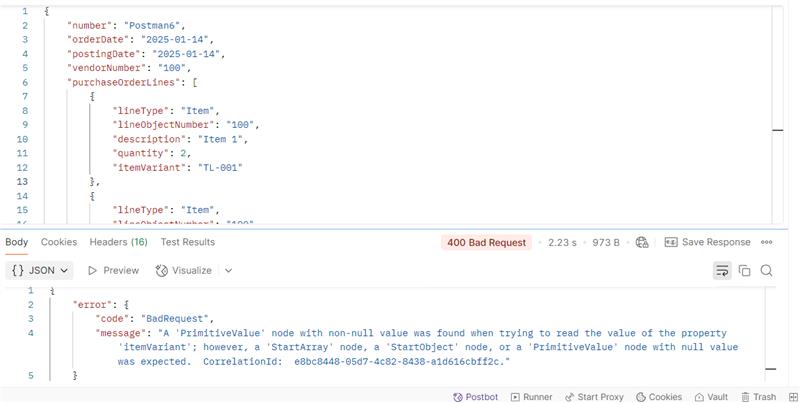
 

Even when I use the standard API for the line:

https://api.businesscentral.dynamics.com/v2.0/{tenantid}/Dev-Sandbox/api/v2.0/purchaseOrderLines(84c12e62-6e94-ef11-8a6b-6045bdd59b7e)

I can't see any key that references "Item Reference No".

Can someone help me with this issue?


do i need to register the Item Reference No field by making standard API copy make my changes like here they have done it : - https://www.kauffmann.nl/2021/03/12/extending-standard-apis-1/


I have the same question (0)
  • Suggested answer
    Satish Srivastava Profile Picture
    242 on at
    Hi ,
     
    In Microsoft Dynamics 365 Business Central, the Purchase Order API is based on the Purchase Order Page. Since we cannot directly modify the standard API, we need to extend the standard Purchase Order page using AL Language.
     
    follow the below steps.
     
     
    * Write a Page Extension to add the Item Reference No. field to the Purchase Order Page.
    * Re-Publish the Standard Purchase Order API
    * Verify the API Schema (Check for "Item Reference No.")
     
    Thanks
    Satish Srivastava
  • Suggested answer
    YUN ZHU Profile Picture
    95,739 Super User 2025 Season 2 on at
    Hi, hope the following can give you some hints.
    Dynamics 365 Business Central: Can we extend standard APIs? – Download Standard Source Code for APIs
     
    Thanks.
    ZHU

Under review

Thank you for your reply! To ensure a great experience for everyone, your content is awaiting approval by our Community Managers. Please check back later.

Helpful resources

Quick Links

Responsible AI policies

As AI tools become more common, we’re introducing a Responsible AI Use…

Neeraj Kumar – Community Spotlight

We are honored to recognize Neeraj Kumar as our Community Spotlight honoree for…

Leaderboard > Small and medium business | Business Central, NAV, RMS

#1
OussamaSabbouh Profile Picture

OussamaSabbouh 2,135

#2
YUN ZHU Profile Picture

YUN ZHU 733 Super User 2025 Season 2

#3
Sumit Singh Profile Picture

Sumit Singh 612

Last 30 days Overall leaderboard

Featured topics

Product updates

Dynamics 365 release plans
