web
You’re offline. This is a read only version of the page.
close
Skip to main content

Announcements

No record found.

News and Announcements icon
Community site session details

Community site session details

Session Id :
Finance | Project Operations, Human Resources, ...
Answered

Not able to find warning log object in ax 2012

(0) ShareShare
ReportReport
Posted on by 4

Hi Guys ,

I am getting error when submit the PO " " MainAccount 410601 is not a valid dimension value in account structure: NAQ - BS." .

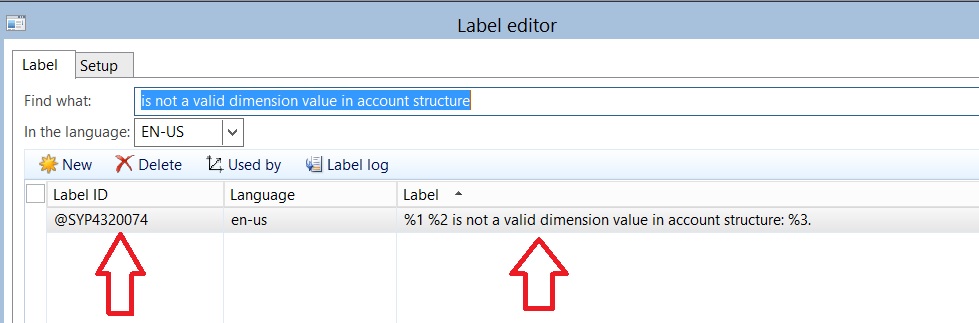
Actually  i am able to find the Error  label ID  from label editor  tool but not able to find from where this error is coming from .
41660.jpg

I want to identify from where this error is coming from also i have label id of this error but not able to find from which class or form this error is generating.

Please suggest how to find the error generation class (Object).

Thanks.

I have the same question (0)
  • Blue Wang Profile Picture
    Microsoft Employee on at

    HI Naveen,

    Once you got the label ID, then you can search the AOT to locate the code where throw the error/warning.

  • Naveen Mishra Profile Picture
    4 on at

    Blue Wang ,

    Please tell me the steps how to find label ID in AOT .

    Thanks

  • Blue Wang Profile Picture
    Microsoft Employee on at

    Hi Naveen,

    It is already shown on your screenshot

  • Naveen Mishra Profile Picture
    4 on at

    Hi Blue Wang ,

    In screen shot is displaying   label  editor  tool , here is the option used by but when click on Used by option result is blank.

    That's why i am asking how to find in AOT .

  • kvnkk Profile Picture
    800 on at

    Click on "used by" option on same window you will get info where itwas used

  • Naveen Mishra Profile Picture
    4 on at

    Hi Blue Wang ,

    In screen shot is displaying   label  editor  tool , here is the option used by but when click on Used by option result is blank.

    That's why i am asking how to find in AOT .

  • Verified answer
    kvnkk Profile Picture
    800 on at

    Right click on AOT window you can see find option( this si common option) . Keep label over start searching. But It will take huge time. If not better sear on Classes,forms and tables.

    pastedimage1577357462594v2.png 

    I would like to suggest you .. if you want to find know that from where the warning message is getting triggered.

    Just put a break point in add() method of Info class and run the process again. Then debugger will hit at add method. Just got to previous method calls in debugger window then you will come to know from where it is getting triggered. 

  • Verified answer
    Blue Wang Profile Picture
    Microsoft Employee on at

    Hi Naveen,

    Sorry, reply late.

    To answer your question, you can take a look at this:www.exploreax.com/.../

Under review

Thank you for your reply! To ensure a great experience for everyone, your content is awaiting approval by our Community Managers. Please check back later.

Helpful resources

Quick Links

Introducing the 2026 Season 1 community Super Users

Congratulations to our 2026 Super Stars!

Meet the Microsoft Dynamics 365 Contact Center Champions

We are thrilled to have these Champions in our Community!

Congratulations to the April Top 10 Community Leaders

These are the community rock stars!

Leaderboard > Finance | Project Operations, Human Resources, AX, GP, SL

#1
Giorgio Bonacorsi Profile Picture

Giorgio Bonacorsi 802

#2
André Arnaud de Calavon Profile Picture

André Arnaud de Cal... 636 Super User 2026 Season 1

#3
Subra Profile Picture

Subra 534

Last 30 days Overall leaderboard

Product updates

Dynamics 365 release plans
