web
You’re offline. This is a read only version of the page.
close
Skip to main content

Announcements

No record found.

News and Announcements icon
Community site session details

Community site session details

Session Id :
Customer Insights - Journeys forum

Customer Journey: Same CJ, different emails, different results - Why does it not send email to all addresses I test?

(0) ShareShare
ReportReport
Posted on by 107

Dear all, 

I have now been testing my Customer Journey multiple times. And I always get different result with different emails AND same emails too... What is happening here?

I just want it to send a simple (no images) "thank you" email, where there is 1 button that redirects to edit preferences. 
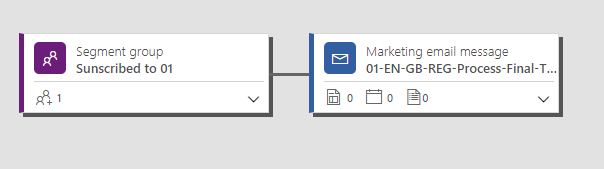
d365_2D00_super_2D00_complex_2D00_customer_2D00_journey_2D00_01.JPG

I say.. cannot be easier than this?! BUT no. It is as complicated as finding a needle in a haystack.

I register: OK. I have all consent in place, it's the Marketing consent (4) therefore I agree to commercial emails. I have a live email with the correct content settings, I see myself in the marketing list, center of preferences all published live and working OK, I can see in the insights of the customer journey that multiple emails have been sent.

But the email gets lost somewhere and never lands in the inbox. Or if it does, it's delayed. 

I tried with GMAIL email address: I received it delayed, but all was working. Success! I say.

BUT:

When trying with my work email address: it either never shows up or directly it just sends it to SPAM quarantine (even tho we asked Microsoft to make sure we have an authenticated DKIM)

Then I tried with Yahoo email address: Nothing gets sent.

Then I tried with other GMAIL address: Nothing gets sent.

How come?

Let me know, 

Thank you!

I have the same question (0)
  • Verified answer
    megcda Profile Picture
    2,192 on at

    Hi Catermina,

    It sounds like something isn't correct in your setup that is causing issues, as I can assure you that this does work without issue on those with the correct configuration.  Can you please open a support ticket and ask them to look into this issue?  Once you open the ticket, please send me an email to megdynmktcomm@outlook.com.  Please include the support ticket number and set the Subject to:  CUSTOMER JOURNEY ISSUES - MISSING EMAIL - COMMUNITY FORUM.  I can then work with the support team to expedite it.

    In the service request that you open, please include the following information about a customer journey with issues so that we can investigate more quickly using telemetry:

    URL of the Customer Journey having issues

    URL of the email used in the Customer Journey

    URL of the Segment used in the Customer Journey

    Two email addresses that should be sent with the journey and descriptions of what is happening to them e.g. junk folder, not sent, etc.

    Thanks,

    Megan

  • Carolin Profile Picture
    127 on at

    Hi Megan,

    I also have problems with the emails. They show up as soft bounce with the information "reputation-related" although the DKIM is configured according to Microsoft Support correctly.

    What was the issue from Catermina? Maybe we face the same issue.

    Thanks in advance, Carolin

Under review

Thank you for your reply! To ensure a great experience for everyone, your content is awaiting approval by our Community Managers. Please check back later.

Helpful resources

Quick Links

November Spotlight Star - Khushbu Rajvi

Congratulations to a top community star!

Forum Structure Changes Coming on 11/8!

In our never-ending quest to help the Dynamics 365 Community members get answers faster …

Dynamics 365 Community Platform update – Oct 28

Welcome to the next edition of the Community Platform Update. This is a status …

Leaderboard > Customer Insights - Journeys

Last 30 days Overall leaderboard

Featured topics

Product updates

Dynamics 365 release plans
