web
You’re offline. This is a read only version of the page.
close
Skip to main content

Announcements

No record found.

News and Announcements icon
Community site session details

Community site session details

Session Id :
Microsoft Dynamics AX (Archived)

Invalid data container type in ax 2012.

(0) ShareShare
ReportReport
Posted on by 4

Hello Expertise,

I need to export Purchase order XML file via batch job automatically . So for achieve this i am following below link for purchase order.

http://deepakdyanmicsax.blogspot.in/2016/03/send-outbound-documents-with-aif-in-ax.html 

I have configured all points which is mention there , In Setup push mechanism -

In AX, there are multiple document for which ‘Send electronically’ functionality is available out-of-the-box. For customer we have to build it. Open AOT and create a new class which extends AxdSend class. In the main method of this class put the below code. (Port name cab be parameterized or not included at all)

pooooooooooooooooooooo.jpg


In above screenshot red mark indicating a class "CustCustomer " for customer . But i am working for  purchase order .

SO I also create a class like this by using PurchTable , now when i use this class in Action menu item and try to open the menu item it's giving error " Invalid data container type".

Or for Purchase order any class is inbuilt in Ax like CustCustomer ?

Please Suggest.


*This post is locked for comments

I have the same question (0)
  • Mark Kopan Profile Picture
    245 on at

    After creating a new construct like this for AIF it is wise. Navigate to AOT\ Classes\ AfStronglyTypedDataContainer and perform a Forward Compile. should work for you.

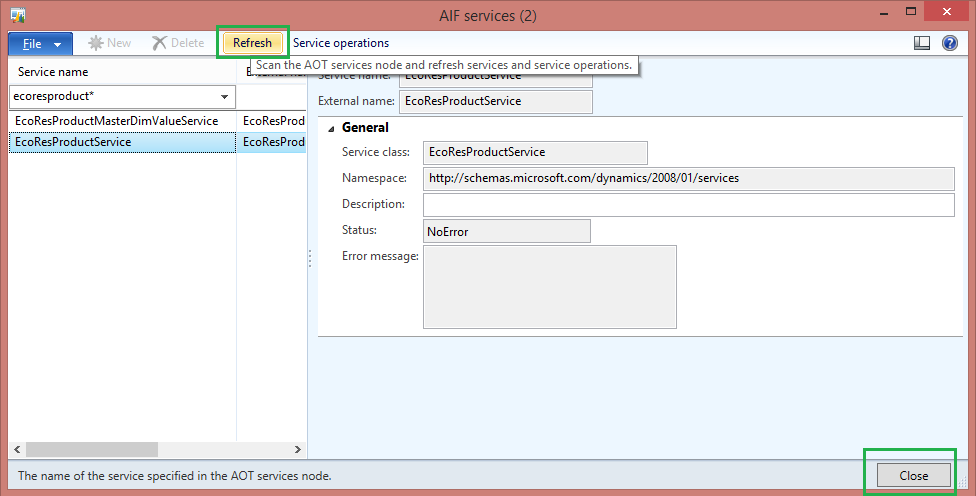
    Also after, you can also navigate to you your new AIF service, Rt+Click Register Service. From the AIF Service Form opens, click REFRESH. This takes a while.. go get a coffee or tea & be patient...

    Image result for ax 2012 service form refresh

Under review

Thank you for your reply! To ensure a great experience for everyone, your content is awaiting approval by our Community Managers. Please check back later.

Helpful resources

Quick Links

Introducing the 2026 Season 1 community Super Users

Congratulations to our 2026 Super Stars!

Meet the Microsoft Dynamics 365 Contact Center Champions

We are thrilled to have these Champions in our Community!

Congratulations to the March Top 10 Community Leaders

These are the community rock stars!

Leaderboard > 🔒一 Microsoft Dynamics AX (Archived)

#1
CP04-islander Profile Picture

CP04-islander 26

#2
imran ul haq Profile Picture

imran ul haq 8

#3
André Arnaud de Calavon Profile Picture

André Arnaud de Cal... 4 Super User 2026 Season 1

Last 30 days Overall leaderboard

Featured topics

Product updates

Dynamics 365 release plans