web
You’re offline. This is a read only version of the page.
close
Skip to main content

Notifications

Announcements

No record found.

Community site session details

Community site session details

Session Id :
Microsoft Dynamics CRM (Archived)

Dynamics CRM 2013 ADFS 2.0 Forms Based Authentication Issue

(0) ShareShare
ReportReport
Posted on by 65

Hi

I am new to Dynamics CRM and having an issue with a new Dynamics CRM 2013 deployment on server 2008 R2. The CRM software is on the same server that ADFS 2.0 is installed.

The issue I am having is related to the Forms Based Authentication for CRM. I have done the following:

- Installed ADFS 2.0

- Setup Relying Trust Party etc. as per the Microsoft Guide

- Edited the web.config to put forms authentication at the top of the list

- Dynamics CRM has been configured for Claims Based Authentication

When trying to hit the web page for CRM (https://internalcrm.company.com.au:5556/company I get the following error:
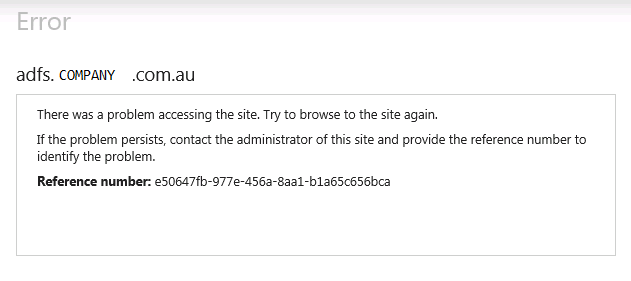
I have setup some SPN records, but I believe this might be where the issue lies.

Can anyone please shed any light on what I might be doing wrong here?

Many thanks

Scott

*This post is locked for comments

I have the same question (0)
  • Remon Profile Picture
    1,485 on at

    Hello Scot,

    First of all I would advise against putting CRM and ADFS on the same server if this is going to be a production system.

    This error can be a lot, check event viewer->applications -> ADFS for more details.

    I don't think SPN's are the issue here, but keep in mind if you set SPN for the Application Pool Account, you should also change the Windows Authentication to 'UseAppPoolCredentials' in IIS on the CRM Website for it to work.

    Why would you change web.config to put Forms Based at the top?

    Steps to check:

    1) Is CRM up and running (without ADFS)?

    2) Is ADFS up and running and working? https://[adfsurl]/adfs/ls/IdpInitiatedSignon.aspx to check if that works.

    3) configure Claims Based Auth. with all Claim rules. Fiddler is a good tool to check if traffic flows correct.

    Let me know what steps you've taken so far.

    good luck,

  • Ragnar Hilmarsson Profile Picture
    3,427 on at

    Try to remove 5556 from your url and see if you get another error

    etc internalcrm.company.com.au/company

    Also i agree with Remon to change windows Authentication to 'UseAppPoolCredentials'  in IIS

  • ScottyG Profile Picture
    65 on at

    Hi Remon

    Thanks for your reply. Currently this setup is just a pilot to test functionality. It will eventually be setup in a production environment that is separate.

    I believe CRM is running fine (the Outlook addin connects) although I am not 100% certain. I didn't do the installation of CRM.

    When browsing to adfs.company.com.au/.../IdpInitiatedSignon.aspx I get the same error as the screenshot I previously posted.

    All Claim rules have been configured and triple checked to ensure they are the same as directed in the Microsoft guide.

    From what I can tell UseAppPoolCredentials seems to be set to true, however I can only find the settings for the default website. Is there a different location for the CRM website to change this setting?

    Also, the web.config file was changed to put Forms Based at the top as when this setting isn't changed, the internalcrm website just pops up for credentials multiple times but doesn't access a working username and password. After several "incorrect attempts" you get a 401 unauthorised. Searches on the web suggested changing the order for CRM.

    Thanks

    Scott

  • ScottyG Profile Picture
    65 on at

    Hi Ragnar

    Removing 5556 from the URL results in an error as the web site does not have a 443 binding.

    Scott

Under review

Thank you for your reply! To ensure a great experience for everyone, your content is awaiting approval by our Community Managers. Please check back later.

Helpful resources

Quick Links

Responsible AI policies

As AI tools become more common, we’re introducing a Responsible AI Use…

Neeraj Kumar – Community Spotlight

We are honored to recognize Neeraj Kumar as our Community Spotlight honoree for…

Leaderboard > 🔒一 Microsoft Dynamics CRM (Archived)

#1
SA-08121319-0 Profile Picture

SA-08121319-0 4

#1
Calum MacFarlane Profile Picture

Calum MacFarlane 4

#3
Alex Fun Wei Jie Profile Picture

Alex Fun Wei Jie 2

Last 30 days Overall leaderboard

Featured topics

Product updates

Dynamics 365 release plans



