web
You’re offline. This is a read only version of the page.
close
Skip to main content

Announcements

No record found.

News and Announcements icon
Community site session details

Community site session details

Session Id :
Microsoft Dynamics 365 | Integration, Dataverse...
Suggested Answer

Set field visibility on business process flow depending on field value.

(0) ShareShare
ReportReport
Posted on by 110

Hello,

I have an option set field which has two values. For example YES and NO. My question is that can I show field somehow on business process flow if field has a value YES? Instead if the field has a value NO then field should not be visible on business process flow.

In order to do that can I use for example business rule? Or is there any other way to show/hide field on process?

Regards

Tuomas

I have the same question (0)
  • cloflyMao Profile Picture
    25,210 on at

    Hi Tuomas,

    You could do it by adding custom javascript at form onload event:

    1. -> Below is general function, just replace field name to your own field name.

    function hideSpecificFieldOnBpf() {
    
      var selectedValue = (Xrm.Page.getAttribute("fieldname") != null) ? Xrm.Page.getAttribute("fieldname").getSelectedOption().text : "";
    
      if (selectedValue == "Yes") {
        Xrm.Page.getControl("header_process_fieldname").setVisible(false);
      }
    
    }
     

    For example, I would like to hide Parent Contact field when lead type is Item based.
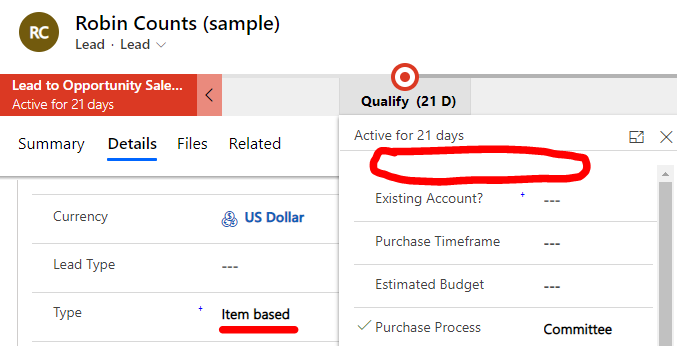
    pastedimage1576824286532v1.png

    Code:

    function hideSpecificFieldOnBpf() {
    
      var selectedValue = (Xrm.Page.getAttribute("msdyn_ordertype") != null) ? Xrm.Page.getAttribute("msdyn_ordertype").getSelectedOption().text : "";
    
      if (selectedValue == "Item based") {
        Xrm.Page.getControl("header_process_parentcontactid").setVisible(false);
      }
    
    }

    2. -> Be noticed that to grab field on BPF, the field name format should be header_process_fieldname.

    You can find field logical name in entities customization:
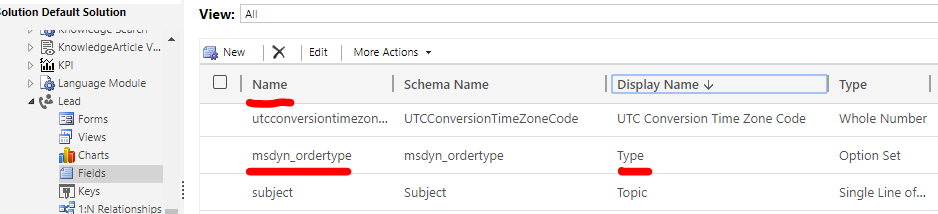
    pastedimage1576824583075v2.png

    Or check it in form editor directly.(because some fields have different form display/label name compared with real Display name)

    You could download the extension to view fields logical name quickly

    https://chrome.google.com/webstore/detail/level-up-for-dynamics-crm/bjnkkhimoaclnddigpphpgkfgeggokam
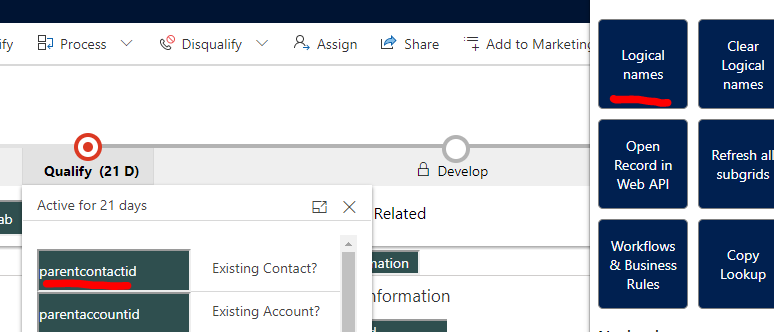
    pastedimage1576824759063v3.png

    3. -> Finally, my code is based on old deprecated Xrm.Page, you could replace it to recommended executionContext: 

    function hideSpecificFieldOnBpf(executionContext) {
    
      var formContext = executionContext.getFormContext();   
    
      var selectedValue = (formContext.getAttribute("fieldname") != null) ? formContext.getAttribute("fieldname").getSelectedOption().text : "";
    
      if (selectedValue == "Yes") {
        formContext.getControl("header_process_fieldname").setVisible(false);
      }
    
    }

    Check the pass execution context .. option if you work with this.
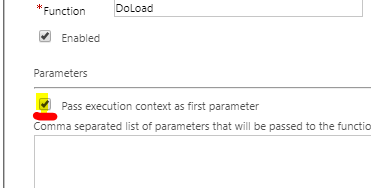
    pastedimage1576825022691v4.png

    Regards,

    Clofly

  • cloflyMao Profile Picture
    25,210 on at

    Hi Tuomas,

    Please kindly point out whether I didn't understand your requirement correctly, thanks.

    Regards,

    Clofly

  • Suggested answer
    Paul_Owen Profile Picture
    2,027 on at

    Hi Tuomas, You can do that with a business rule but those fields will need to be on the form too, you can make them not visible on the form if you wish.

    regards

    Paul

  • Jess Howes Profile Picture
    67 on at

    Hi Paul,

    [quote user="Paul_Owen"]

    Hi Tuomas, You can do that with a business rule but those fields will need to be on the form too, you can make them not visible on the form if you wish.

    regards

    Paul

    [/quote]

    That sounds like a much better solution than being reliant on JavaScript.

    I am in the same situation. Please can you clarify I have understood correctly:

    Fields A B and C in my BPF. I only want to display C if B = Yes.

    For ease add all fields A B and C to the Form as hidden and set a Business Rule on the Form to toggle the visibility of C.

    This will affect the BPF only and the hidden fields (C) will not appear on the form even when it meets the conditions of the Business Rule?

  • RugerSR762 Profile Picture
    375 on at

    Unfortunately this solution does not seem to be working for me.  The JS code does not error, its just setting the variable to "" (null) although it has a value (true/Yes)

    function bpfdisplayrule(executionContext) {
    debugger;
        var formContext = executionContext.getFormContext();
    
        var approved = (formContext.getAttribute("header_process_xrm_approved") != null) ? formcontext.getAttribute("header_process_xrm_approved").getSelectedOption().text : "";
    
        if (approved == "Yes") {
            formContext.getControl("header_process_xrm_recallapproval").setVisible(true);
        } else {
            formContext.getControl("header_process_xrm_recallapproval").setVisible(false);
        }
    
    }

    2022_2D00_05_2D00_18_5F00_6_2D00_34_2D00_23.png

    2022_2D00_05_2D00_18_5F00_6_2D00_36_2D00_04.png

Under review

Thank you for your reply! To ensure a great experience for everyone, your content is awaiting approval by our Community Managers. Please check back later.

Helpful resources

Quick Links

Introducing the 2026 Season 1 community Super Users

Congratulations to our 2026 Super Stars!

Congratulations to our 2025 Community Spotlights

Thanks to all of our 2025 Community Spotlight stars!

Leaderboard > Microsoft Dynamics 365 | Integration, Dataverse, and general topics

#1
11manish Profile Picture

11manish 156

#2
ManoVerse Profile Picture

ManoVerse 52 Super User 2026 Season 1

#3
Niki Patel Profile Picture

Niki Patel 40

Last 30 days Overall leaderboard

Product updates

Dynamics 365 release plans
