web
You’re offline. This is a read only version of the page.
close
Skip to main content

Announcements

No record found.

News and Announcements icon
Community site session details

Community site session details

Session Id :
Microsoft Dynamics AX (Archived)

How to Resize Auto lookup for a custom field

(0) ShareShare
ReportReport
Posted on by

I've a field named Department on a form for which I override a lookup method on datasource 'Department' field. The code is as   
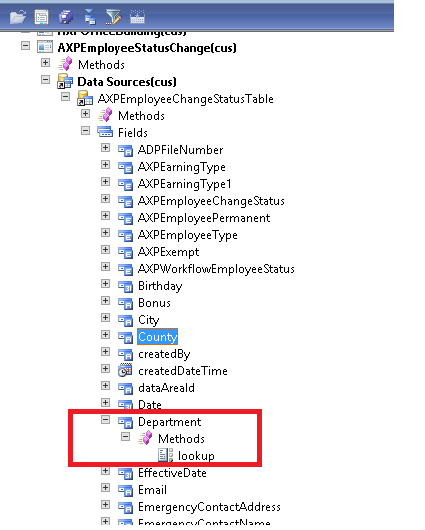
7610.aa.png

public void lookup(FormControl _formControl, str _filterStr)
{
Query query = new Query();
QueryBuildDataSource queryBuildDataSource;
QueryBuildRange queryBuildRange;

SysTableLookup sysTableLookup = SysTableLookup::newParameters(tableNum(OMOperatingUnit), _formControl, true);

sysTableLookup.addLookupField(fieldNum(OMOperatingUnit, Name));
sysTableLookup.addLookupField(fieldNum(OMOperatingUnit, OMOperatingUnitNumber));

queryBuildDataSource = query.addDataSource(tableNum(OMOperatingUnit));
queryBuildDataSource.addRange(fieldNum(OMOperatingUnit, OMOperatingUnitType)).value(queryValue(OMOperatingUnitType::OMDepartment));

sysTableLookup.parmQuery(query);
sysTableLookup.performFormLookup();
}

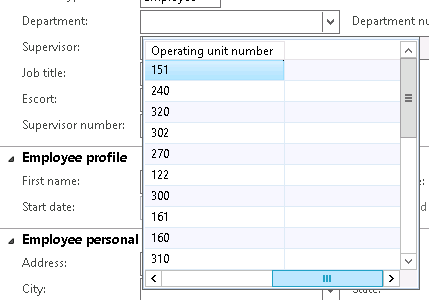
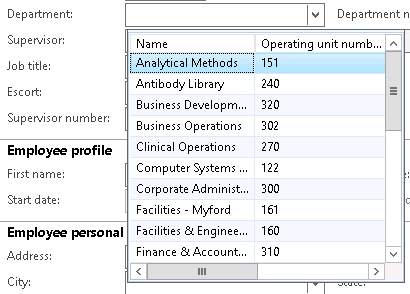
I wish to know that how would i resize my auto lookup form not manually, as  this:
d3.png
Currently, it displays this way: 

0675.d1.png    8306.d2.png

*This post is locked for comments

I have the same question (0)
  • Verified answer
    André Arnaud de Calavon Profile Picture
    304,711 Super User 2026 Season 1 on at

    Hi Bilal,

    Possibly you can better create a lookup form in the AOT and call this one. Then you can manage all sizes yourself. I'm not sure if the SysTableLookup class is supporting the column or form width.

  • Suggested answer
    Chaitanya Golla Profile Picture
    17,225 on at

    Hi,

    I don't think resizing is possible through sysTableLookup as the size of the grid is controlled by methods buildGrid and buildFormGridDesign of class SysTableLookupBase and as this method has protected as its access identifier it's not available on sysTableLookup class. Instead, it's better to create a lookup form(as suggested by André).

    Refer the following link:

    (How to Use AX Form As lookup in Dynamics Ax 2012)

    community.dynamics.com/.../how-to-use-ax-form-as-lookup-in-dynamics-ax-2012

    Thanks,

    Chaitanya Golla

  • Community Member Profile Picture
    on at

    Hi @Sukrut It is a good work around. but One issue is that while selecting a record from lookup I get
    OperatingUnitNumber in field rather than Name.

    I guess i'm missing some thing in the code. Below is the code for reference: 

    public void lookup(FormControl _formControl, str _filterStr)
    {
    Query query = new Query();
    QueryBuildDataSource queryBuildDataSource;
    QueryBuildRange queryBuildRange;

    SysTableLookup sysTableLookup = SysTableLookup::newParameters(tableNum(OMOperatingUnit), _formControl, true);


    sysTableLookup.addLookupField(fieldNum(OMOperatingUnit, OMOperatingUnitNumber));

    sysTableLookup.addLookupField(fieldNum(OMOperatingUnit, Name));

    queryBuildDataSource = query.addDataSource(tableNum(OMOperatingUnit));
    queryBuildDataSource.addRange(fieldNum(OMOperatingUnit, OMOperatingUnitType)).value(queryValue(OMOperatingUnitType::OMDepartment));

    sysTableLookup.parmQuery(query);
    sysTableLookup.performFormLookup();

    super(_formControl, _filterStr);
    }

  • Verified answer
    Community Member Profile Picture
    on at

    Thank you so much every one.

    Issue: One issue is that while selecting a record from lookup I get

    OperatingUnitNumber in field rather than Name.

    Solution:  we must add a boolean argument in adding lookup field as I did below:

    (This code is referencing to the code in my previous reply)

    sysTableLookup.addLookupField(fieldNum(OMOperatingUnit, OMOperatingUnitNumber));

    sysTableLookup.addLookupField(fieldNum(OMOperatingUnit, Name, true));

    p.s. SysTableLookup  doesnot support resizing so for custom resizing one must create autolookup form.
    and then bind it to the fieled

  • Community Member Profile Picture
    on at

    Hi Chaitanya!

    The blog you shared for reference is good to know but at some time it leaves discrepancy

    like from  where Ali Raza sahab call this function named: configuredCustomLookup()

    thanks btw; I treasure it. :)  

Under review

Thank you for your reply! To ensure a great experience for everyone, your content is awaiting approval by our Community Managers. Please check back later.

Helpful resources

Quick Links

Introducing the 2026 Season 1 community Super Users

Congratulations to our 2026 Super Stars!

Meet the Microsoft Dynamics 365 Contact Center Champions

We are thrilled to have these Champions in our Community!

Congratulations to the April Top 10 Community Leaders

These are the community rock stars!

Leaderboard > 🔒一 Microsoft Dynamics AX (Archived)

#1
CP04-islander Profile Picture

CP04-islander 39

#2
Michel ROY Profile Picture

Michel ROY 14

#3
imran ul haq Profile Picture

imran ul haq 8

Last 30 days Overall leaderboard

Featured topics

Product updates

Dynamics 365 release plans