web
You’re offline. This is a read only version of the page.
close
Skip to main content
Community site session details

Community site session details

Session Id :
Microsoft Dynamics AX (Archived)

Master Scheduling is not generating planned orders

(0) ShareShare
ReportReport
Posted on by 1,307

Hi,

Master scheduling is not generating planned orders. So I started debugging and here is what I found out.

MasterScheduling.png  CovCreateCoverage_5F00_ExplodeNonPlanned.png     explodeReceipt.png  ReqCalc_5F00_mustnotExplodeNonPlannedReceipt.png

The code is flown as in snapshots.

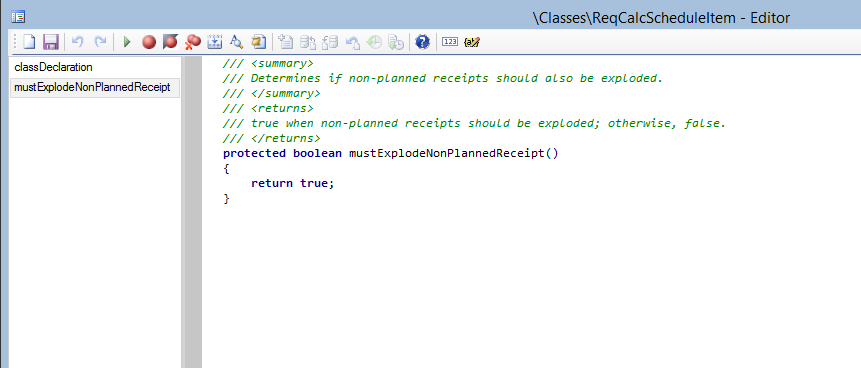
Since mustexplodeNonPlannedReceipts is false, no planned orders are getting generated.

Instead the code must go through either one of the below code to generate planned orders.

ReqCalcExplode_5F00_mustExplodeNonPlannedReceipt.png   ReqCalcScheduleItem_5F00_mustExplodeNonPlannedReceipt.png

Could anyone please help me in finding out which parameter or value is missing or need to setup properly

 so that mustExplodeNonplannedReceipts value will be true.

Thanks,

Lakshmi

*This post is locked for comments

I have the same question (0)
  • Guy Terry Profile Picture
    28,924 Moderator on at
    RE: Master Scheduling is not generating planned orders

    Are you debugging because you have already exhausted all investigations into the setup, or because you are a developer who is more comfortable in the AOT than the Master Planning module?

    If the latter, can we see the Coverage group and Item coverage settings for the item in your screenshot, and the Net requirements screen for that item?

  • Lakshmi Karambakkam Profile Picture
    1,307 on at
    RE: Master Scheduling is not generating planned orders

    Here is the settings info. We do not have item coverage settings.

    Item-Coverage_5F00_SA7768_5F00_903.png  Item-Coverage_5F00_SA7768_5F00_903.png

    NetRequirements_5F00_SA7768_5F00_903.png

  • Suggested answer
    Community Member Profile Picture
    on at
    RE: Master Scheduling is not generating planned orders

    What is the default coverage group assigned in MRP parameters?

    The coverage type is an important factor used in MRP, if the coverage group is set to manual then no planned orders would be generated.

  • Suggested answer
    Community Member Profile Picture
    on at
    RE: Master Scheduling is not generating planned orders

    Hi Lakshmi,

    Looking at your NET requirement form I don't see why would MRP generate you a planned order if there's open kanban order that will fulfill your SO requirements.

    Regards,

    V

  • Lakshmi Karambakkam Profile Picture
    1,307 on at
    RE: Master Scheduling is not generating planned orders

    Settings are proper. Planned orders are not getting generated for a given Item.

    As I mentioned in my earlier chat in this discussion, mustexplodeNonPlannedreceipts is setting to false and so no planned orders are getting generated.

    any help is highly appreciated.

    Thanks,

    Lakshmi

  • Guy Terry Profile Picture
    28,924 Moderator on at
    RE: Master Scheduling is not generating planned orders

    Your settings may well be fine, but the scenario you've presented to us is working correctly.

    You have a Coverage code of 'Requirement' set on the item's Coverage group. This means you want AX to create a single supply order to cover each demand.

    In the scenario above, you have one demand of 20 (a sales order), which is covered by one supply of 20 (a kanban). AX has no need to generate a planned order in this example. Do you have other examples?

  • Lakshmi Karambakkam Profile Picture
    1,307 on at
    RE: Master Scheduling is not generating planned orders

    Hi Guy,

    Could you please let me know what changes need to be made to the coverage group settings so that planned orders are generated?

    Thanks,

    Lakshmi

  • Weaveriski Profile Picture
    23,616 Moderator on at
    RE: Master Scheduling is not generating planned orders

    Increase the demand to more than the supply.

    Set a minimum safety stock (although not even sure if that works with Kanban as the point of a Kanban is a visual trigger for the amount that can fit in the movement container).

    Why do you want to create a planned order when you have a requirement for 20 and a supplying 20?

Under review

Thank you for your reply! To ensure a great experience for everyone, your content is awaiting approval by our Community Managers. Please check back later.

Helpful resources

Quick Links

Responsible AI policies

As AI tools become more common, we’re introducing a Responsible AI Use…

Neeraj Kumar – Community Spotlight

We are honored to recognize Neeraj Kumar as our Community Spotlight honoree for…

Leaderboard > 🔒一 Microsoft Dynamics AX (Archived)

#1
Priya_K Profile Picture

Priya_K 4

#2
Alexey Lekanov Profile Picture

Alexey Lekanov 3

#3
Scott_itD Profile Picture

Scott_itD 2 Community Manager

Last 30 days Overall leaderboard

Featured topics

Product updates

Dynamics 365 release plans