web
You’re offline. This is a read only version of the page.
close
Skip to main content

Notifications

Announcements

No record found.

Community site session details

Community site session details

Session Id :
Small and medium business | Business Central, N...
Answered

Report Data not showing on Report

(0) ShareShare
ReportReport
Posted on by 84

Hello, 

This is my first time posting question in this forum regarding development.
I'm trying to recreate report Picking List (5752) and add additional field to the report but its not showing anything
Below are my step on creating the field, I'm not sure if my approach is already correct or not.

  • I create new table extension to add 2 additional fields ;Carton No and Pallet No, both are looking up from sales order
  • I create new page extension to show the field on the page
  • I added the field to dataset in OnAfterGetRecord() with condition if Carton No <> "" then Header Column = "Carton No." and line column get data from new field on table extension else if for pallet no.
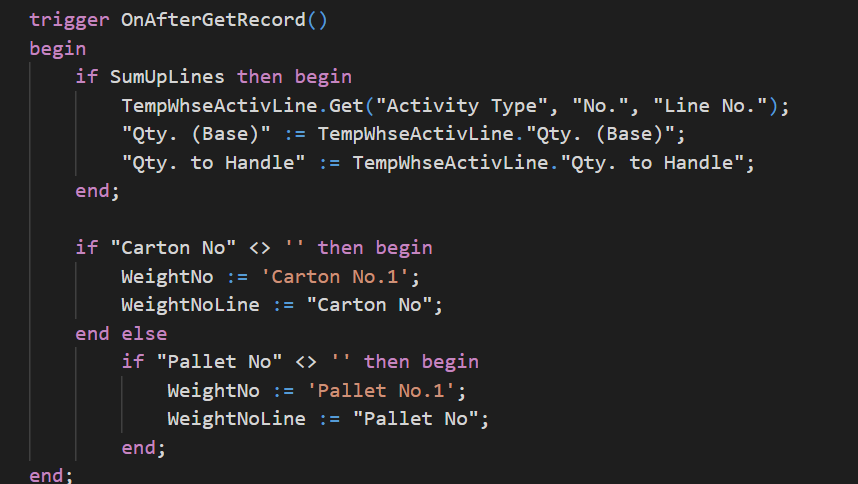
    pastedimage1602814300675v1.png
  • I added the column to rdlc file 

    pastedimage1602814539505v2.png
I have the same question (0)
  • Suggested answer
    THE Italian Profile Picture
    on at

    You might try to run the debugger to see if these values are popuplated or not.

    Visibility in the layout might depends WHERE you placed the column in your report. (in which data item).

    I see you logged this request in NAV forum so I assume you could run Windows Client and the same report with the option to see the dataset (about this report).

    From there, you could inspect how it looks like your dataset and if the fields is there and how is populated.

  • Verified answer
    Bilal Fazrin Profile Picture
    84 on at

    Hello sir, Thanks for the replying.

    Turned out the cause is because the reference field is using calcFormula lookup,

    I just now that I can't take field to report from calc Formula field.

    So I create local procedure to call it straight from standard object.

Under review

Thank you for your reply! To ensure a great experience for everyone, your content is awaiting approval by our Community Managers. Please check back later.

Helpful resources

Quick Links

Responsible AI policies

As AI tools become more common, we’re introducing a Responsible AI Use…

Neeraj Kumar – Community Spotlight

We are honored to recognize Neeraj Kumar as our Community Spotlight honoree for…

Leaderboard > Small and medium business | Business Central, NAV, RMS

#1
OussamaSabbouh Profile Picture

OussamaSabbouh 3,143

#2
Jainam M. Kothari Profile Picture

Jainam M. Kothari 1,694 Super User 2025 Season 2

#3
YUN ZHU Profile Picture

YUN ZHU 1,067 Super User 2025 Season 2

Last 30 days Overall leaderboard

Featured topics

Product updates

Dynamics 365 release plans


