web
You’re offline. This is a read only version of the page.
close
Skip to main content

Announcements

No record found.

News and Announcements icon
Community site session details

Community site session details

Session Id :
Microsoft Dynamics AX (Archived)

How to add parameter, without define

(0) ShareShare
ReportReport
Posted on by


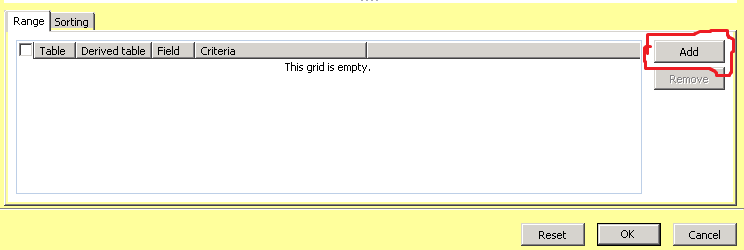
how to add the default range on Query for report, so that range can be used by other users without having to be determined again

ex : user A add the range once, so user B do not have to add range again.
6014.2.PNG

*This post is locked for comments

I have the same question (0)
  • Suggested answer
    André Arnaud de Calavon Profile Picture
    304,508 Super User 2026 Season 1 on at

    Hi Harriadi,

    Have a look at the blog from Axaptian: axaptian.blogspot.com/.../savecopy-filtersqueriesinquires-to.html

    This blog describes a way to copy used queries from one user to another. It sould give you a great start.

  • Community Member Profile Picture
    on at

    thanks andre, 

    but, I mean  when i develop and how to make a default parameter ?

    sorry i forgot to tell you that i'm a developer.

    6557.5.PNG

  • Suggested answer
    István Orosz Profile Picture
    2,137 on at

    Hi,

    You can add the range directly to the report query, and all users will be able to see it. What do you mean by 'default', and are we talking about a query based SSRS report?

    Kind regards,

    István

  • Verified answer
    Catalyst619 Profile Picture
    355 on at

    If this is a query based report, you can go into the report query and manually define a range like so:

    QueryRange.png

    Instead of PurchaseOrderCube, you would find the Query associated to your report.

    If you're looking to do it programmatically, you can do so by using the addrange function on your QueryBuildDataSource:

    https://msdn.microsoft.com/en-us/library/querybuilddatasource.addrange.aspx

  • Community Member Profile Picture
    on at

    thanks catalyst, its working

Under review

Thank you for your reply! To ensure a great experience for everyone, your content is awaiting approval by our Community Managers. Please check back later.

Helpful resources

Quick Links

Introducing the 2026 Season 1 community Super Users

Congratulations to our 2026 Super Stars!

Meet the Microsoft Dynamics 365 Contact Center Champions

We are thrilled to have these Champions in our Community!

Congratulations to the March Top 10 Community Leaders

These are the community rock stars!

Leaderboard > 🔒一 Microsoft Dynamics AX (Archived)

#1
CP04-islander Profile Picture

CP04-islander 39

#2
Michel ROY Profile Picture

Michel ROY 14

#3
imran ul haq Profile Picture

imran ul haq 8

Last 30 days Overall leaderboard

Featured topics

Product updates

Dynamics 365 release plans
