web
You’re offline. This is a read only version of the page.
close
Skip to main content

Notifications

Announcements

No record found.

Community site session details

Community site session details

Session Id :
Customer experience | Sales, Customer Insights,...
Suggested Answer

On-Premise Gateway Connector: error Couldn't Create Data Source

(0) ShareShare
ReportReport
Posted on by

Hi !

I'm trying to import orders data into CI (Trial) from on-premise Sql Server database using On-Premise Gateway Connector.

I've installed On-Premise Gateway Connector on local machine and using local Sql Server instance for proof-of-concept.

I've successfully registered Gateway Connector and created connection at Power Apps Portal. 

Next step is to create Data Source in CI. I can see all orders in Power Query:
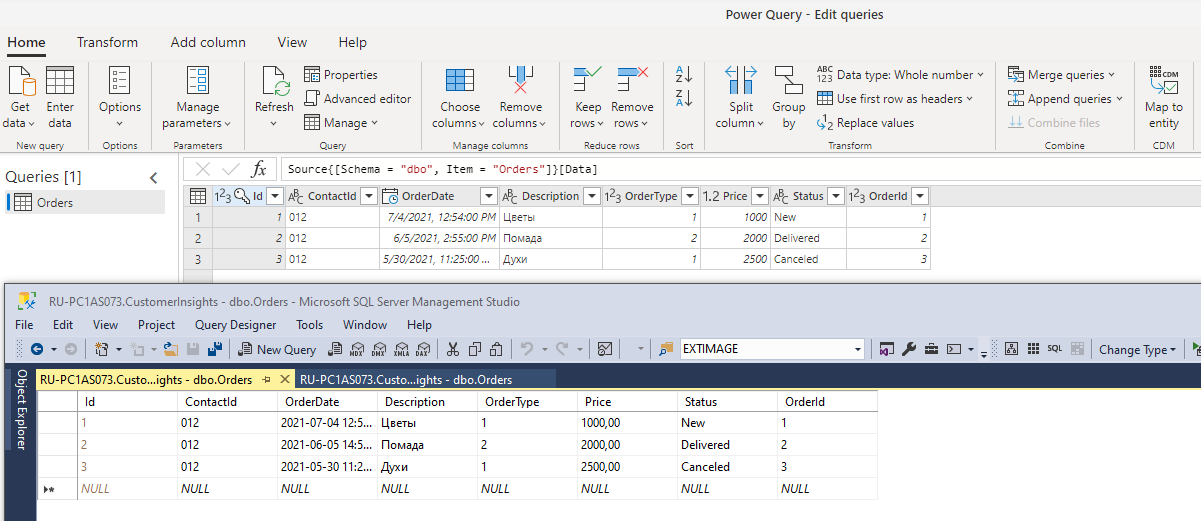
Image-983.png

But when I click "Save" button - error message is displayed:

Image-984.png

I've checked browser network trace (from Developer Tools): request to /manage/datasources returns Http 503:

{"exception":null,"httpStatusCode":503,"exceptionCulprit":"System","errorCode":"DataSourceCreateOrUpdateFailed","resultSeverity":"Error","message":"Failed to create/update data source.","name":null,"params":{"InstanceId":"df41d518-d59a-42c5-83c2-6698752f7454","DataSourceId":""},"ciResults":null}

Any ideas ?

I have the same question (0)
  • Suggested answer
    Bill Ryan Profile Picture
    8 on at

    When I've had this problem, it's usually been b/c the region in CI is different  from the region in PowerApps/CDS.  I think usually if you can't easily see it, but you can see it in PowerApps and you're getting that error, I suspect Microsoft will need to change the region for you.  

  • Community Member Profile Picture
    on at

    Hi Bill,

    Thank you for reply ! I'm not 100% sure how to check the region, but at the first glance - they are the same (North Europe):

    pastedimage1626800693814v1.png

  • Community Member Profile Picture
    on at

    Hi!

    It seems that it is not possible to create Data Source at all! I'm trying to import orders from Excel (OneDrive folder):

    pastedimage1626958409869v1.png

    And I got the same error as for On-Premise Gateway Connector: Couldn't create data source. I have admin rights in CI.

  • Suggested answer
    John Wiese Profile Picture
    on at

    Do you have any data sources setup?  If not you may want to try and "reset" your environment.  

    1. Click the environment name
    2. click the vertical ellipse
    3. choose "reset"
  • Community Member Profile Picture
    on at

    Yes, I have single Data Source - Common Data Service (Sales 365). Ok, I'll try to reset environment.

  • Community Member Profile Picture
    on at

    I cannot reset environment :( After clicking reset I’ve got an error (Error occurred during reset). I’ve tried is several times – the same error.

    pastedimage1627032160122v1.png

    pastedimage1627034412242v1.png

  • Community Member Profile Picture
    on at

    Created new Trial Environment.

    It seems I cannot create new Data Source other than CDS:

    pastedimage1627056380294v1.png

    When I'm trying to import data from On-Premise SQL Server I got an error (despite the fact that I can see data from sql table):

    pastedimage1627056423465v2.png

    The same error appears when I'm trying to import data from Excel (OneDrive):

    pastedimage1627056523674v3.png

  • Bill Ryan Profile Picture
    8 on at

    So you can definitely hit CDS but other sources you can't, is that right?  There could be a few different reasons and it might just be a coincidence that it's both SQL Server and OneDrive. The first thing i'd do is try to see if I can access either both through Power BI Desktop, if not the problem is with the sources. The fact the data comes in is really interesting, I've never seen that happen before.  At what point exactly is that error happening?  I might try to just pull in Source first, save, then try again with Navigation, Promoted headers.

  • Bill Ryan Profile Picture
    8 on at

    Ivan, these trial environments can be a little wonky for sure.  I just ran through one of my instances and do not have any issue with creating a new source once I have a CDS one.  The fact you can get the data back though, is really intriguing.  If you open up the Developer tools or Fiddler, can you see what specific errors are coming back?  And just to be clear, this one was the one that was reset or is it a totally new environment? I've had a case before where it looks like something broke in terms of metadata so even after resetting the environment the issue persisted but if this is a totally clean one, IDK

  • Community Member Profile Picture
    on at

    Hi Bill,

    Error comes from XHR POST request to /manage/datasources. It returns HTTP Status 503 (Service Unavailable):

    {"exception":null,"httpStatusCode":503,"exceptionCulprit":"System","errorCode":"DataSourceCreateOrUpdateFailed","resultSeverity":"Error","message":"Failed to create/update data source.","name":null,"params":{"InstanceId":"bce3bc8d-d617-4e20-8735-7d8f610bb84a","DataSourceId":""},"ciResults":null}

    I have created brand new Trial environment - it did not help. The same error.

Under review

Thank you for your reply! To ensure a great experience for everyone, your content is awaiting approval by our Community Managers. Please check back later.

Helpful resources

Quick Links

Responsible AI policies

As AI tools become more common, we’re introducing a Responsible AI Use…

Neeraj Kumar – Community Spotlight

We are honored to recognize Neeraj Kumar as our Community Spotlight honoree for…

Leaderboard > Customer experience | Sales, Customer Insights, CRM

#1
Tom_Gioielli Profile Picture

Tom_Gioielli 171 Super User 2025 Season 2

#2
#ManoVerse Profile Picture

#ManoVerse 83

#3
Jimmy Passeti Profile Picture

Jimmy Passeti 50 Most Valuable Professional

Last 30 days Overall leaderboard

Product updates

Dynamics 365 release plans
