web
You’re offline. This is a read only version of the page.
close
Skip to main content

Notifications

Announcements

No record found.

Community site session details

Community site session details

Session Id :
Finance | Project Operations, Human Resources, ...
Suggested Answer

Wrong number of arguments to 'FillActionsButton' Error after upgrading GP

(0) ShareShare
ReportReport
Posted on by 5

Hi GP Forum

I just upgraded our production GP from 18.0 to the latest version 18.4.1436. The issue is now when we click Sales Transaction Entry, GP pops out an error: Wrong number of arguments to 'FillActionsButton' 
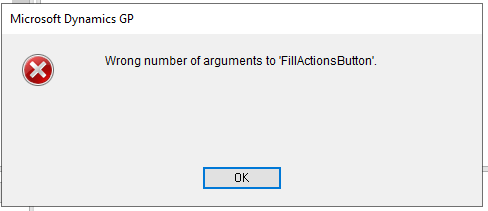
pastedimage1659988924903v2.png

We can press OK twice for the Sales transaction entry window to pop up, but when we close that windows, we get this error:

Unhandled script exception:
Object has no reference.

EXCEPTION_CLASS_SCRIPT_BAD_PARAM
SCRIPT_CMD_DEREF_TABLE
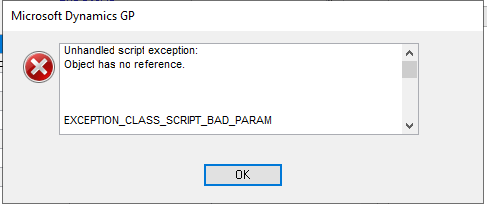

pastedimage1659988993292v3.png

Any help would be appreciated, thank you. 

Categories:
I have the same question (0)
  • David Musgrave MVP GPUG All Star Legend Moderator Profile Picture
    14,095 Most Valuable Professional on at

    Have you upgraded all your ISV or customizations to v18.4 as well.

    Sounds like you have old custom code referencing a script that has changed.

  • Richard Wheeler Profile Picture
    75,848 Moderator on at

    Could this be referencing SmartFill? Are you using Rockton? Check your DYNAMICS.SET file for what products are loaded.

  • kchan Profile Picture
    5 on at

    Hi David:

    This is my first time upgrading Dynamics GP. I don't think our ISV or customizations are fully upgraded to 18.4. I will look into how to do it. I have only upgraded SmartConnect, and I am waiting for BinaryStream to get back to be regarding the latest ARED installer.

  • kchan Profile Picture
    5 on at

    Hi Richard:

    We have eOne Smartconnect which we upgraded to the latest version. We are not using rockton. However, we are using Advanced Revenue & Expense Deferrals from BinaryStreams and that build is too old. I am still waiting for them to get back to me because their self-serving portal is down.

    These are the products we use according to dynamics.set

    14
    0
    Microsoft Dynamics GP
    4
    Dynutils
    949
    FieldService
    1042
    Interfund Management
    1493
    SmartList
    1632
    Cash Flow Management
    1878
    Excel-Based Budgeting
    2277
    Purchase Order Enhancements
    2416
    Control Account Management
    2547
    Enhanced Commitment Management
    2992
    CopierSeries
    3104
    Advanced Security
    3278
    Report Scheduler
    5597
    HITB Report
    Windows

  • Suggested answer
    kchan Profile Picture
    5 on at

    Hi guys:

    I have managed to fix this. Thank you to @David Musgrave MVP. I narrowed down the issue. It was BinaryStream's ARED and ARCB customized forms. I had to download the latest installer from the vendor, and update the software. I then used Dynutils.exe to update the appropriate DIC files.

    For ARED: C:\Program Files (x86)\Microsoft Dynamics\GP2018\BS71.DIC

    For ARCB: C:\Program Files (x86)\Microsoft Dynamics\GP2018\Data\BS71RPTS.DIC

Under review

Thank you for your reply! To ensure a great experience for everyone, your content is awaiting approval by our Community Managers. Please check back later.

Helpful resources

Quick Links

Responsible AI policies

As AI tools become more common, we’re introducing a Responsible AI Use…

Neeraj Kumar – Community Spotlight

We are honored to recognize Neeraj Kumar as our Community Spotlight honoree for…

Leaderboard > Finance | Project Operations, Human Resources, AX, GP, SL

#1
Martin Dráb Profile Picture

Martin Dráb 672 Most Valuable Professional

#2
André Arnaud de Calavon Profile Picture

André Arnaud de Cal... 534 Super User 2025 Season 2

#3
Sohaib Cheema Profile Picture

Sohaib Cheema 289 User Group Leader

Last 30 days Overall leaderboard

Product updates

Dynamics 365 release plans
