web
You’re offline. This is a read only version of the page.
close
Skip to main content

Notifications

Announcements

Community site session details

Community site session details

Session Id :
Microsoft Dynamics AX (Archived)

Installing AOS Client

(0) ShareShare
ReportReport
Posted on by 110

Hello,

After installing AOS Client, I'm trying to run AX but nothing is happening. I accessed AX server configuration to check on the ports and saw that the "Service WSDL port" is disabled while it must be assigned to port number 8101 by default.
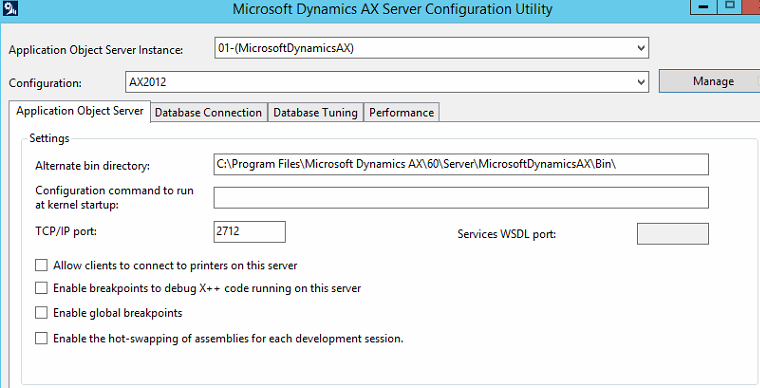
3750.Issue.png

Thank you for your help,

Regards.

*This post is locked for comments

I have the same question (0)
  • Mahmoud Hakim Profile Picture
    17,887 on at

    try to create a new configuration

  • Rabih Khoury Profile Picture
    110 on at

    It is already a new configuration created.

  • Ajit Profile Picture
    8,755 on at

    Looks like something wrong with your AOS installation. Was that WSDL port there after installation?

  • Rabih Khoury Profile Picture
    110 on at

    It was a database connection issue.. Now I installed AX and everything is working fine but I had to enable the debugger in my code so I accessed again AX server configuration Utility to mark the checkbox "Enable breakpoints to debug X++ code.." but all the fields are inaccessible and grey, so I tried to create a new configuration and the following error is appearing:

    ConfigurationIssue.PNG

    Can you help me solve it? I don't know how to create rules.. It should be configured automatically by default no?

    Many thanks,

    Regards.

  • Vilmos Kintera Profile Picture
    46,149 on at

    Follow the instruction in the error message and verify what is going on with your Windows Firewall, is it up and running? Are you using alternative antivirus and firewall software which could have disabled it? AX can only set up rules automagically in case standard Windows Firewall service is active.

  • Rabih Khoury Profile Picture
    110 on at

    Windows Firewall is enabled and its service is running. There are no antivirus or alternative firewall software installed.. How can I setup the rules manually? I can't find the installation guide.

  • Vilmos Kintera Profile Picture
    46,149 on at

    I typically just disable Windows Firewall for the Domain profile to allow free communication within the network, that should be fine if your IT has isolated those servers from the rest of your LAN/WAN infrastructure.

  • Rabih Khoury Profile Picture
    110 on at

    I turned off Windows Firewall and I still get the same error.

Under review

Thank you for your reply! To ensure a great experience for everyone, your content is awaiting approval by our Community Managers. Please check back later.

Helpful resources

Quick Links

Responsible AI policies

As AI tools become more common, we’re introducing a Responsible AI Use…

Congratulations to our 2025 Community Spotlights

Thanks to all of our 2025 Community Spotlight stars!

Leaderboard > 🔒一 Microsoft Dynamics AX (Archived)

#1
Volodya Profile Picture

Volodya 2

#2
tgudwanski Profile Picture

tgudwanski 1

Last 30 days Overall leaderboard

Featured topics

Product updates

Dynamics 365 release plans
