web
You’re offline. This is a read only version of the page.
close
Skip to main content

Notifications

Announcements

No record found.

Community site session details

Community site session details

Session Id :
Microsoft Dynamics 365 | Integration, Dataverse...
Unanswered

Filtering by related record on Lookup doesn't work in new PA Editable Grid

(6) ShareShare
ReportReport
Posted on by 19

Hello everyone,

I have been recently trying my hand around the new Power Apps editable grid and I'm currently facing an issue : I'm trying to filter a lookup based on the selected record on another lookup (Filter by related record), I currently have the following setup :

I have a table Specialisation where each record can be a parent or a child.

The parent field is a Lookup on the table Specialisation as you can see here : 
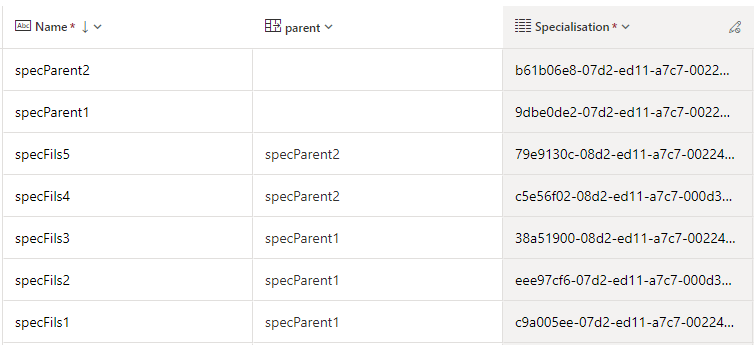
pastedimage1680599686508v5.png

specParent1 has 3 children : specFils1, specFils2 and specFils3

specParent2 has 2 children : specFils4 and specFils5

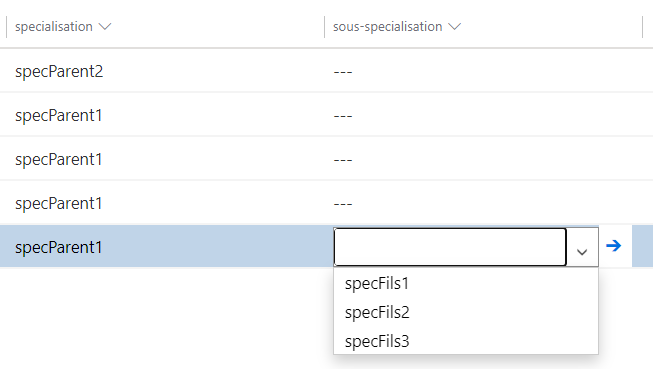
The thing I wanted to achieve was the filtering by related record that was previously implemented in the old editable grid like this, meaning that if I select a parent in specialisation only its children will be displayed in sous-specialisation : 
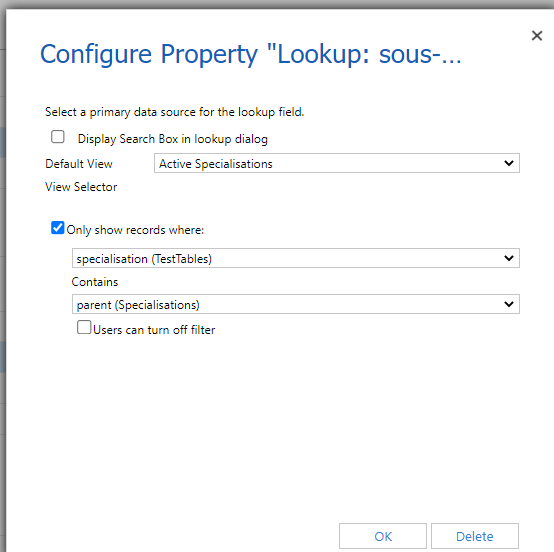
pastedimage1680599331808v3.png

pastedimage1680599381260v4.png

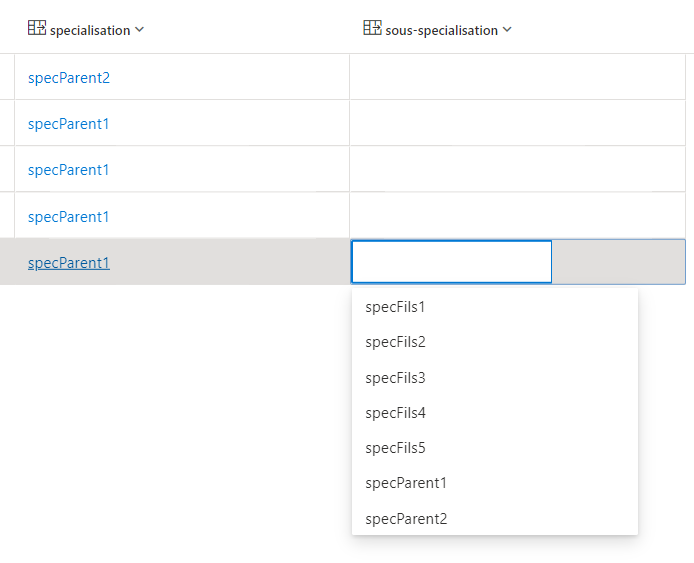
In the old grid it's working perfectly fine but once I try to replicate this behaviour using the new grid with a rather similar setup, all the content of the Specialisation table gets displayed instead of the filtered values I'm looking to get : 
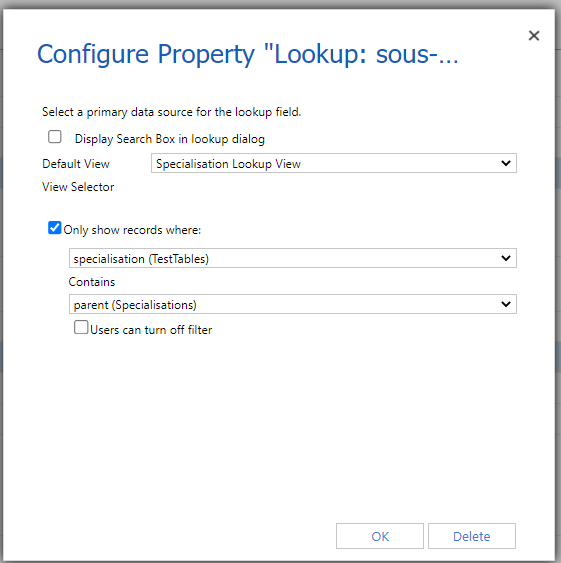
pastedimage1680599231539v1.png

pastedimage1680599252565v2.png

If any of you have any idea how I could fix this, I'm eager to hear your suggestions

It might just be a bug, after all it's still in "preview" but since there's not much documentation available at the moment and since I'm rather new to this environment I want to make sure that the issue isn't coming from my side or if I'm missing some parameters !

Arnaud

I have the same question (0)
  • Eiken Profile Picture
    on at

    Hi,

    Firstly, remember to save and publish the change in Advanced setting

    pastedimage1680772041108v2.png

    Now it works well in my test app.

    It is important to note that when you have finished selecting the parent, you need to deselect the record and select it again to save the parent's value.

    Just like this:

    pastedimage1680772413229v3.png

    pastedimage1680772429154v4.png

    pastedimage1680772443396v5.png

  • ArnaudD Profile Picture
    19 on at

    Hello Eiken ,

    I think there's a little bit of a misunderstanding, I know that the previous editable grid works just fine as I showed in the screenshots at the beginning of my post, the problem I'm facing is with the new grid that's in preview at the moment (see next picture, the Power Apps grid control), which is not working with the exact same setup :

    pastedimage1680774580559v1.png

    And of course, I made sure to save and publish all of my modifications every time I modified my parameters 

    Kind regards,

    Arnaud

  • M-M Profile Picture
    11 on at
    I've seen the same behavior, just now/today.
     
    Unfortunately it appears the Lookup configuration is not respected at all... odd... seems like a bug.
     
    Would love some insight from Microsoft about this.
  • shalem120kjh Profile Picture
    5 on at
    Well, the Power Apps Grid Control is not in preview anymore, yet I'm still facing the same issue you are. I have no solution but to keep using the old grid control, which I hate. 
    Also, if you add the new grid control through the modern designer - you can add the "Lookup" column, but the filtering part ("Only show records where:") is missing.
  • roman5k Profile Picture
    7 on at
    yup, the issue still persists. the filtering of the lookup
    doesnt work in the Power Apps Grid Control, however
    in the form the filtering gets applied.

    The only way to get it to work is via the old Editable Grid.

Under review

Thank you for your reply! To ensure a great experience for everyone, your content is awaiting approval by our Community Managers. Please check back later.

Helpful resources

Quick Links

Responsible AI policies

As AI tools become more common, we’re introducing a Responsible AI Use…

Neeraj Kumar – Community Spotlight

We are honored to recognize Neeraj Kumar as our Community Spotlight honoree for…

Leaderboard > Microsoft Dynamics 365 | Integration, Dataverse, and general topics

#1
Siv Sagar Profile Picture

Siv Sagar 93 Super User 2025 Season 2

#2
#ManoVerse Profile Picture

#ManoVerse 74

#3
Martin Dráb Profile Picture

Martin Dráb 64 Most Valuable Professional

Last 30 days Overall leaderboard

Product updates

Dynamics 365 release plans