web
You’re offline. This is a read only version of the page.
close
Skip to main content

Announcements

News and Announcements icon
Community site session details

Community site session details

Session Id :
Microsoft Dynamics CRM (Archived)

How to create a lookup field that looks up to different entities

(0) ShareShare
ReportReport
Posted on by 410

Hi All,

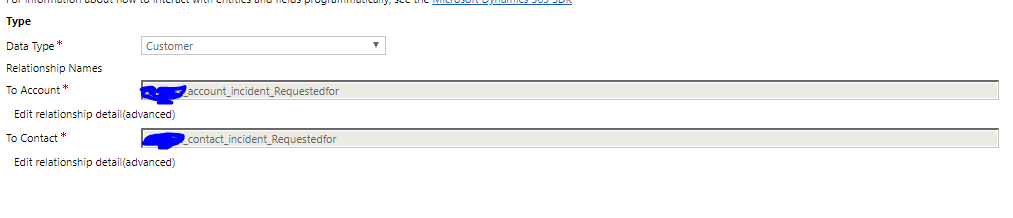
I want to to create a custom field that look up to two different entities   e.g The below field is created and its looking up the account  and contact entity
44527.Capture.PNG

Please someone help me out. Thanks 

 pls look at the above.

Thanks 

*This post is locked for comments

I have the same question (0)
  • Verified answer
    Arun Vinoth Profile Picture
    11,615 Moderator on at

    Customer lookup is a special datatype points to Account or Contact. Microsoft gave us the option to create this special datatype in our entities.

    Whereas any other entities cannot be bind with this datatype or similar can be created by us.

    If your entity could be a type of activity (custom activity) then "Regarding" lookup is another special attribute can hold multiple entity types in single field. This field can never be created in any entity unless it's a custom activity & system will give the OOB Regarding lookup for you.

  • Victor Onyebuchi Profile Picture
    410 on at

    Thanks @arun

  • Victor Onyebuchi Profile Picture
    410 on at

    Hi Arun Vinoth , how does the system know the exact entity to lookup to, since it i looking up both account and contact at the same time ??

  • Suggested answer
    Arun Vinoth Profile Picture
    11,615 Moderator on at

    From UI when you type/search in lookup all the records from both Account & Contact will be suggested, you can filter by record types + views.

    ledgeviewpartners.com/.../dynamics-crm-2016-new-customer-field

    From javascript code you have to mention entityType while assigning values.

  • Victor Onyebuchi Profile Picture
    410 on at

    Thanks Arun Vinoth !!

Under review

Thank you for your reply! To ensure a great experience for everyone, your content is awaiting approval by our Community Managers. Please check back later.

Helpful resources

Quick Links

Season of Sharing Community Challenge Winners!

Congratulations to our community stars!

Women in Power Builds Momentum

Expanding mentorship, skilling, and AI innovation

Congratulations to the June Top 10 Community Leaders

These are the community rock stars!

Leaderboard > 🔒一 Microsoft Dynamics CRM (Archived)

Last 30 days Overall leaderboard

Featured topics

Product updates

Dynamics 365 release plans
