web
You’re offline. This is a read only version of the page.
close
Skip to main content

Announcements

No record found.

News and Announcements icon
Community site session details

Community site session details

Session Id :
Microsoft Dynamics CRM (Archived)

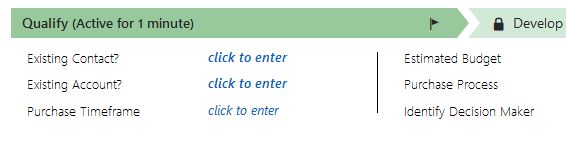
What is the name of the Existing Contact field from a Lead's Qualify section?

(0) ShareShare
ReportReport
Posted on by

Hi. I would like to import data for the field Existing Contact and then find a way to bulk qualify the Leads into the corresponding Contacts (to fix Lead-Contact duplicates/non-qualified leads issues).
Lead_2D00_duplicate_2D00_detection_2D00_job2.jpg

But I can't figure out which field is Existing Contact. How is it called in the Lead's Fields section? Which field to update?

Do you have any idea what is the name of this field? Or is it even there? Or maybe some workaround to set the value of this field from import?

Thanks,

Adrian

*This post is locked for comments

I have the same question (0)
  • Verified answer
    Inogic Profile Picture
    756 on at

    The ‘Existing Contact?’ field on the BPF is mapped with the field ‘parentcontactid(Parent Contact for lead)‘.

    If this answered your question, please make sure to Mark this as an Answer.

    Thanks!

  • Adrian Suteu Profile Picture
    on at

    Thank you very much.

    Is there a way of copying the Activities from Lead to Contact while deactivating the Lead?

    This works when I qualify the Lead and I get a newly created Contact. But if the Contact is already there and it contravenes a duplicate detection rule (Leads with the same email as Contacts) it won't pass the activities to that Contact.

    Can you help me with this?

  • Hittori Profile Picture
    72 on at

    The field you are looking for is parentcontactid

  • Hittori Profile Picture
    72 on at

    If this happen "the Contact is already there and it contravenes a duplicate detection rule....  " it is because the user hasnt look for the existing parent contact lookup.

    What you can do in here is to create a plugin that on creation of a contact if there is a OriginatingLeadId, then get the activities of the lead and tied them to the contact. (this will remove the relationship of the activity with the lead and move it to the contact.

    Remember this will have to be on step 50, basically when the Contact has being created, so you have the contactid, and you can go to the lead, get the list of activities you want to re-assign, and assign them with the new Contact ID.

Under review

Thank you for your reply! To ensure a great experience for everyone, your content is awaiting approval by our Community Managers. Please check back later.

Helpful resources

Quick Links

Introducing the 2026 Season 1 community Super Users

Congratulations to our 2026 Super Stars!

Meet the Microsoft Dynamics 365 Contact Center Champions

We are thrilled to have these Champions in our Community!

Congratulations to the March Top 10 Community Leaders

These are the community rock stars!

Leaderboard > 🔒一 Microsoft Dynamics CRM (Archived)

#1
AS-17030037-0 Profile Picture

AS-17030037-0 2

Last 30 days Overall leaderboard

Featured topics

Product updates

Dynamics 365 release plans
