web
You’re offline. This is a read only version of the page.
close
Skip to main content

Notifications

Announcements

No record found.

Community site session details

Community site session details

Session Id :
Microsoft Dynamics CRM (Archived)

Manually edit workflows in text editor due fields/entitys have changed names? (Migrating from CRM 2015 to CRM 365 Online)

(0) ShareShare
ReportReport
Posted on by 886

Hi,

I have a lot of workflows (400+) where fields and entities have changed names, then the workflow rules will point to in existing fields/entities. We are migrating from CRM 2015 to CRM 365 Online.

I cannot just export the solution from CRM 2015 and re-import to CRM 365 Online without any errors due fields and entities have changed names.

My idea was to export the workflows as an unmanaged solution from CRM 2015. Then unzip the solution and then open the workflows in a text editor ex. Notepad++ and just edit the variables from the old names to the new names and save the file. Then zip the file again and import it into CRM365 Online.

Anyone that have experience with this?
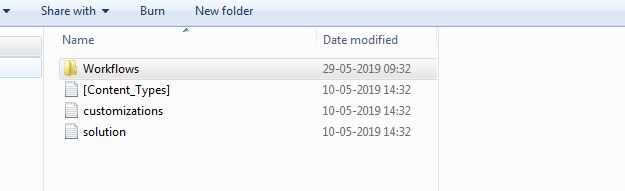
folder.JPG

*This post is locked for comments

I have the same question (0)
  • Suggested answer
    Dynamics365 Rocker Profile Picture
    7,755 on at

    You can try this, I am not sure that it will work.

    Why are you not updating field from CRM UI?

  • rskadk1 Profile Picture
    886 on at

    What do you mean by "Why are you not updating field from CRM UI?"?

    Only the current fields/entitys are available on my CRM 2015 platform. The new fields/entitys in CRM 365 Online are actually replacements. And therefore they are only available in CRM 365 Online... So I cannot change my workflows in CRM 2015 to "point to" the new fields/entitys...

  • Suggested answer
    Kalpavruksh D365 CoE Profile Picture
    2,545 on at

    Hi,

    You can export unmanaged solution from Dynamics 365 and re-import by making the changes but the solution can't be imported from MSCRM 2015 to Dynamics 365 directly as there are a lot of changes in the xml formats of solution files. I would suggest doing the changes in Dynamics 365 environment directly.

  • rskadk1 Profile Picture
    886 on at

    Kalpavruksh -> Is there anyhow I can "prepare" my solution to imported into Dynamics 365 Online, so the xml structure would be correct? Ex. By upgrading my CRM 2015 to 2016 or something like that?

  • Suggested answer
    Kalpavruksh D365 CoE Profile Picture
    2,545 on at

    1. Export the same workflow from MSCRM 2015 and create an unmanaged solution.

    2. Follow the same steps for Dynamics 365.

    3. Compare customizations.xml file and get the difference in the xml format.

    4. Also, compare solution.xml of both the solutions.

    Try tweaking Dynamics 365 solution with the above steps with the desired changes and import in Dynamics 365 environment. We had followed the same steps while importing few workflows from V9.0 to V8.2.

    If found useful, please mark this answer as verified.

  • rskadk1 Profile Picture
    886 on at

    Hi again,

    If I export the workflows from MSCRM 2015 as unmanaged and import them into Dynamics 365. Im sure the import will fail? As the workflows are referring to fields and entitys that doesn't exist in the Dynamics 365 solution. The workflows are currently ONLY in MSCRM 2015 and not in Dynamics 365...

  • Suggested answer
    Kokulan Profile Picture
    18,054 on at

    Hi

    I would not recommend manually editing Workflow XAML, especially when you have 400+ workflows. You can definitely edit XAML its a the format is not very intuitive and you could easily make mistake and you could end up spending a lot of time in manual edit.

    You could consider one of the following options

    Option 1 :

    01. Create an Un-managed solution on CRM 2015 and add all you workflows.

    02. Try to export this solution and CRM will give you the dependent components warning - take screenshot of this and cancel the export

    03. Add all the dependencies it was complaining about - refer the screenshot from Step 02.

    04. Export the solution from CRM 2015 and Import onto Dynamics 365 online.

    05. Change the workflows (Entity / Field change) using Workflow Designer.

    Option 2:

    01. Create an un-managed solution on Dynamics 365 online and add all the entities and fields that you are going to be using in the workflow

    02. Export the solution and change the solution version by unzipping and editing the Solution xml file

    03. Import the solution onto CRM 2015, Add all the workflows to this solution

    04. Change the workflows (Entity /Field change) using workflow designer

    05. Export this solution and import onto Dynamics 365 Online

    I would only consider going down the path of editing XAML if the option 1 and option 2 are not going to work at all.

  • Dynamics365 Rocker Profile Picture
    7,755 on at

    Do you have replaced entities in CRM 2015?

    If not then update solution xml but it may take time.

    By the way how many workflows you have that has deprecated entities and fields?

  • rskadk1 Profile Picture
    886 on at

    Kokulan Eswaranathan ->

    I also share your concern manually editing it. I will try with 1 to see if it's easy and decide if I will try this solution.

    And thanks for presenting option 1 and 2. I will definitely consider those before editing the XAML. The only issue is that it can be tricky editing the workflows using workflow designer since Field "Display Names" are the same between the old field a the new field (schema name is of course different). So using the workflow designer this can be tricky, since it only displays the "Display name". Then I will need to edit "Display Name" of all the old fields. To Ex. Field 1 OLD, Field 2 OLD etc. So I can tell the difference in workflow designer when changing the entity / fields..

    Dynamics365 Rocker ->

    What do you mean by, if I have replaced entities in CRM 2015?

    I have 400+ workflows with deprecated entities and fields, that are replaced with new entities and fields..

  • Dynamics365 Rocker Profile Picture
    7,755 on at

    Replaced entity means --> new entities.

Under review

Thank you for your reply! To ensure a great experience for everyone, your content is awaiting approval by our Community Managers. Please check back later.

Helpful resources

Quick Links

Responsible AI policies

As AI tools become more common, we’re introducing a Responsible AI Use…

Neeraj Kumar – Community Spotlight

We are honored to recognize Neeraj Kumar as our Community Spotlight honoree for…

Leaderboard > 🔒一 Microsoft Dynamics CRM (Archived)

#1
SA-08121319-0 Profile Picture

SA-08121319-0 4

#1
Calum MacFarlane Profile Picture

Calum MacFarlane 4

#3
Alex Fun Wei Jie Profile Picture

Alex Fun Wei Jie 2

Last 30 days Overall leaderboard

Featured topics

Product updates

Dynamics 365 release plans



