web
You’re offline. This is a read only version of the page.
close
Skip to main content

Notifications

Announcements

No record found.

Community site session details

Community site session details

Session Id :
Finance | Project Operations, Human Resources, ...
Answered

Budget check not performed

(0) ShareShare
ReportReport
Posted on by 1,443 Super User 2025 Season 2

Hello experts,

need help on the below.

I am configuring the Budget Control configuration for a new customer. But for some reason it does not work. I have done all the required configuration and activated the budget control. Budget registered entry is created and trying to post new journals (Daily journal) but budget check is not performed.

My setups so far in the Budget Control configuration:

In Define parameters: I have selected main account with dimension.
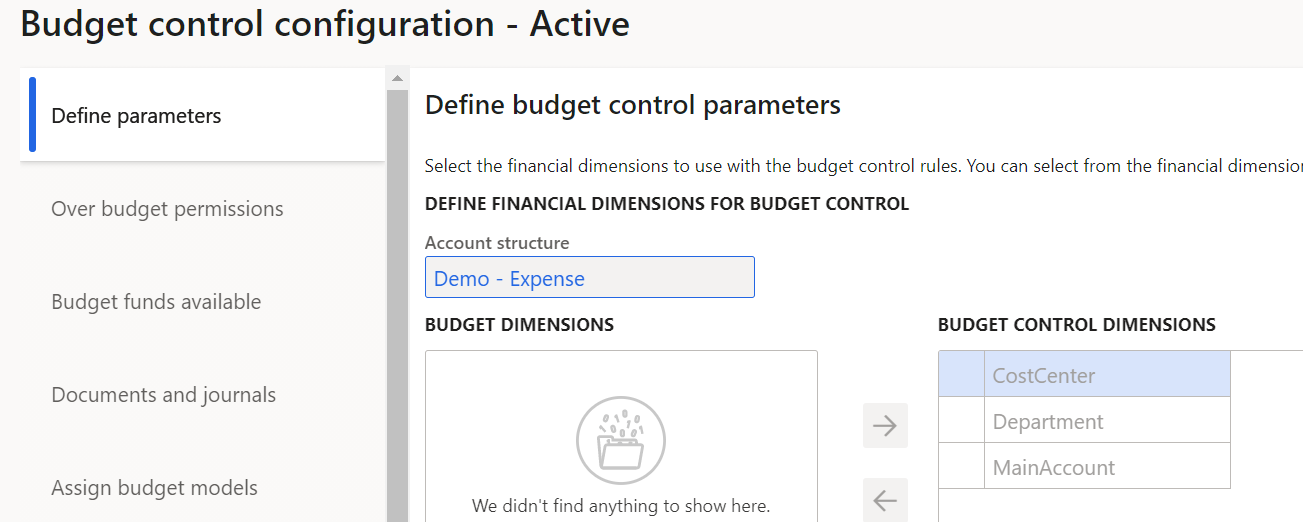
pastedimage1623742467159v1.png

In Budget funds i have selected original budget and Actual expenditure

pastedimage1623742716203v3.png

In documents and journals: I have selected Daily journals.
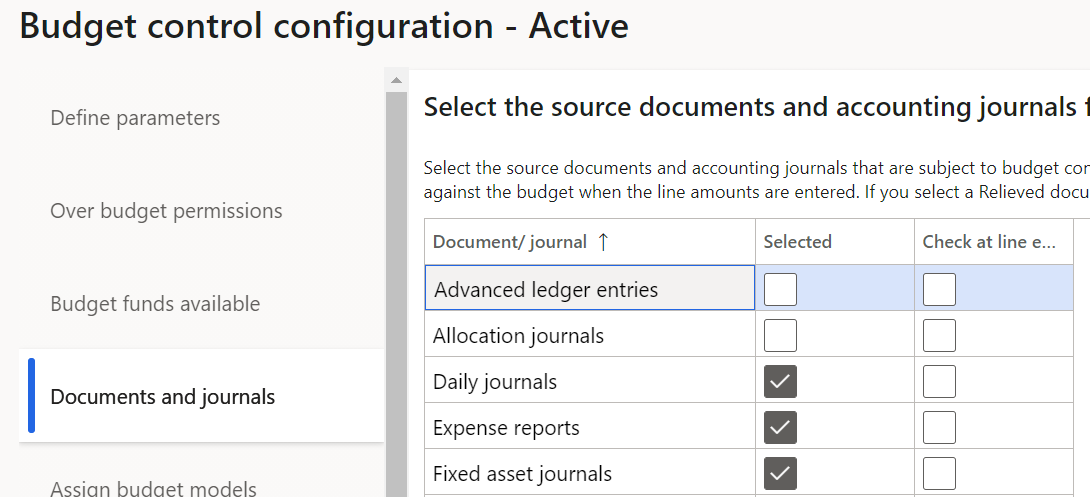
pastedimage1623742587358v2.png

Assign budget modules has been linked

pastedimage1623742782691v4.png

Define budget control rules - I have selected main account (Rent - 30000)
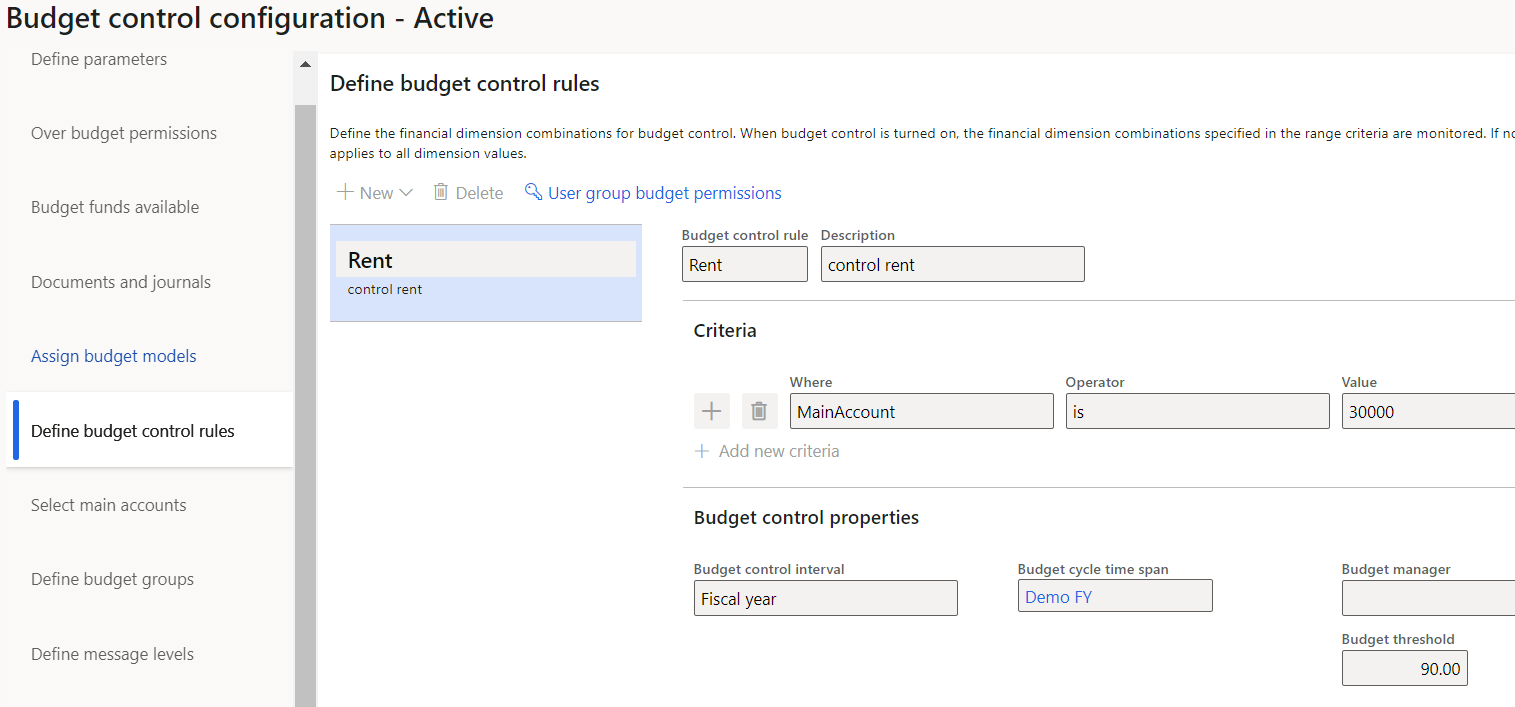
pastedimage1623742893598v5.png

Budget control is activated and Turned on.

pastedimage1623742980074v6.png

After the above setup I have created a budget register entry. I have selected Rent(30000) account and amount is 12000

pastedimage1623743242091v7.png

Now, when i am trying to post a new entry in GL for rent expense, budget check is not performed.

pastedimage1623743392319v8.png

I am not sure if I have missed any setup or configured something wrongly, kindly help me with this.

I have the same question (2)
  • Verified answer
    saurabh bharti Profile Picture
    15,039 Moderator on at

    Looks like in your setup for Documents and journals you have selected at header level ,not at the line level.

    So if you try to enter amount 13000 and try post it will not allow. So budget check is there but at header.

    you can try enabling for lines and then turn on.

    Create line again.

  • Verified answer
    Ludwig Reinhard Profile Picture
    Microsoft Employee on at

    Hello Bharath jain,

    Have you tried modifying your budget control rules in a way that the rule hits in when an empty cost center and empty department is specified?

    In addition, check the line/header level configuration that Saurabh mentioned.

    Best regards,

    Ludwig

  • Sanam Khan Profile Picture
    30 on at

    HI,

    Are you facing any error being thrown by the system or is it only a red cross there ??

  • Suggested answer
    MauricioSaldana Profile Picture
    on at

    Hello,

    As Ludwig and Saurabh mentioned, try selecting check at line entry so the check is getting perform not when posting but when creating the lines

    pastedimage1623764914654v1.png

  • Bharath jain Profile Picture
    1,443 Super User 2025 Season 2 on at

    Hi Saurabh,

    Yes, you were right. i was just validating and dint post so the budget check was not performed. Since its at header level when i post its working.

Under review

Thank you for your reply! To ensure a great experience for everyone, your content is awaiting approval by our Community Managers. Please check back later.

Helpful resources

Quick Links

Responsible AI policies

As AI tools become more common, we’re introducing a Responsible AI Use…

Neeraj Kumar – Community Spotlight

We are honored to recognize Neeraj Kumar as our Community Spotlight honoree for…

Leaderboard > Finance | Project Operations, Human Resources, AX, GP, SL

#1
Martin Dráb Profile Picture

Martin Dráb 660 Most Valuable Professional

#2
André Arnaud de Calavon Profile Picture

André Arnaud de Cal... 549 Super User 2025 Season 2

#3
Sohaib Cheema Profile Picture

Sohaib Cheema 307 User Group Leader

Last 30 days Overall leaderboard

Product updates

Dynamics 365 release plans



