web
You’re offline. This is a read only version of the page.
close
Skip to main content

Notifications

Announcements

No record found.

Community site session details

Community site session details

Session Id :
Microsoft Dynamics GP (Archived)

Treeview Node Images and State Images missing

(0) ShareShare
ReportReport
Posted on by 727

I know I'm doing something wrong but I'm just not sure what it is.  I have a window I created with a treeview control but I can't get the state images to display.
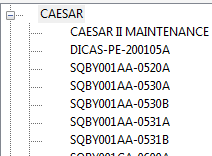
In the expand script I set the state image to by:

previous_image = TreeView_SetNodeStateImage('(L) TreeView0',new_node,2);


and in the dblclick script I try to togle it:

if TreeView_GetNodeStateImage('(L) TreeView0', node_ID) = 1 then
previous_image = TreeView_SetNodeStateImage('(L) TreeView0',node_ID,2);
{previous_image = TreeView_SetNodeStateImage('(L) TreeView0',node_ID,2);}
else
previous_image = TreeView_SetNodeStateImage('(L) TreeView0',node_ID,1);
{previous_image = TreeView_SetNodeStateImage('(L) TreeView0',node_ID,1);}
end if;

It has to be a step when I create my chunk file but I'm just not seeing it.

 I'm just using the steps decribed in http://support.microsoft.com/kb/894700 to create my cnk file.


*This post is locked for comments

I have the same question (0)
  • Suggested answer
    bwholl Profile Picture
    727 on at

    This one turned out to be pretty easy.  When the manuals suggest that the icons should be 16x16 pixels, it should say that they must be at least 16x16.  The pictures I tried to use were TV_CheckedCB and TV_EmptyCheckBox.  Turns out that these pictures are 14x14.  I used gimp to create new images that were 16x16 and now it works

  • xiaoyuandlg Profile Picture
    80 on at

    This is my first time to see such a problem on the TreeView control. I am also curious about how to make this fixed, but that seems to be impossible to me. I've read something about TreeView Nodes manipulation in C#, don't know if that kind of thing be useful to relief this situation or not.

  • bwholl Profile Picture
    727 on at

    I used GIMP(free Photoshop like tool) or MS Paint to create the images at 16x16 pixels.  I copied them into my paste buffer.  In Dexterity I created a new picture, gave it a name and pasted the image in.  I tend to stick to Dexterity for most everything but I do use VSTools for a couple of web services.

Under review

Thank you for your reply! To ensure a great experience for everyone, your content is awaiting approval by our Community Managers. Please check back later.

Helpful resources

Quick Links

Responsible AI policies

As AI tools become more common, we’re introducing a Responsible AI Use…

Neeraj Kumar – Community Spotlight

We are honored to recognize Neeraj Kumar as our Community Spotlight honoree for…

Leaderboard > 🔒一 Microsoft Dynamics GP (Archived)

#1
mtabor Profile Picture

mtabor 1

Last 30 days Overall leaderboard

Featured topics

Product updates

Dynamics 365 release plans



