web
You’re offline. This is a read only version of the page.
close
Skip to main content

Announcements

No record found.

News and Announcements icon
Community site session details

Community site session details

Session Id :
Microsoft Dynamics AX (Archived)

Default Location is not getting fetched while adding Item in BOM | AX 2012 R3 CU8

(0) ShareShare
ReportReport
Posted on by 162

HI Guys,

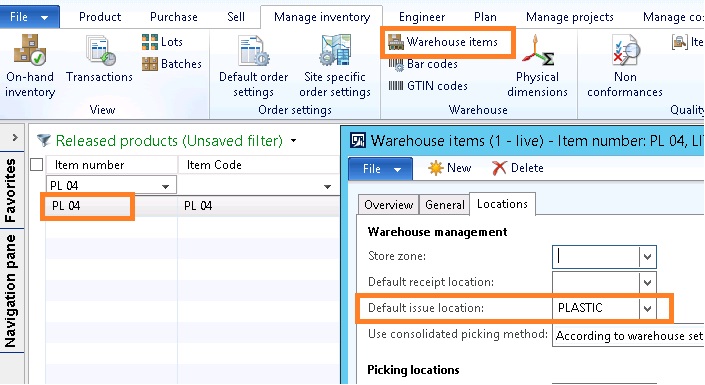
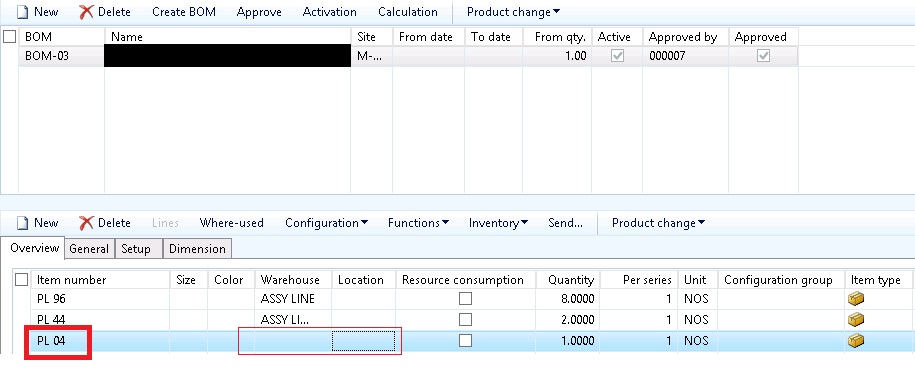
When I am creating a BOM for specific item, in the BOM lines I am adding related row material, I have set default issue location in "warehouse items"  (Manage Inventory | warehouse) for raw material. But still it's not showing while creating BOM.

can anyone please guide me whether this is correct way to add location ? or any other place i need to define location for raw material ?
5187.1.jpg

3750.2.jpg

*This post is locked for comments

I have the same question (0)
  • Suggested answer
    André Arnaud de Calavon Profile Picture
    305,150 Super User 2026 Season 1 on at

    Hi Kishor,

    A default issue location is not related to a BOM setup. It is used when performing warehouse operations. Are you sure you want to tie a BOM line with a specific warehouse location? Usually a site and sometimes a warehouse on the BOM line is sufficient for your setup. The warehouse operations should be able to point you where to pick the items from.

  • KishorJadhav Profile Picture
    162 on at

    Hi Andre,

    Thanks for reply and suggestion.

    But as per client requirement we need to setup location on Item so that by default it should show in BOM line.

  • Suggested answer
    Brandon Wiese Profile Picture
    17,790 on at

    When a consumption line is added to a Report as finished inventory journal, the site is inherited from the receipt line (which can be seen in your screen shot).  The warehouse on the consumption line can come from the item (as setup under Site specific order settings on the Released product for the specified site), or more likely is setup on the original BOM line itself.  Since the Default issue location is specific to a warehouse, if no warehouse is specified on the Released product or the BOM line, then no location will be defaulted.  In other words, make sure the consumption line has a warehouse first, before worrying about the location (and we can see in your screen shot that it does not inherit a warehouse from anywhere).

  • KishorJadhav Profile Picture
    162 on at

    Hi Brandon,

    Yes you are correct. I have setup warehouse and location in default order setting and site specific order setting.

    In my screenshot you can check for first two items warehouse is showing, but not location, whereas I have setup both warehouse and location in Item order setup.

    Waiting for solution. :)

  • Brandon Wiese Profile Picture
    17,790 on at

    Please post screenshots for the site specific order setup for the item, showing the default warehouse.

  • KishorJadhav Profile Picture
    162 on at

    Hi Brandon,

    Please check below screen shot.

    7128.3.JPG

  • Brandon Wiese Profile Picture
    17,790 on at

    Sorry, that screen shot shows "Warehouse items", and that record says "when warehouse STORE occurs, use default issue location of PLASTIC".

    Click the Site specific order settings button, and show us the record that says "when site X occurs, use default warehouse of STORE for Inventory"?

  • KishorJadhav Profile Picture
    162 on at

    6076.4.jpg

  • JeroenBoer Profile Picture
    on at

    Hi Kishor,

    did you already found a working solution for this problem?

    Looking formward to your respons.

    Thanks in advance

Under review

Thank you for your reply! To ensure a great experience for everyone, your content is awaiting approval by our Community Managers. Please check back later.

Helpful resources

Quick Links

Introducing the 2026 Season 1 community Super Users

Congratulations to our 2026 Super Stars!

Meet the Microsoft Dynamics 365 Contact Center Champions

We are thrilled to have these Champions in our Community!

Congratulations to the April Top 10 Community Leaders

These are the community rock stars!

Leaderboard > 🔒一 Microsoft Dynamics AX (Archived)

#1
CP04-islander Profile Picture

CP04-islander 24

#2
Michel ROY Profile Picture

Michel ROY 14

#3
Jagadabi Profile Picture

Jagadabi 6

Last 30 days Overall leaderboard

Featured topics

Product updates

Dynamics 365 release plans
