web
You’re offline. This is a read only version of the page.
close
Skip to main content

Notifications

Announcements

No record found.

Community site session details

Community site session details

Session Id :
Microsoft Dynamics CRM (Archived)

Exporting to Excel giving an error

(1) ShareShare
ReportReport
Posted on by

Hi Guys,

Im trying to export all of my leads to an excel but Im getting the attached error.
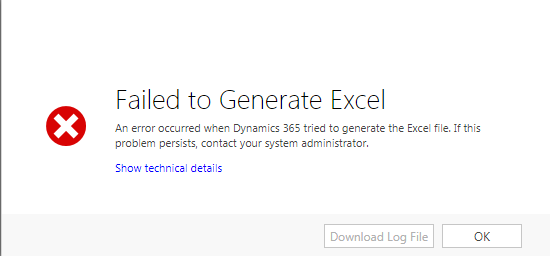
Error-downloading-excel.PNG

Having looked through some other posts I see that this error may be caused by duplicate display names (I have checked and havent seen a duplicate name) or it my be having the same columns on the export (again have checked and all seems to be ok here)

Could it be anything else that is causing this error?

*This post is locked for comments

I have the same question (0)
  • Verified answer
    Radu Chiribelea Profile Picture
    6,667 on at

    If you click on Show technical details, does that give you more information on the error?

  • Community Member Profile Picture
    on at

    Hi Radu, Thanks for the quick response. No, nothing shows when I click for more details:Error-downloading-excel-2.PNG

  • Community Member Profile Picture
    on at

    I am aso getting this issue and i have looked on you tube was advised of the duplication issue which i dont have so i am now back to square one and cannot export my report to excel !!! Help

  • Community Member Profile Picture
    on at

    I just get the above when i click on technical details also

  • Verified answer
    Daniel Wikell Profile Picture
    2,360 on at

    We got the same in one of our online environments and it seems to have appeared with the latest patch.

    The problem shows when you have a lookup column in the view that you are trying to export and at least one of the rows contain a lookup with no name. CRM displays these lookups as "(No Name)" but the name field(s) is in reality blank if you view the actual entity.  It seems that the Excel export fails to generate when dealing with these.

    This is likely a bug that MS will hopefully correct in an upcoming patch but in the meantime, you can work around the problem by either excluding those faulty rows in your query or by updating your entities that has no name and give them one.

  • Community Member Profile Picture
    on at

    I dont have faulty rows

  • Verified answer
    Daniel Wikell Profile Picture
    2,360 on at

    You do, but they are "faulty" because of the bug. Not faulty per se.

    I've seen reported that people had similar issues but with different type of columns (not just lookups). If the lookup scenario does not apply to the view you are trying to export from, try excluding columns one at a time from the view in order to locate which one is causing trouble in your particular case.

  • Community Member Profile Picture
    on at

    Thanks Daniel, I removed all columns bar the ones i needed (Lead name and email address as I need the email address to see who is already within my dynamics before I load a new batch of people) I was able to download the report this way meaning I can complete the checks. Clearly the error is with one of the other columns. thanks for your help.

  • Suggested answer
    gdas Profile Picture
    50,091 Moderator on at

    Hi ,

    Which version of Dynamics CRM you are using ?  Sometimes its happening for new roll up you also try to identify when the issue actually  started and what the changes has made in the environment.

    Is this happening for all entity or any specific entity ?

    Thanks

    Gotuam

  • Byron Dittberner Profile Picture
    235 on at

    I recently had an error like this, after selecting "Export to Excel" there seems to be no response. i found that this is caused when one or more field labels in your view have the same name. for example, let's say you are trying to export policy information and there is a main member and a spouse on the contact record, while both the main member and the spouse have the same field name called, "First Name". if the word "First Name" appears twice in the same view, the export to excel will fail. to resolve this issue, change the name of the second field to "Spouse First Name" then your file will export. I hope this helps your issue.

Under review

Thank you for your reply! To ensure a great experience for everyone, your content is awaiting approval by our Community Managers. Please check back later.

Helpful resources

Quick Links

Responsible AI policies

As AI tools become more common, we’re introducing a Responsible AI Use…

Neeraj Kumar – Community Spotlight

We are honored to recognize Neeraj Kumar as our Community Spotlight honoree for…

Leaderboard > 🔒一 Microsoft Dynamics CRM (Archived)

#1
SA-08121319-0 Profile Picture

SA-08121319-0 4

#1
Calum MacFarlane Profile Picture

Calum MacFarlane 4

#3
Alex Fun Wei Jie Profile Picture

Alex Fun Wei Jie 2

Last 30 days Overall leaderboard

Featured topics

Product updates

Dynamics 365 release plans



