web
You’re offline. This is a read only version of the page.
close
Skip to main content

Notifications

Announcements

No record found.

Community site session details

Community site session details

Session Id :
Microsoft Dynamics CRM (Archived)

Set Default value for "Regarding lookup" of Task record

(0) ShareShare
ReportReport
Posted on by

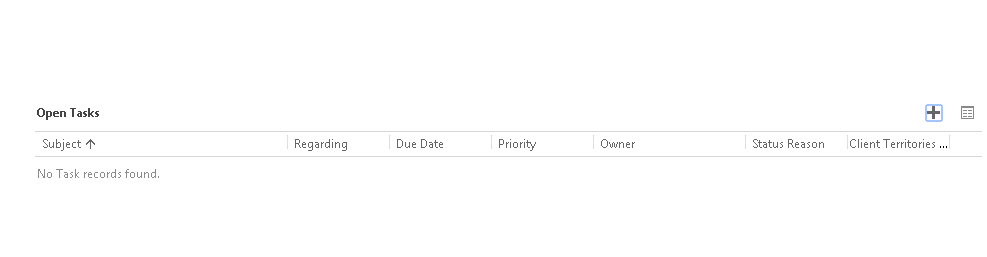
We have a sub-grid view of Task on Account.
6278.3.png

We want to create new task record by clicking the "+" button. It seems like Task entity doesn't support quick create form. So we are going to use the main form.
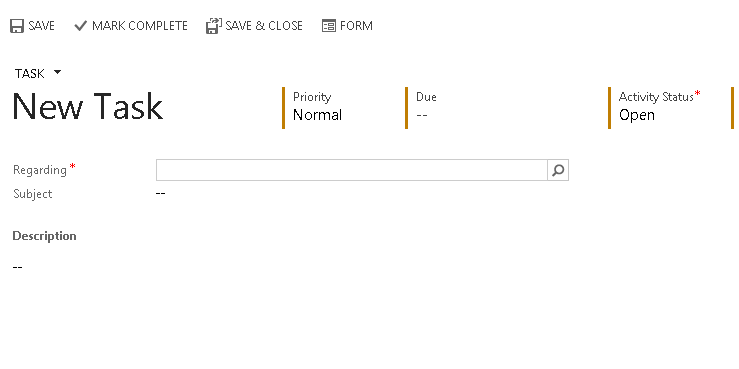
We'd like to prepopulate the Regarding field with the Account where we create the task.

I got into trouble here:

1. Is it possible to set regarding field? I read  on msdn :http://msdn.microsoft.com/en-us/library/gg334375.aspx

However, I did found some tutorial article on this.

2. It seems like "Xrm.Utility.openEntityForm("task", null, parameters); will work for my requirement.

var params = {
pId: referenced record id,
pType: referenced record type code,
pName: referenced record display name
};

Xrm.Utility.openEntityForm("task", null, params);

https://community.dynamics.com/crm/b/hardworkdays/archive/2013/01/10/ms-crm-2011-open-new-activity-form-with-regarding-field-prefilled.aspx

Does the names of the keys matters? Should they match the parameter names in the url?

How am I able to get the "referenced record id"?


*This post is locked for comments

I have the same question (0)
  • Verified answer
    Royal King Profile Picture
    27,686 on at

    This behaviour looks like a bug because when you have subgrid  create new button should pre-populate parent lookup value. This works fine when you click on Activities and click on new task it auto populates regarding field value. You should log this as a bug in microsoft connect site.

    Anyway here is the code to populate regarding field value based on the parent account.

    Just with javascript on the form onload of task entity you can prepopulate regardingid.

    When user clicks "+" button to create task in the subgrid , it opens create task window

    with following querystrings in  the url

    /main.aspx?etc=4212&extraqs=?_CreateFromId={9A76BA82-2C0F-E411-A4CE-9CB654946F5C}&_CreateFromType=1&etc=4212&histKey=796838752&newWindow=true&pagetype=entityrecord#522943729

    In the query string you have parent recordid as well as parent record type ( highlighted in the blue). In form load use the below script to set the regarding objectid value

    function setRegarding()
    {
    if(Xrm.Page.context.getQueryStringParameters()._CreateFromType !== null && Xrm.Page.context.getQueryStringParameters()._CreateFromType ==="1")
    {
    var accountId =Xrm.Page.context.getQueryStringParameters()._CreateFromId;

    var ClientUrl = Xrm.Page.context.getClientUrl()

    + "/XRMServices/2011/OrganizationData.svc"
    + "/AccountSet(guid'" + accountId + "')"
    +"?$select=Name,AccountNumber";
    //var URL = ClientUrl + oData_EndPoint + oData_EntityCollection + Query;

    //Asynchronous XMLHttpRequest to retrieve account record
    var req = new XMLHttpRequest();
    retrievedName = req.open("GET", encodeURI(ClientUrl), true);
    req.setRequestHeader("Accept", "application/json");
    req.setRequestHeader("Content-Type", "application/json; charset=utf-8");
    req.onreadystatechange =function () {
    //debugger;
    if (this.readyState == 4 /* complete */) {
    req.onreadystatechange = null; //avoids memory leaks
    if (this.status == 200) {
    //parse the response string as a JSON object into the successCallback method.
    var retrieved=JSON.parse(req.responseText).d;
    Xrm.Page.getAttribute("regardingobjectid").setValue( [{id: accountId , name: retrieved.Name, entityType: "account"}]);
    }
    else {
    errorCallback(accountId);
    }
    }
    };
    req.send();

    }

    }

  • Suggested answer
    Aileen Gusni Profile Picture
    44,524 on at

    Hi,

    Have you read these links:

    stackoverflow.com/.../task-regarding-field-not-populating-from-subgrid-in-crm-2013

    This is another post reported for the bug behavior

    And this is the code to autopopulate in crm, but crm 2011, you might try this code.

    community.dynamics.com/.../automatically-set-regarding-on-new-activities.aspx

    Hope it helps

    Thank you!

  • Jeff K Profile Picture
    25 on at

    For anyone else having this problem, I posted a pure JS solution to this problem here: stackoverflow.com/.../7920473

Under review

Thank you for your reply! To ensure a great experience for everyone, your content is awaiting approval by our Community Managers. Please check back later.

Helpful resources

Quick Links

Responsible AI policies

As AI tools become more common, we’re introducing a Responsible AI Use…

Neeraj Kumar – Community Spotlight

We are honored to recognize Neeraj Kumar as our Community Spotlight honoree for…

Leaderboard > 🔒一 Microsoft Dynamics CRM (Archived)

#1
SA-08121319-0 Profile Picture

SA-08121319-0 4

#1
Calum MacFarlane Profile Picture

Calum MacFarlane 4

#3
Alex Fun Wei Jie Profile Picture

Alex Fun Wei Jie 2

Last 30 days Overall leaderboard

Featured topics

Product updates

Dynamics 365 release plans



