web
You’re offline. This is a read only version of the page.
close
Skip to main content

Announcements

No record found.

News and Announcements icon
Community site session details

Community site session details

Session Id :
Microsoft Dynamics AX (Archived)

Setup ProjectGroup for Time and Material Project Type

(0) ShareShare
ReportReport
Posted on by 4,624

Hi All,

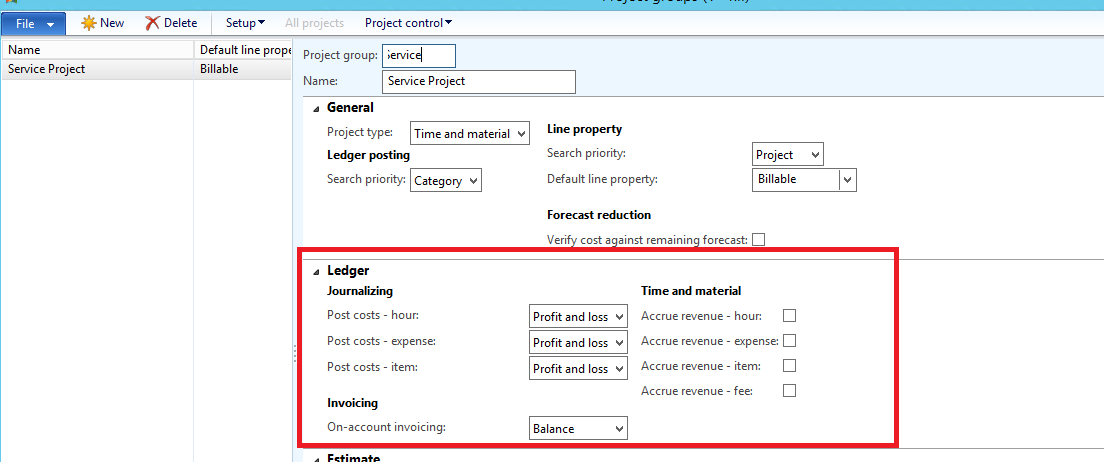
I am going to setup Project Group for Time & material Project Type but i don't understand the Ledger fast tab shown below:
ProjectGroup.PNG

can you please tell what is use of all these option and how to setup for time and material project type ?

Thanks

Regards

Visvash Walia

*This post is locked for comments

I have the same question (0)
  • Verified answer
    Ludwig Reinhard Profile Picture
    Microsoft Employee on at

    Hi Visvash Walia,

    What you setup above is a typical T&M project setup.

    That is, all costs are immediately recoded in the income statement.

    The same holds for the revenues.

    If you would have longer running projects that run over several periods (3, 4, 5, ... months) you could 'store' the costs in the balance sheet first but for short running T&M projects where you regularly create customer invoices this is not necessary and you can continue with the setup that you have.

    Best regards,

    Ludwig

  • Rohin Profile Picture
    4,624 on at

    Hi Ludwig,

    Thanks for reply.

    Okay if i have short running project (let say <1 month) , i can use same setup as screenshot shows.

    And if i have  long running project then screenshot will be :

    Project-group2.PNG

    what is use of this ?  what are those Accrue revenue (hours, expense, item ,fee ) option ? please explain as i don't have idea about accounting .

    Thank you!

  • Verified answer
    Ludwig Reinhard Profile Picture
    Microsoft Employee on at

    Hi Rohin,

    Here is a screenshot that illustrates what happens if you record costs from Jan-April an write a single invoice in May with the Profit and Loss setup:

    Figure1_2D00_139.png

    (blue = cost, red = Revenue)

    If you make use of accruals you will see something like this from a costing perspective

    Figure1_2D00_139.png

    (green = accruals)

    The advantage of making this setup is that you can track and compare cost and revenues in each period and get a detailed control of your Project.

    The Balance Setup results in the following:

    Figure1_2D00_140.png

    (Grey = Balance sheet Transactions)

    The disadvantage is that you do not have a control until you write your invoice.

    Does this answer your question?

    Best regards,

    Ludwig

  • Rohin Profile Picture
    4,624 on at

    Thank you so much Ludwig for such detail.

    I am satisfied with your answer.

    Regards

    Visvash Walia

Under review

Thank you for your reply! To ensure a great experience for everyone, your content is awaiting approval by our Community Managers. Please check back later.

Helpful resources

Quick Links

Introducing the 2026 Season 1 community Super Users

Congratulations to our 2026 Super Stars!

Meet the Microsoft Dynamics 365 Contact Center Champions

We are thrilled to have these Champions in our Community!

Congratulations to the April Top 10 Community Leaders

These are the community rock stars!

Leaderboard > 🔒一 Microsoft Dynamics AX (Archived)

#1
CP04-islander Profile Picture

CP04-islander 24

#2
Michel ROY Profile Picture

Michel ROY 14

#3
Jagadabi Profile Picture

Jagadabi 6

Last 30 days Overall leaderboard

Featured topics

Product updates

Dynamics 365 release plans
