web
You’re offline. This is a read only version of the page.
close
Skip to main content

Announcements

No record found.

News and Announcements icon
Community site session details

Community site session details

Session Id :
Customer experience | Sales, Customer Insights,...
Answered

Recurring Journey Stops Automatically

(0) ShareShare
ReportReport
Posted on by 15

Hello Team,

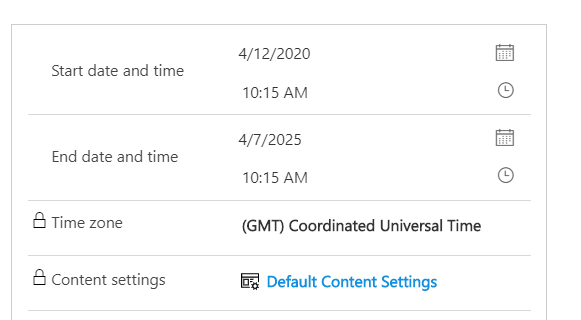
I have a recurring journey the start and end date is set as below -
pastedimage1588827465254v1.png

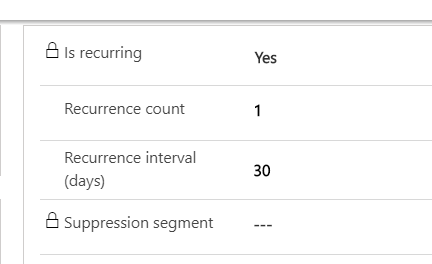
And the recurrence settings are below -
pastedimage1588827515805v2.png

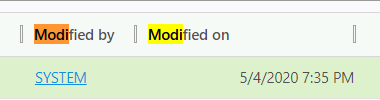
It was modified by the system on 4th May, since the auditing is not enabled.
pastedimage1588827775990v4.png

Does anyone have an idea why is it getting stopped automatically even though the end date is 2025 ?

Regards,

Vishal

I have the same question (0)
  • CU03040610-0 Profile Picture
    45 on at

    In this case you need to set recurrence count more than 1. Since, it is set as 1. Your journey will stop after 1 count.

  • Suggested answer
    Satish Tiwari - CRM Profile Picture
    Microsoft Employee on at

    Hello Vishal,

    As per article - docs.microsoft.com/.../customer-journeys-create-automated-campaigns

    Recurrence interval - number of days each recurrence should last.

    Recurrence count -  maximum number of recurrences each contact can experience.

    So, can you try to increase the number of recurrence count and check if it still stops ? You can create another recurring journey - just for testing purpose and select recurrence count more than 1 and recurrence interval maybe 1-2 days or even less than that so we can check the results faster.

    Let me know how it goes.

  • vtayade Profile Picture
    15 on at

    Thank you for your response Satish.

    My agenda is to send a newsletter every month once till 2025, so what should be the recurrence count and interval ?

  • vtayade Profile Picture
    15 on at

    Currently, I have kept the settings as below, I will update you with the results.

    pastedimage1589348824997v1.png

    However, if you could please let me know the suggested/recommended settings to send the newsletter once in a month till 2025 that would be really helpful.

    Thanks in advance.

  • Suggested answer
    Satish Tiwari - CRM Profile Picture
    Microsoft Employee on at

    This is setting that you can use to send newsletter once in a month for one year -

    pastedimage1589437499749v2.png

    And, for 5 years - you can select this settings and it will send emails once in every month for next 5 years -

    pastedimage1589437478611v1.png

  • vtayade Profile Picture
    15 on at

    Thank you very much for your response Satish.

  • CGI PROD Profile Picture
    10 on at

    Hi,

    What will happen if the newsletter subscriber, unsubscribe for the newsletter, and then after a year wants to subscribe again. Will it then be able to start the newsletter journey again?

Under review

Thank you for your reply! To ensure a great experience for everyone, your content is awaiting approval by our Community Managers. Please check back later.

Helpful resources

Quick Links

Introducing the 2026 Season 1 community Super Users

Congratulations to our 2026 Super Stars!

Congratulations to our 2025 Community Spotlights

Thanks to all of our 2025 Community Spotlight stars!

Leaderboard > Customer experience | Sales, Customer Insights, CRM

#1
ManoVerse Profile Picture

ManoVerse 151 Super User 2026 Season 1

#2
Jimmy Passeti Profile Picture

Jimmy Passeti 51 Most Valuable Professional

#3
NeerajPawar Profile Picture

NeerajPawar 42

Last 30 days Overall leaderboard

Product updates

Dynamics 365 release plans
