web
You’re offline. This is a read only version of the page.
close
Skip to main content

Notifications

Announcements

No record found.

Community site session details

Community site session details

Session Id :
Finance | Project Operations, Human Resources, ...
Answered

Call Center (Call Centre) Case Management

(0) ShareShare
ReportReport
Posted on by 65

Hi All,

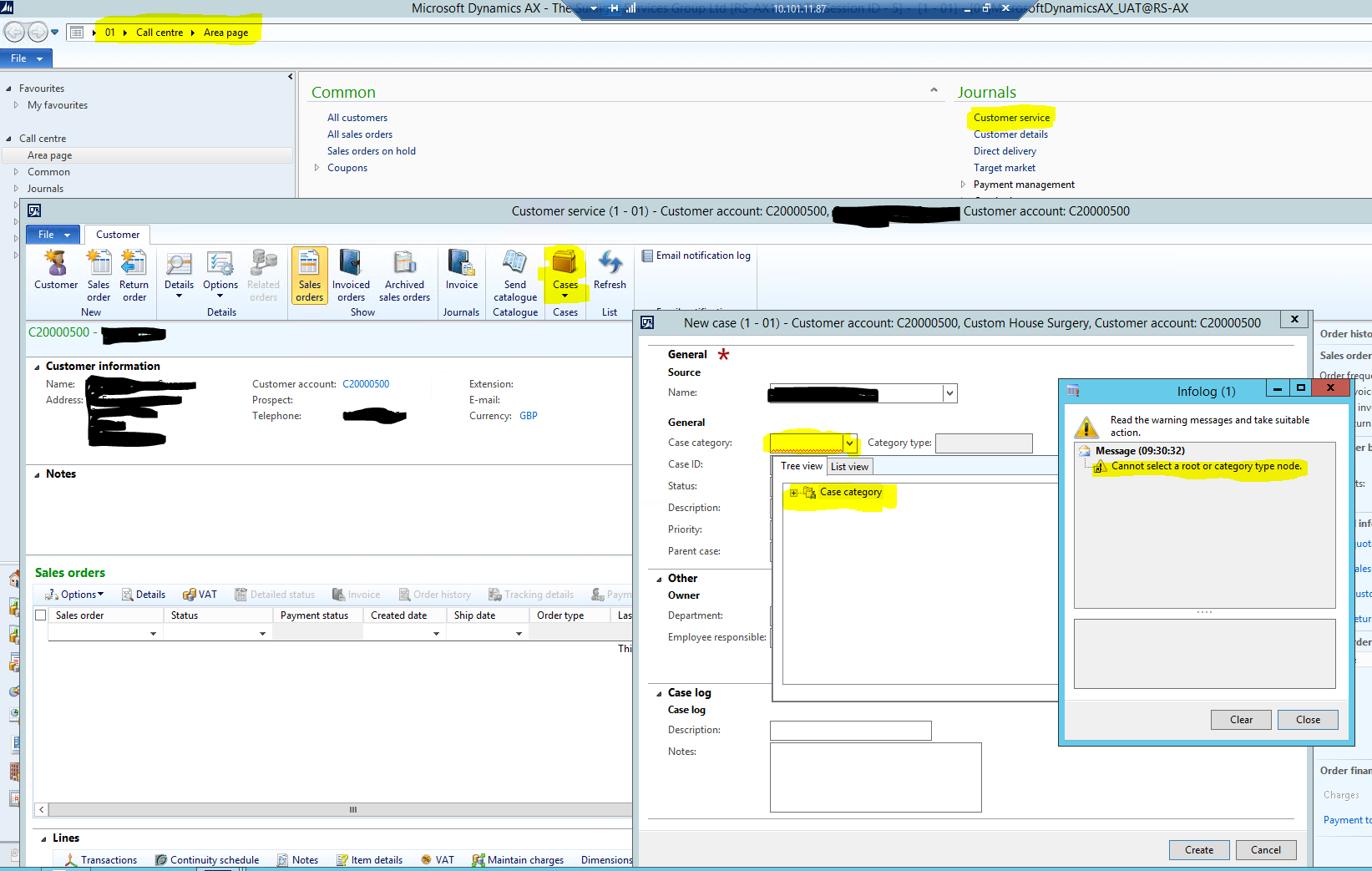
Trying to get our Customer Service team to use the Call Center module and in particular the 'Customer Service' form in journals.  Generally happy with it's use, however i'm struggling to get Case Management to work from within the form.

I have a Case Hierarchy set up for Sales (Customer complaint logging) which is accessible from all other areas of AX (Sales & Marketing, cust accounts, sales orders etc.), just not from within the Customer Service form.  Am i missing some configuration / security?

Screen shot below, just shows how i'm trying to get to cases and the error that is being thrown

Thanks

Mark
pastedimage1597309278289v1.png

I have the same question (0)
  • Suggested answer
    Ludwig Reinhard Profile Picture
    Microsoft Employee on at

    Hi,

    What categories do you have available under the main node? That is, if you click the + symbol do you see some categories you can select from?

    Best regards,

    Ludwig

  • Mark Bowden Profile Picture
    65 on at

    Hi Ludwig,

    There are no categories expanding when clicking the + symbol.  I get the error message as soon as I press the + symbol

    When i create a case from anywhere else in AX i can see the full SALES category hierarchy.

    Regards

    Mark

  • RP-27050721-0 Profile Picture
    on at

    Hi Mark,

    What is the AX version you are using?

    Thank you,

    Raluca

  • Mark Bowden Profile Picture
    65 on at

    Hi,

    We're running AX2012 R3 CU10

    Regards

    Mark

  • Suggested answer
    Ludwig Reinhard Profile Picture
    Microsoft Employee on at

    Hi Mark,

    I have not  found a bug / hotfix on LCS for this issue.

    Do you have a developer around who could possibly debug the issue?

    Best regards,

    Ludwig

  • Verified answer
    Mark Bowden Profile Picture
    65 on at

    Turns out there are two options when the 'Case' icon is selected.  Selecting 'New Case' throws the error mentioned above, but the other option 'view customer cases' will actually take you through to the case list for the customer and then you can create a new case from there.  

    This hasn't fixed the original issue, but is a workable solution for our customer service team

    Thanks for looking

    Regards

    Mark

Under review

Thank you for your reply! To ensure a great experience for everyone, your content is awaiting approval by our Community Managers. Please check back later.

Helpful resources

Quick Links

Responsible AI policies

As AI tools become more common, we’re introducing a Responsible AI Use…

Neeraj Kumar – Community Spotlight

We are honored to recognize Neeraj Kumar as our Community Spotlight honoree for…

Leaderboard > Finance | Project Operations, Human Resources, AX, GP, SL

#1
Martin Dráb Profile Picture

Martin Dráb 663 Most Valuable Professional

#2
André Arnaud de Calavon Profile Picture

André Arnaud de Cal... 540 Super User 2025 Season 2

#3
Sohaib Cheema Profile Picture

Sohaib Cheema 348 User Group Leader

Last 30 days Overall leaderboard

Product updates

Dynamics 365 release plans
