web
You’re offline. This is a read only version of the page.
close
Skip to main content

Announcements

No record found.

News and Announcements icon
Community site session details

Community site session details

Session Id :
Microsoft Dynamics AX (Archived)

Operation no. on BOM lines are not displayed in the drop down

(0) ShareShare
ReportReport
Posted on by

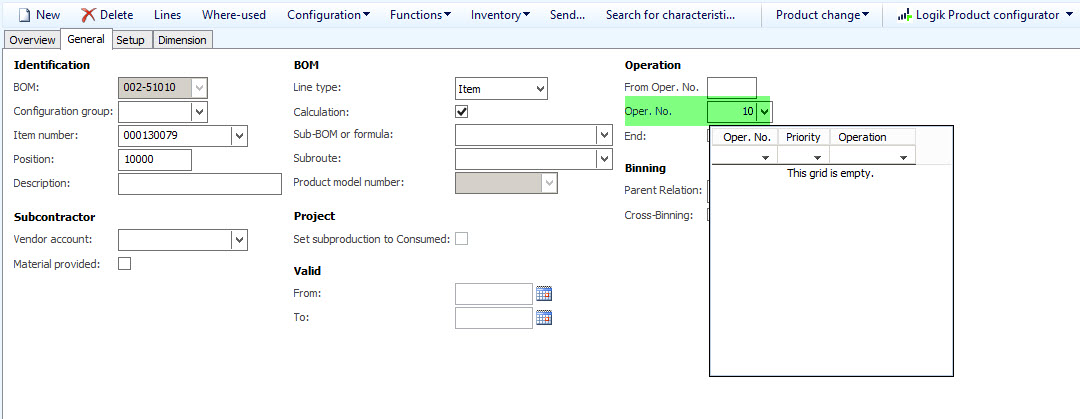
OPnoBOMLine.jpg 

Hello!

On the BOM lines under the tab "General" the operation no. can (should) be put in to which operation the material should be provided (consumed). It is possible to put in the operation no. and it works in production. However, the drop down doesnt display the operations that are possible to choose. The route version (and BOM Version) is approved and active..

Any ideas on that?

*This post is locked for comments

I have the same question (0)
  • Community Member Profile Picture
    on at

    Hi Adis,

    It will only display available operation numbers what you have allocated to your approved route version.

    Regarding the production order BOM - you can override approved route version operations by adding additional ones to your production order.

    Regards,

    V

  • Community Member Profile Picture
    on at

    Hi!

    Yeah i know...but even if i have a route appoved and active, it doesnt show it..

  • Suggested answer
    Nagendra Varma K Profile Picture
    on at

    Hi Adis,

    If the BOM\Formula Route is approve & activated than you can link the operation in the BOM lines. Is the route in approved and activated? can you share screenshot of the route ?

  • Suggested answer
    Nagendra Varma K Profile Picture
    on at

    HI

    Check the To date on the route should be not effective date. change the date to current date or future date you should be able to see

  • Community Member Profile Picture
    on at

    28_2D00_07_2D00_2017-12_2D00_04_2D00_07.jpg

  • Community Member Profile Picture
    on at

    In the meantime i figured out this needs to be some kind of setup...in another company it does work :). I am just not sure if that setup is available in standard AX or if something was messed up through customization...

    By the way: Thanks for the advices!

Under review

Thank you for your reply! To ensure a great experience for everyone, your content is awaiting approval by our Community Managers. Please check back later.

Helpful resources

Quick Links

Introducing the 2026 Season 1 community Super Users

Congratulations to our 2026 Super Stars!

Meet the Microsoft Dynamics 365 Contact Center Champions

We are thrilled to have these Champions in our Community!

Congratulations to the March Top 10 Community Leaders

These are the community rock stars!

Leaderboard > 🔒一 Microsoft Dynamics AX (Archived)

#1
Basit Profile Picture

Basit 1

#1
GL-01081504-0 Profile Picture

GL-01081504-0 1

#1
Roya Profile Picture

Roya 1

Last 30 days Overall leaderboard

Featured topics

Product updates

Dynamics 365 release plans
