Hello everyone,
We have CRM2016 on premise, sql server 2016, Server is 2012. Whenever trying to register new assembly using Registration tool I am getting error “The caller was not authenticated by the service.” I am entering all data as shown in screenshot.
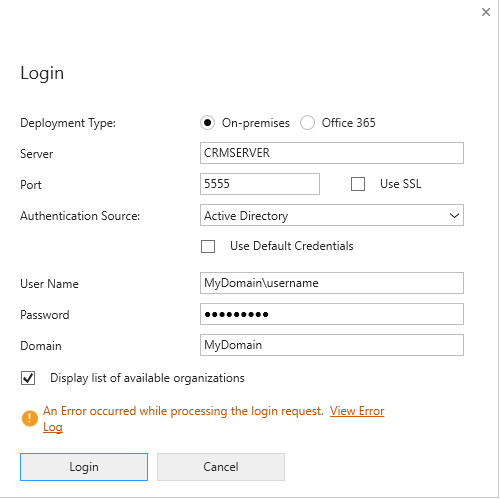
And here is the full error details:
Source : mscorlib
Method : HandleReturnMessage
Date : 4/29/2019
Time : 7:27:28 AM
Error : The caller was not authenticated by the service.
Stack Trace : Server stack trace:
at System.ServiceModel.Security.IssuanceTokenProviderBase`1.DoNegotiation(TimeSpan timeout)
at System.ServiceModel.Security.SspiNegotiationTokenProvider.OnOpen(TimeSpan timeout)
at System.ServiceModel.Security.WrapperSecurityCommunicationObject.OnOpen(TimeSpan timeout)
at System.ServiceModel.Channels.CommunicationObject.Open(TimeSpan timeout)
at System.ServiceModel.Security.CommunicationObjectSecurityTokenProvider.Open(TimeSpan timeout)
at System.ServiceModel.Security.SymmetricSecurityProtocol.OnOpen(TimeSpan timeout)
at System.ServiceModel.Security.WrapperSecurityCommunicationObject.OnOpen(TimeSpan timeout)
at System.ServiceModel.Channels.CommunicationObject.Open(TimeSpan timeout)
at System.ServiceModel.Channels.SecurityChannelFactory`1.ClientSecurityChannel`1.OnOpen(TimeSpan timeout)
at System.ServiceModel.Channels.CommunicationObject.Open(TimeSpan timeout)
at System.ServiceModel.Channels.ServiceChannel.OnOpen(TimeSpan timeout)
at System.ServiceModel.Channels.CommunicationObject.Open(TimeSpan timeout)
at System.ServiceModel.Channels.ServiceChannel.CallOpenOnce.System.ServiceModel.Channels.ServiceChannel.ICallOnce.Call(ServiceChannel channel, TimeSpan timeout)
at System.ServiceModel.Channels.ServiceChannel.CallOnceManager.CallOnce(TimeSpan timeout, CallOnceManager cascade)
at System.ServiceModel.Channels.ServiceChannel.EnsureOpened(TimeSpan timeout)
at System.ServiceModel.Channels.ServiceChannel.Call(String action, Boolean oneway, ProxyOperationRuntime operation, Object[] ins, Object[] outs, TimeSpan timeout)
at System.ServiceModel.Channels.ServiceChannelProxy.InvokeService(IMethodCallMessage methodCall, ProxyOperationRuntime operation)
at System.ServiceModel.Channels.ServiceChannelProxy.Invoke(IMessage message)
Exception rethrown at [0]:
at System.Runtime.Remoting.Proxies.RealProxy.HandleReturnMessage(IMessage reqMsg, IMessage retMsg)
at System.Runtime.Remoting.Proxies.RealProxy.PrivateInvoke(MessageData& msgData, Int32 type)
at Microsoft.Xrm.Sdk.Discovery.IDiscoveryService.Execute(DiscoveryRequest request)
at Microsoft.Xrm.Sdk.Client.DiscoveryServiceProxy.Execute(DiscoveryRequest request)
at Microsoft.Xrm.Tooling.Connector.CrmWebSvc.DiscoverOrganizations(Uri discoveryServiceUri, Uri homeRealmUri, ClientCredentials clientCredentials, ClientCredentials deviceCredentials)
at Microsoft.Xrm.Tooling.CrmConnectControl.CrmConnectionManager.ValidateServerConnection(CrmOrgByServer selectedOrg)
======================================================================================================================
Inner Exception Level 1 :
Source : System.ServiceModel
Method : ThrowIfNegotiationFault
Date : 4/29/2019
Time : 7:27:28 AM
Error : The request for security token could not be satisfied because authentication failed.
Stack Trace : at System.ServiceModel.Security.SecurityUtils.ThrowIfNegotiationFault(Message message, EndpointAddress target)
at System.ServiceModel.Security.SspiNegotiationTokenProvider.GetNextOutgoingMessageBody(Message incomingMessage, SspiNegotiationTokenProviderState sspiState)
======================================================================================
Can someone help me?
Regards,
Hani







