web
You’re offline. This is a read only version of the page.
close
Skip to main content

Announcements

No record found.

News and Announcements icon
Community site session details

Community site session details

Session Id :
Small and medium business | Business Central, N...
Suggested Answer

Customize Report in Word

(0) ShareShare
ReportReport
Posted on by

Hi Community,

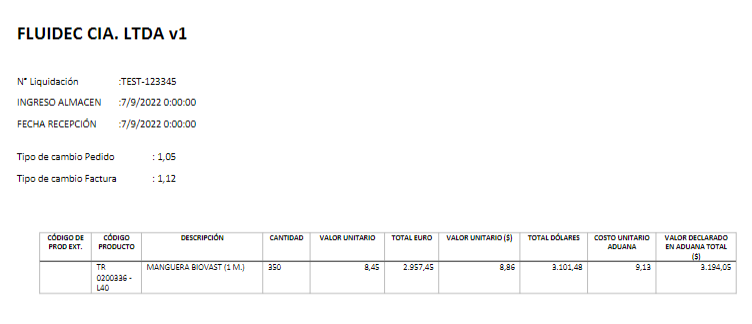
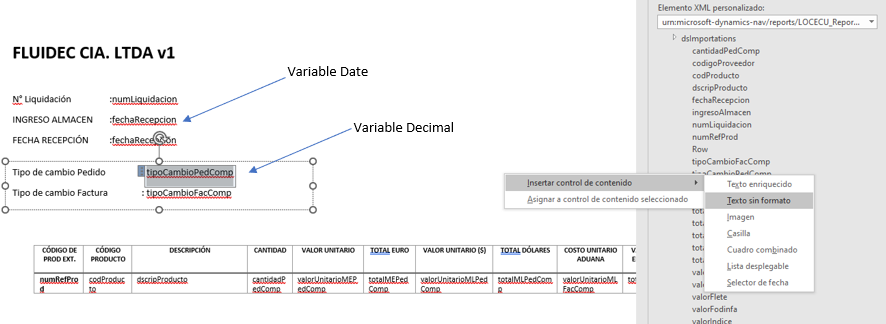
I would appreciate information on how to solve this problem. My problem is how to indicate the number of decimals for a variable that comes from business central, by default it shows me 2 decimals in word, however I need 5 (in business central it handles even more decimals, but I need 5). And on the other hand also the date format since I can customize it. Attached image:

As viewed in Business Central
pastedimage1662673695639v1.png

How do I add the variable in Word to the Report
pastedimage1662674580246v5.png

I have the same question (0)
  • Suggested answer
    IB-29041624-0 Profile Picture
    1,177 Moderator on at

    If you want to control the number of decimals that needs to be defined in the report it self, you can not change that behavior in the report layout.

    In the report you have to use the decimal place property for the fields you want to control.

    docs.microsoft.com/.../devenv-decimalplaces-property

  • Suggested answer
    YUN ZHU Profile Picture
    100,212 Super User 2026 Season 1 on at

    Hi,  Inge is right. But there are additional factors to keep in mind.

    You also need to check the following setup in General ledger Setup.

    pastedimage1662702327115v1.png

    If you are using foreign currency, you will also need to confirm the currency settings.

    pastedimage1662702364218v2.png

    Hope this helps as well.

    Thanks.

    ZHU

Under review

Thank you for your reply! To ensure a great experience for everyone, your content is awaiting approval by our Community Managers. Please check back later.

Helpful resources

Quick Links

Introducing the 2026 Season 1 community Super Users

Congratulations to our 2026 Super Stars!

Meet the Microsoft Dynamics 365 Contact Center Champions

We are thrilled to have these Champions in our Community!

Congratulations to the April Top 10 Community Leaders

These are the community rock stars!

Leaderboard > Small and medium business | Business Central, NAV, RMS

#1
OussamaSabbouh Profile Picture

OussamaSabbouh 2,012 Super User 2026 Season 1

#2
YUN ZHU Profile Picture

YUN ZHU 986 Super User 2026 Season 1

#3
Teagen Boll Profile Picture

Teagen Boll 659 Super User 2026 Season 1

Last 30 days Overall leaderboard

Featured topics

Product updates

Dynamics 365 release plans
