web
You’re offline. This is a read only version of the page.
close
Skip to main content

Notifications

Announcements

No record found.

Community site session details

Community site session details

Session Id :
Supply chain | Supply Chain Management, Commerce
Suggested Answer

Purchase order approval workflow (PurchTableTemplate) - how to disable the workflow submit dialog?

(0) ShareShare
ReportReport
Posted on by 1,650

Hello,

we are using the standard Microsoft puchase order approval workflow (PurchTableTemplate). My requirement is to turn of clicking two times on a "Submit" button when starting a purchase order approval workflow. Here is the current behaviour:

First the user submits the workflow in the purchase order form:
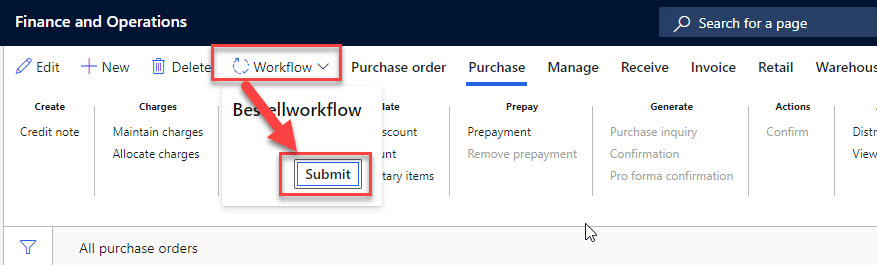
7607.PurchWorkflow01.jpg

After this automatically the "submit dialog" opens with the possibility to enter a comment and the user again has to close this with clicking the second time on a "submit" button:

8054.PurchWorkflow02.jpg

Is there a possibility how I can turn of / get rid of the second dialog with the comment (because our customer don't needs the comment)?

Thanks in advance for any hint.

Sebastian

I have the same question (0)
  • Suggested answer
    Mohit Rampal Profile Picture
    12,565 Moderator on at

    Hi Sebastian, I think its not controlled by workflow configuration, so customization would be required. You can add breakpoint on init method of WorkflowWorkItemActionDialog form and debug to get more details.

    community.dynamics.com/.../x-how-to-get-workflow-submit-comments-mandatory-in-d365fo

  • Sebastian Aurand Profile Picture
    1,650 on at

    Thanks for the answer. I debugged the PurchTableWorkflow class which calls the dialog:

    PurchWorkflow03.jpg

    How could I achieve via code extension that the dialog does not open but the workflow is started?

    Sebastian

  • Suggested answer
    Mohit Rampal Profile Picture
    12,565 Moderator on at

    Hi Sebastian, One way is to create extension class and bypass standard condition. However, please note that its not recommended approach by Microsoft as any future updates on that method will be missing on your extended method and you have to manually copy it. (I tried re-factoring standard code and tested so not sure if it will work)

        public void  submit()
        {
            PurchTable purchTableLocal = purchTable; //mapping table buffer
            WorkflowSubmitDialog            workflowSubmitDialog;
            purchTable = null;
            
            next submit();
            purchTable = purchTableLocal;
    
            if (purchTable != null)
            {
                // Tax is needed to be calculated first or else the Accounting Distribution allocation factor will not be calculated correctly.
                PurchTotals::newPurchTable(purchTable).calc();
                  
                if (this.canSubmit(purchTable))
                {
                    purchTable.submitToWorkflow(workFlowTypeStr(PurchTableTemplate), workflowSubmitDialog.parmWorkflowComment(), false);
                }
            }
        }

Under review

Thank you for your reply! To ensure a great experience for everyone, your content is awaiting approval by our Community Managers. Please check back later.

Helpful resources

Quick Links

Responsible AI policies

As AI tools become more common, we’re introducing a Responsible AI Use…

Neeraj Kumar – Community Spotlight

We are honored to recognize Neeraj Kumar as our Community Spotlight honoree for…

Leaderboard > Supply chain | Supply Chain Management, Commerce

#1
Siv Sagar Profile Picture

Siv Sagar 266 Super User 2025 Season 2

#2
Laurens vd Tang Profile Picture

Laurens vd Tang 213 Super User 2025 Season 2

#3
André Arnaud de Calavon Profile Picture

André Arnaud de Cal... 140 Super User 2025 Season 2

Last 30 days Overall leaderboard

Featured topics

Product updates

Dynamics 365 release plans
