web
You’re offline. This is a read only version of the page.
close
Skip to main content

Notifications

Announcements

Community site session details

Community site session details

Session Id :
Microsoft Dynamics AX (Archived)

Limit maximum length of quantity

(0) ShareShare
ReportReport
Posted on by 125

Hi experts,

some body tell me how to restrict Qty field till 9999 in the override method of field.The Qty field is coming in a forms grid.and its EDT is SalesOrderedQty. I dont want to handle it through EDT because it would disturb already entered values.Currently maximum range is in attached screen shot,it is accepting 15 digits before decimal point,i want just 4 digits before decimal point.
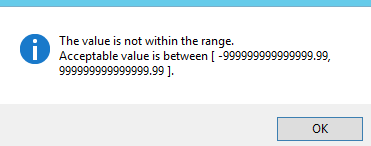
85441.Capture.PNG

*This post is locked for comments

I have the same question (0)
  • Suggested answer
    nmaenpaa Profile Picture
    101,166 Moderator on at

    You can use event handler or Chain of Command in the validateField and/or validateWrite method of the underlying table (or form data source, depending on your requirement).

  • Faran Baig Profile Picture
    125 on at

    No Crispin,

    I have my custom form and in data source a custom table,i dont know how set it in code,what will be the code,i want it on form,may be code should be written in field method or form data source mehtod.Please Guide me.

  • Faran Baig Profile Picture
    125 on at

    Hi Nikolaos,

    but how to set it in code?What will be the syntax?

  • Verified answer
    nmaenpaa Profile Picture
    101,166 Moderator on at

    In your form, expand Data sources - your data source - your field. In Methods, right click - Override method - validate.

    Add your logic in the validate method and return true or false depending on the data in the field.

    public boolean validate()
    {
        boolean ret = true;
        if (myTable.myField > 9999)
        {
            ret = checkFailed("Max value is 9999.");
        }
        return ret;
    }


  • Suggested answer
    nmaenpaa Profile Picture
    101,166 Moderator on at

    But are you sure you want to validate it on the form instead of in the table. Now anyone who inserts data from other place than this form (Excel, data integrations, other form, x++ code) can insert values that are larger than 9999.

  • Faran Baig Profile Picture
    125 on at

    Yes,currently i want it to validate it in form.

  • Faran Baig Profile Picture
    125 on at

    Thanks Nikolaos,i got my problem solved.

Under review

Thank you for your reply! To ensure a great experience for everyone, your content is awaiting approval by our Community Managers. Please check back later.

Helpful resources

News and Announcements

Season of Giving Solutions is Here!

Quick Links

Responsible AI policies

As AI tools become more common, we’re introducing a Responsible AI Use…

Neeraj Kumar – Community Spotlight

We are honored to recognize Neeraj Kumar as our Community Spotlight honoree for…

Leaderboard > 🔒一 Microsoft Dynamics AX (Archived)

#1
TAHER Mehdi Profile Picture

TAHER Mehdi 3

#2
Nakul Profile Picture

Nakul 2

#2
Mea_ Profile Picture

Mea_ 2

Last 30 days Overall leaderboard

Featured topics

Product updates

Dynamics 365 release plans



