web
You’re offline. This is a read only version of the page.
close
Skip to main content

Notifications

Announcements

No record found.

Community site session details

Community site session details

Session Id :
Microsoft Dynamics CRM (Archived)

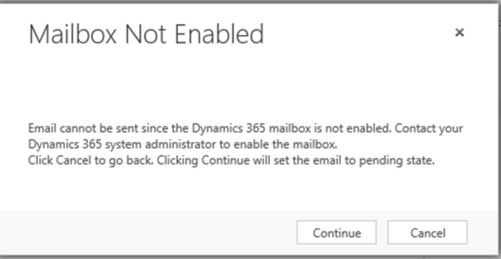
Mailbox Not Enabled error message using MS Dynamics 365 for Outlook

(0) ShareShare
ReportReport
Posted on by 5

I am getting this error when sending email from within CRM 365 web front-end.  Their Mailbox is configured to only use MS Dynamics 365 Outlook for both Incoming and Outgoing Email. I have clicked the "Test & Enable Mailbox" button and "Approve Email" and the Status always stays in "Not Run".   After clicking "Continue" on error message, the email does get Sent using Outlook, but is there a setting in Outlook or CRM 365 to fix this error message pop-up?

pastedimage1568400119001v2.png

pastedimage1568400172957v3.png

pastedimage1568400343800v4.png

*This post is locked for comments

I have the same question (0)
  • Suggested answer
    Arun Vinoth Profile Picture
    11,615 Moderator on at

    You followed all the steps, except one. Thats why the status is "Not Run".

    Reach out to your O365 Global Administrator to approve the mailbox, then all set.

  • Suggested answer
    NODAL Profile Picture
    860 on at

    Hi Aaron,

    Select server profile inn mailbox and then click "test and enable" in milbox,

    You can check alert section in mailbox for more details.

    Regards,

    Ketan

Under review

Thank you for your reply! To ensure a great experience for everyone, your content is awaiting approval by our Community Managers. Please check back later.

Helpful resources

Quick Links

Responsible AI policies

As AI tools become more common, we’re introducing a Responsible AI Use…

Neeraj Kumar – Community Spotlight

We are honored to recognize Neeraj Kumar as our Community Spotlight honoree for…

Leaderboard > 🔒一 Microsoft Dynamics CRM (Archived)

#1
SA-08121319-0 Profile Picture

SA-08121319-0 4

#1
Calum MacFarlane Profile Picture

Calum MacFarlane 4

#3
Alex Fun Wei Jie Profile Picture

Alex Fun Wei Jie 2

Last 30 days Overall leaderboard

Featured topics

Product updates

Dynamics 365 release plans

