web
You’re offline. This is a read only version of the page.
close
Skip to main content

Announcements

No record found.

News and Announcements icon
Community site session details

Community site session details

Session Id :
Microsoft Dynamics AX (Archived)

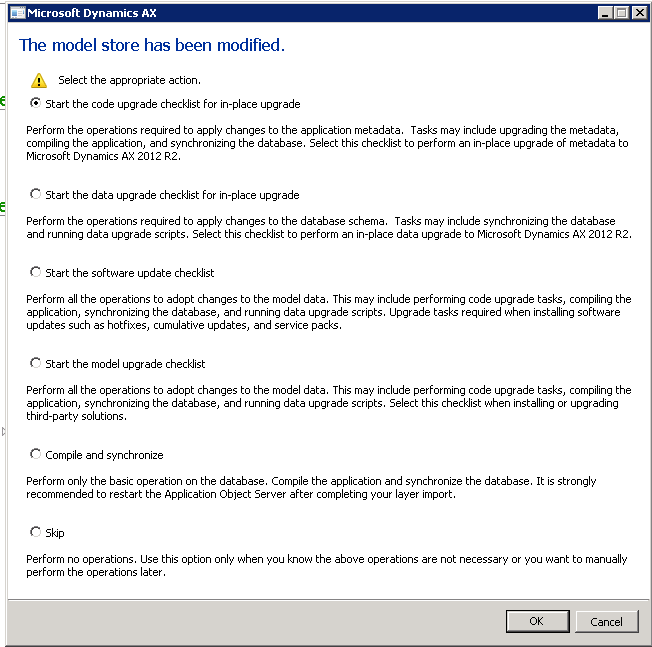
The model store has been modified

(0) ShareShare
ReportReport
Posted on by 175

Hi ,

Can anyone please give the solution?


I have installed SecurityDevTool in AX 2012 R2 and I restarted AOS also.  I selected "Start the model upgrade checklist" in the form to complete the checklist process and finished all the steps successfully.


But still I'm getting the same form when I open ax client though I selected skip option also.

Can anyone suggest what would be the solution. 


*This post is locked for comments

I have the same question (0)
  • Anuradha Pandrangi Profile Picture
    260 on at

    Hi Siva Mohan,

    Select Compile and Sync and click Ok (this will take min of 3 hours). Once it is done then do Full CIL.

    Thanks,

    Anu

  • Siva Mohan Profile Picture
    175 on at

    Hi Anu,

    Thanks for your reply.

    I already completed this. Ok, I'll do again and let you know the status.

  • sshaheen Profile Picture
    127 on at

    I am experiencing the same issue after installing CU6 on AX 2012 R2. I can't get the checklist window to stop opening.

  • John Lindsay Profile Picture
    110 on at

    Try AXUTIL set /noinstallmode

  • Andy Adamak Profile Picture
    4,074 on at

    Having this issue after going to R2 as well..

  • Suggested answer
    sshaheen Profile Picture
    127 on at

    I got mine to go away after running all of the items in the Software Update Checklist.

  • Suggested answer
    Volker Breitkopf Profile Picture
    Microsoft Employee on at

    You might be facing the same issue described and suggestedly answered here:

    community.dynamics.com/.../219016.aspx

  • Andy Adamak Profile Picture
    4,074 on at

    I was able to resolve this issue with help in this forum:

    community.dynamics.com/.../224887.aspx

    Basically, make/run a new job that is one line of code:

    SysCheckList_Update::finalizeMinorUpgrade();

Under review

Thank you for your reply! To ensure a great experience for everyone, your content is awaiting approval by our Community Managers. Please check back later.

Helpful resources

Quick Links

Introducing the 2026 Season 1 community Super Users

Congratulations to our 2026 Super Stars!

Meet the Microsoft Dynamics 365 Contact Center Champions

We are thrilled to have these Champions in our Community!

Congratulations to the April Top 10 Community Leaders

These are the community rock stars!

Leaderboard > 🔒一 Microsoft Dynamics AX (Archived)

#1
CP04-islander Profile Picture

CP04-islander 24

#2
Michel ROY Profile Picture

Michel ROY 14

#3
Jagadabi Profile Picture

Jagadabi 6

Last 30 days Overall leaderboard

Featured topics

Product updates

Dynamics 365 release plans
