web
You’re offline. This is a read only version of the page.
close
Skip to main content

Announcements

No record found.

News and Announcements icon
Community site session details

Community site session details

Session Id :
Microsoft Dynamics AX (Archived)

How to select value from combo box to textbox

(0) ShareShare
ReportReport
Posted on by 3,805

In form, I have combo box "List Milestone" and "Percent (%)"
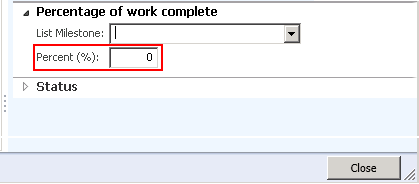
If I click combo box, show "Name" and "Percent".

Example :

if I select one Name, so I get value for Percent in text "Percent (%)".
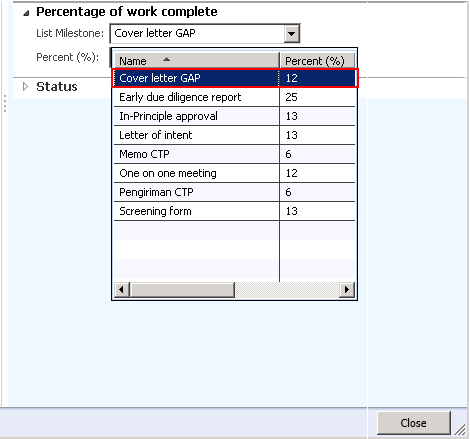
Please, help me.

Thank You.

*This post is locked for comments

I have the same question (0)
  • Suggested answer
    Ivan (Vanya) Kashperuk Profile Picture
    Microsoft Employee on at

    Are these fields coming from a data source? If yes, you should look into the modifiedField() method that you can override on the table or on the datasource on the form

    If the fields are unbound (not coming from a table in DB), you can override the modified() method on the combobox control, and retrieve the percent value based on the name.

  • fajar Profile Picture
    3,805 on at

    The field coming from method Lookup in another table.

    Can you write the method sample for modified() or modifiedField().

    Please..

  • Ivan (Vanya) Kashperuk Profile Picture
    Microsoft Employee on at

    Here's an example of how the method would look if overridden on a new table that has 2 fields (ItemId and Field2):

    public void modifiedFieldValue(FieldName _fieldName, int _arrayIndex = 1)

    {

       super(_fieldName, _arrayIndex);

       switch (_fieldName)

       {

           case fieldStr(Table1, ItemId):

               if (this.ItemId)

               {

                   this.Field2 = InventTable::find(this.ItemId).grossVolume();

               }

               // This is optional, will immediately show the updated value on the form (otherwise, you need to tab off the field).

               //if (this.dataSource())

               //{

               //     this.dataSource().refresh();

               //}

               break;

       }

    }

  • fajar Profile Picture
    3,805 on at

    Thanks Ivan.. I'm newbie.. so I confused.

    I will explain...

    I have table "PII_PercentageTmp" with field "Name" and "Percent".

    4848.a.png

    And in Table "smmActivities", I create 2 field "Name" and "Percent".

    And in form Hierarchy, in design, I create TabPage "Percentage of work Complete". I drag 2 field from smmActivities datasource.

    Field "Name" and "Percent".

    In field "Name", I create method Lookup for show data "Name" and "Percent" from table "PII_PercentageTmp".

    2816.b.png

    And this code for Lookup.

    public void lookup()
    {
        SysTableLookup          sysTableLookup = SysTableLookup::newParameters(tableNum(PII_PercentageTmp),this);

        Query                   query = new Query();
        QueryBuildDataSource    queryBuildDataSource = query.addDataSource(tableNum(PII_PercentageTmp));
        sysTableLookup.addLookupfield(fieldNum(PII_PercentageTmp, PII_Name));
        sysTableLookup.addLookupfield(fieldNum(PII_PercentageTmp, PII_Percent));

        sysTableLookup.parmQuery(query);
        sysTableLookup.performFormLookup();

    }

    So, where I create the methods modified().

    And, do you write that methods full?

    Thank Ivan..

  • Verified answer
    Ivan (Vanya) Kashperuk Profile Picture
    Microsoft Employee on at

    Override the modifiedFieldValue method on smmActivities table

    public void modifiedFieldValue(FieldName _fieldName, int _arrayIndex = 1)

    {

      super(_fieldName, _arrayIndex);

      switch (_fieldName)

      {

          case fieldStr(SmmActivities, Name):

              if (this.Name)

              {

    // This assumes you have a find method on the PII table, that searches by name.

                  this.Percent = PII_PercentageTmp::find(this.Name).PII_Percent;

              }

              // This is optional, will immediately show the updated value on the form (otherwise, you need to tab off the field).

              //if (this.dataSource())

              //{

              //     this.dataSource().refresh();

              //}

              break;

      }

    }

  • fajar Profile Picture
    3,805 on at

    Thanks Ivan..

    i get Error in "this.Percent = PII_PercentageTmp::find(this.Name).PII_Percent;"

    Table PII_PercentageTmp not have class methods find.

    " Find is not a class method "

    What should i do Ivan?

    Thanks..

  • Suggested answer
    Ivan (Vanya) Kashperuk Profile Picture
    Microsoft Employee on at

    Like I wrote in the above example as a comment, you need to create a method "find" on the PII_PercentageTmp table, that should look similar to any other find method on the other tables in AOT, and should search the record by name.

  • fajar Profile Picture
    3,805 on at

    This issue solved..

    Thanks very much Kashperuk Ivan(Vanya)..

Under review

Thank you for your reply! To ensure a great experience for everyone, your content is awaiting approval by our Community Managers. Please check back later.

Helpful resources

Quick Links

Introducing the 2026 Season 1 community Super Users

Congratulations to our 2026 Super Stars!

Meet the Microsoft Dynamics 365 Contact Center Champions

We are thrilled to have these Champions in our Community!

Congratulations to the April Top 10 Community Leaders

These are the community rock stars!

Leaderboard > 🔒一 Microsoft Dynamics AX (Archived)

#1
CP04-islander Profile Picture

CP04-islander 39

#2
Michel ROY Profile Picture

Michel ROY 14

#3
imran ul haq Profile Picture

imran ul haq 8

Last 30 days Overall leaderboard

Featured topics

Product updates

Dynamics 365 release plans
