web
You’re offline. This is a read only version of the page.
close
Skip to main content

Notifications

Announcements

No record found.

Community site session details

Community site session details

Session Id :
Small and medium business | Business Central, N...
Suggested Answer

Allow Posting From & To dates in general journal template

(0) ShareShare
ReportReport
Posted on by 10

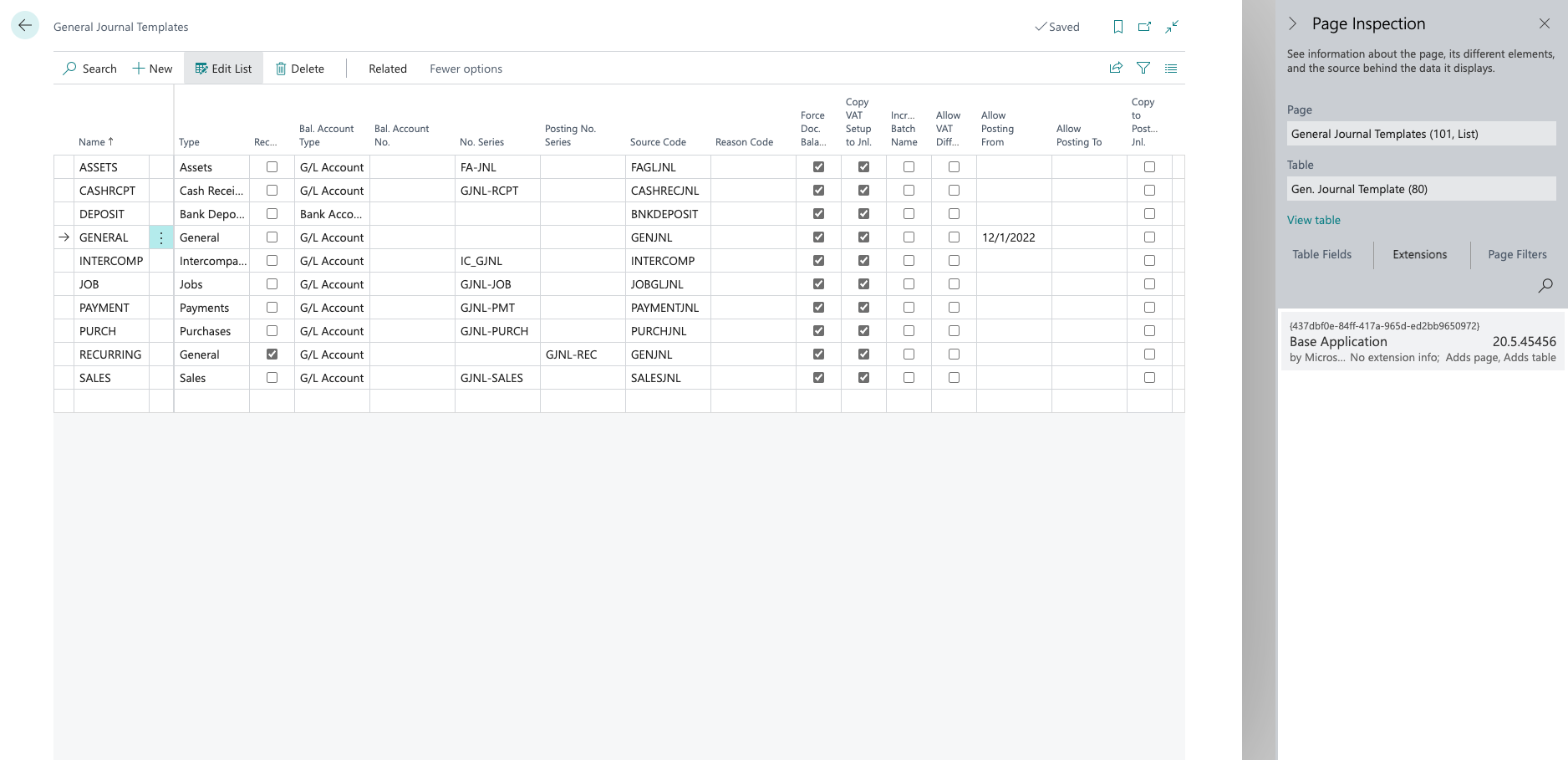
In the Business Central version I'm using, I can see "Allow posting from date" and "Allow posting to date" fields in the general journal template. I tested these fields and it seems those fields are not working. I also know that we can have the date control via user set up as well. But, I'm curious why these fields are not working. Have you encountered the same before? Could it be a bug?Screenshot-2022_2D00_10_2D00_17-at-23.49.41.png
I have the same question (0)
  • Suggested answer
    Inge M. Bruvik Profile Picture
    1,111 Moderator on at

    There is a field in the general ledger setup called "Journal template name mandatory".

    Have you set that field to true?

    If i remember correctly the date fields on the template is only used of that value is set to true.

    Try that first please.

  • Suggested answer
    YUN ZHU Profile Picture
    95,597 Super User 2025 Season 2 on at

    Hi, These fields has existed since before.

    https://learn.microsoft.com/en-us/training/modules/general-journal-templates-dynamics-365-business-central/1-templates

    pastedimage1666051915156v1.png

    But it doesn't exist in NAV2018.

    pastedimage1666052404084v2.png

    And Igne is right. 

    However, this field is not displayed on the screen by default and needs to be added by Design feature or a developer.

    For example,

    pastedimage1666053262271v8.png

    pastedimage1666053235924v7.png

    pastedimage1666053213239v6.png

    Hope this helps.

    Thanks.

    ZHU

  • Community member Profile Picture
    4 on at
    Wow, this is very exciting! Has anybody actually implemented this, and is it working? 
    Since those fields are not available without having a developer add the fields to the pages, I'm wondering if there's a catch, or if they're not supported by Microsoft?
    But I started playing with this and it looks promising!
     
    Thank you Yun and Inge for pointing this out :)
    Thanks, Theo

Under review

Thank you for your reply! To ensure a great experience for everyone, your content is awaiting approval by our Community Managers. Please check back later.

Helpful resources

Quick Links

Responsible AI policies

As AI tools become more common, we’re introducing a Responsible AI Use…

Neeraj Kumar – Community Spotlight

We are honored to recognize Neeraj Kumar as our Community Spotlight honoree for…

Leaderboard > Small and medium business | Business Central, NAV, RMS

#1
OussamaSabbouh Profile Picture

OussamaSabbouh 2,917

#2
Jainam M. Kothari Profile Picture

Jainam M. Kothari 1,161 Super User 2025 Season 2

#3
YUN ZHU Profile Picture

YUN ZHU 1,025 Super User 2025 Season 2

Last 30 days Overall leaderboard

Featured topics

Product updates

Dynamics 365 release plans



