web
You’re offline. This is a read only version of the page.
close
Skip to main content

Notifications

Announcements

No record found.

Community site session details

Community site session details

Session Id :
Small and medium business | Business Central, N...
Suggested Answer

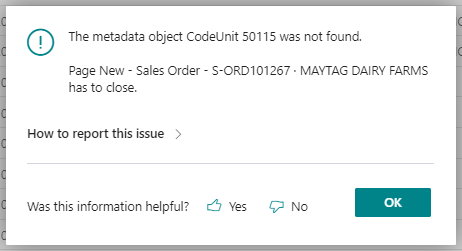
Metadata Object CodeUnit 50115 Not Found

(0) ShareShare
ReportReport
Posted on by 248

Anyone have insight in why this would all of a sudden show up and/or how to resolve? Luckily, this is in a sandbox environment.

The client was trying to create a new sales order and this is occurring now when they are in the sales order, enter a customer, and tab to the next field.
pastedimage1666277323209v1.png

I do notice that they have a sales order that is number ' and I've tried to delete and it won't remove. Could this also be the culprit? 

I have the same question (0)
  • Suggested answer
    Nitin Verma Profile Picture
    21,708 Moderator on at

    Hi,

    It seems that you have made some customization in the system, can you please confirm with your developer to correct this?

    Thanks

  • ahanson Profile Picture
    248 on at

    Update - I did remove the order number ' and that did not make a difference. Looking at code now.

  • Suggested answer
    Amit Profile Picture
    2,559 on at

    Hi,

    Do the following steps-:

    1. Clear Credentials--> https://erpconsultors.com/clear-credentials-cache-in-al-language/

    2. Download Symbols--> https://erpconsultors.com/configure-or-use-other-extensions-in-bc-d365-via-dependencies-settings/

    3. Publish the extension.

    Regards

    Amit Sharma

    www.erpconsultors.com

  • ahanson Profile Picture
    248 on at

    Just to confirm, clearing the cache would just clear history and not any extensions themselves? Is there a way to find what code the codeunit referenced is coming from?

  • Suggested answer
    Nitin Verma Profile Picture
    21,708 Moderator on at

    Hi,

    You can click on the red marked  link, click on copy to clipboard link again, and it will show you the reference error.

    pastedimage1666279967170v1.png

  • Suggested answer
    YUN ZHU Profile Picture
    95,761 Super User 2025 Season 2 on at

    Hi, has this Sandbox environment been upgraded recently? It looks like the extension under development was automatically uninstalled.

    https://learn.microsoft.com/en-us/dynamics365/business-central/dev-itpro/developer/devenv-sandbox-overview

    pastedimage1666312730808v1.png

    Hope this helps.

    Thanks.

    ZHU

Under review

Thank you for your reply! To ensure a great experience for everyone, your content is awaiting approval by our Community Managers. Please check back later.

Helpful resources

Quick Links

Responsible AI policies

As AI tools become more common, we’re introducing a Responsible AI Use…

Neeraj Kumar – Community Spotlight

We are honored to recognize Neeraj Kumar as our Community Spotlight honoree for…

Leaderboard > Small and medium business | Business Central, NAV, RMS

#1
OussamaSabbouh Profile Picture

OussamaSabbouh 2,126

#2
Khushbu Rajvi. Profile Picture

Khushbu Rajvi. 744 Super User 2025 Season 2

#3
YUN ZHU Profile Picture

YUN ZHU 674 Super User 2025 Season 2

Last 30 days Overall leaderboard

Featured topics

Product updates

Dynamics 365 release plans



