web
You’re offline. This is a read only version of the page.
close
Skip to main content

Notifications

Announcements

No record found.

Community site session details

Community site session details

Session Id :
Customer experience | Sales, Customer Insights,...
Answered

Ms Flow giving an error while filtering rows using list rows action for lookup column

(0) ShareShare
ReportReport
Posted on by 35

 I was creating a scheduled flow in which I was using microsoft dataverse connectors and the action was to "list rows" and when I tried to filter rows using one of the column name Due date of table EmployeeTaskEntries, which is a lookup from another table DueDateMaster , i was not able to complete the flow , since the value it contains is a reference to the DueDateMaster so what should be the exact column name should I put to make it call the DueDateMaster's DueDate column instead of the current table DueDate.
3515.error.pnglistrows.png

I have the same question (0)
  • Suggested answer
    Abdul Wahab Profile Picture
    12,119 Moderator on at

    Hi rahul78610,

    Use the Fetch XML Query property of List rows. Make that query using advanced find and paste it here. Below are the steps:

    pastedimage1672064153321v1.png

    pastedimage1672064168094v2.png

    pastedimage1672064353778v3.png

    pastedimage1672064397528v4.png

  • rahul78610 Profile Picture
    35 on at

    Hi Abdul Wahab , how are you getting to that advanced find screen , is there a URL or some other way ? I am trying this Microsoft Dataverse on teams app only so is there any other way you are trying on some other platform or app?

  • Suggested answer
    Abdul Wahab Profile Picture
    12,119 Moderator on at

    Hi rahul78610,

    Here you are: 

    1. example: https://org3382972c.crm4.dynamics.com/main.aspx?pagetype=advancedfind&appid=#516183534
    2. Manipulate it for you: organizationURL/main.aspx?pagetype=advancedfind&appid=#516183534
    3. Go to the Advanced settings from make.powerapps.com
      1. pastedimage1672107408450v1.png
      2. and then Advanced find
        1. pastedimage1672107455323v2.png
  • Suggested answer
    Leah Ju Profile Picture
    Microsoft Employee on at

    Hi rahul78610,

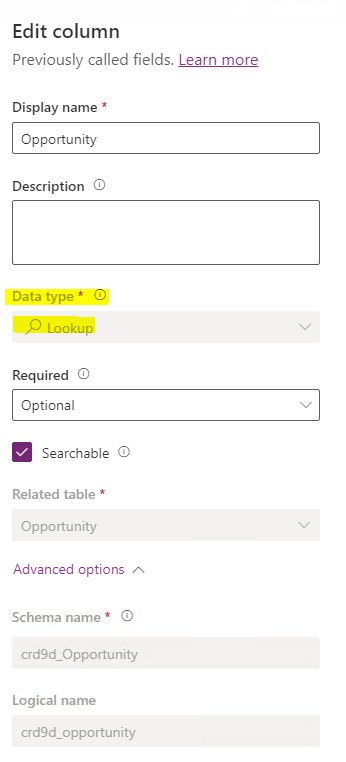
    If ‘ Due date’ is lookup column, you need check the following two points:

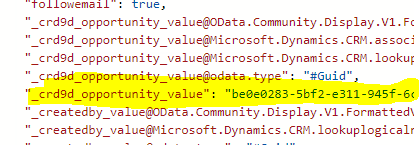
    (1) The format should be _cr9c8_DueDate_value

    The best way I found how to make the Filters work on Dynamics is to:

    First run the Flow with List Dynamics action without the filter.

    Second check the results of the Flow run, and look for the value you wish to be filtering on.

    Third copy the field name without quotes and use that as the filter.
    pastedimage1672105047893v1.png

    2.The value of the lookup column should Guid, but you are using date value.

    So â€˜ Due date’ is Lookup column?

    pastedimage1672105256717v2.png

  • Suggested answer
    Leah Ju Profile Picture
    Microsoft Employee on at

    Hi rahul78610,

    You can use FetchXML Builder(a powerful tool that generates FetchXML without the user having to actually know any FetchXML.) for XrmToolBox

    https://fetchxmlbuilder.com/ 

    https://carldesouza.com/10-features-in-fetchxml-builder-you-need-to-be-using/ 

  • rahul78610 Profile Picture
    35 on at

    Hi Abdul Wahab , I tried that way but I cannot see my table in this list .
    pastedimage1672120640368v1.png

  • rahul78610 Profile Picture
    35 on at

    Hi Leah , I tried downloading it but it is giving a warning and I am not using my personal laptop so it might be a risk to install it on my work laptop

  • Suggested answer
    Mohamed GRAIB Profile Picture
    2,504 Moderator on at

    Hi Rahul,

    Please try to add  this two '' in your formula like this

     'formatDateTime'

  • rahul78610 Profile Picture
    35 on at

    Hi Mohamed GRAIB , I have used the above expression only in my filter column which you have mentioned.

  • Suggested answer
    Mohamed GRAIB Profile Picture
    2,504 Moderator on at

    Hi Rahul, 

    In this case, try add another action to List rows of the table which exist your lookuo field. 

    Then you add your filter and add the two ''

Under review

Thank you for your reply! To ensure a great experience for everyone, your content is awaiting approval by our Community Managers. Please check back later.

Helpful resources

Quick Links

Responsible AI policies

As AI tools become more common, we’re introducing a Responsible AI Use…

Neeraj Kumar – Community Spotlight

We are honored to recognize Neeraj Kumar as our Community Spotlight honoree for…

Leaderboard > Customer experience | Sales, Customer Insights, CRM

#1
Tom_Gioielli Profile Picture

Tom_Gioielli 70 Super User 2025 Season 2

#2
Gerardo Rentería García Profile Picture

Gerardo Rentería Ga... 33 Most Valuable Professional

#3
Daniyal Khaleel Profile Picture

Daniyal Khaleel 32 Most Valuable Professional

Last 30 days Overall leaderboard

Product updates

Dynamics 365 release plans