web
You’re offline. This is a read only version of the page.
close
Skip to main content

Announcements

No record found.

News and Announcements icon
Community site session details

Community site session details

Session Id :
Small and medium business | Business Central, N...
Answered

Error while integration from CRM to Business Central

(0) ShareShare
ReportReport
Posted on by 3,094

Hi All,

I am encountering with an issue when i tried to setup Dynamics 365 Sale using assisted setup. Also, I successfully completed Data verse Connection setup.

But i am unable to do same in Dynamics 365 Sale.
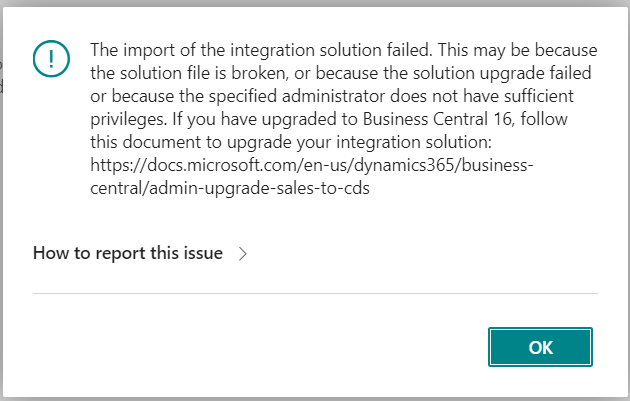
pastedimage1643631053413v1.png

Please note : Below is the CRM admin user with following permission.

  • System administrator 
  • System Customizer 
  • Business Central CDS Integration.
  • Dynamics 365 Business Central Integration Administrator 
  • Dynamics 365 Business Central Integration User 
  • Dynamics 365 Business Central Product Availability User 

The same CRM admin user is used in Business central as Integration User.

I would be grateful if anyone could assist me.

Thank you very much!

I have the same question (0)
  • Suggested answer
    Marco Mels Profile Picture
    Microsoft Employee on at

    (duplicated issue as it seems)

    Hello,

    The error indicates two issues.

    The issue with solution upgrade has been hot fixed. Depending on what release you are using. This was a bug and has been hot fixed (at least in SaaS).

    The mitigation for the second issue with permissions may be because your CRM may be running in AdminOnlyMode. Business Central cannot connect to customer Dataverse environment because the integration user is not an admin, but the environment is in admin mode, so only admins can log.

    cloudblogs.microsoft.com/.../

    If these suggestions do not help, please raise it to Microsoft support via your partner or CSP. We have had these questions before and it is something that we can help you with.

    Thanks.

  • Verified answer
    Raviraj2277 Profile Picture
    199 on at

    Hi Vaishnavi, it might be you are not using business central Administrator account , to run the setup.

    Refer the following blog

    docs.microsoft.com/.../admin-setting-up-integration-with-dynamics-sales

  • Suggested answer
    AA-12021134-0 Profile Picture
    32 on at
    please use the admin account if you already used admin account then refresh the tab and try again some time the system give the erorrs
  • Suggested answer
    Khushbu Rajvi. Profile Picture
    21,573 Super User 2026 Season 1 on at
    It seems an error is occurring due to insufficient privileges. Please use an admin account to proceed.

Under review

Thank you for your reply! To ensure a great experience for everyone, your content is awaiting approval by our Community Managers. Please check back later.

Helpful resources

Quick Links

Introducing the 2026 Season 1 community Super Users

Congratulations to our 2026 Super Stars!

Congratulations to our 2025 Community Spotlights

Thanks to all of our 2025 Community Spotlight stars!

Leaderboard > Small and medium business | Business Central, NAV, RMS

#1
OussamaSabbouh Profile Picture

OussamaSabbouh 1,965 Super User 2026 Season 1

#2
YUN ZHU Profile Picture

YUN ZHU 1,125 Super User 2026 Season 1

#3
Dhiren Nagar Profile Picture

Dhiren Nagar 961 Super User 2026 Season 1

Last 30 days Overall leaderboard

Featured topics

Product updates

Dynamics 365 release plans
