web
You’re offline. This is a read only version of the page.
close
Skip to main content

Notifications

Announcements

No record found.

Community site session details

Community site session details

Session Id :
Finance | Project Operations, Human Resources, ...
Suggested Answer

When adding in a field on form other field values disappear/blank out - How to resolve?

(0) ShareShare
ReportReport
Posted on by 5

Good morning,

Sometimes when adding a field on a form by personalization, other field values disappear or blank out. This seems to only happen when adding a field from the base table (Ex: adding a field from SalesTable on sales order form). This was caught in testing when upgrading to 10.0.32. It does not happen in 10.0.29, but it could be from .30 or .31 as well sine we are going from .29 to .32.

The code looks the same from what I can tell (debugging) between .29 and .32 when adding a field. There are no customizations that affect this code.

This occurs in either standard or personalized views. I’ve been able to replicate it in bank statements, loads, sales, transfer, production and purchase order forms. This is most likely affecting all forms. I have not been able to determine why some fields cause this issue and others do not.

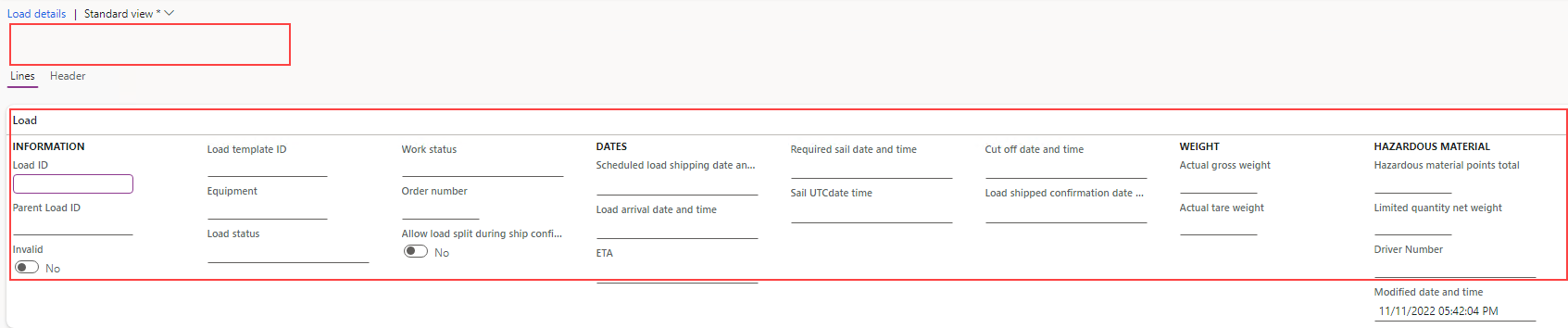
When this occurs, a user can click the refresh button on the form and values will be reappear. So, it is a minor bug, but I know some users will lose it when this happens in production.

Does anyone have an idea what might be causing this? Is this related to a new feature?

Below are screen shots of the above issue/bug.

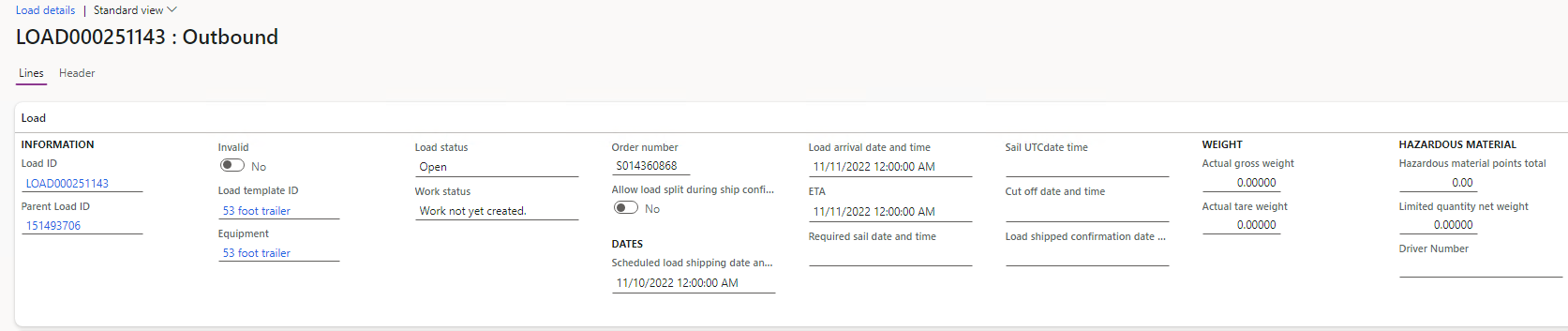
Load – No fields added:
6131.pastedimage1681136988513v2.png


Load – “Modified date and time” field added – other fields values disappear:
4314.pastedimage1681136979479v1.png

I have the same question (0)
  • llittlee Profile Picture
    5 on at

    I'm not sure why this was moved to the Finance Forum, it is not specific to Finance. It should be moved back under Dynamics 365 General Forum

  • Suggested answer
    huijij Profile Picture
    19,811 on at

    Hi llittlee,

    The genera forum is for CRM related products, and it is appropriate that your question is posted on the Finance forum.

    I have just tested that this problem does not reappear in a 10.0.30 version, do you only have this problem in your .32 environment?

    2211.png0841.Capture.PNG

  • llittlee Profile Picture
    5 on at

    As of right now it only occurs in .32 environments. Since we went from .29 to .32 I'm not sure which version this happened in.

    I'm going to check today if I have any environments that haven't been upgraded to .32 yet. The plan is to upgrade it to .30 test, then .31 and test again. If I'm able to do that, at least I would be able to verify which version it is.

  • Mohit Rampal Profile Picture
    12,565 Moderator on at

    Hi llittlee  I have tested in Loads form as your screenshot, created Saved view, added modified date and time field and it seems to be working. I have tested in 10.0.32 environment

    pastedimage1681361875191v1.png

  • llittlee Profile Picture
    5 on at

    I wanted to give an update on this.

    I have not been able to resolve this bug yet. Most likely I'm going to have to submit a ticket with Microsoft.

    I was able to track the issue down to release 10.0.31. So something with this release is what is causing the issue, but nothing in particular stands out as to why that is. It seems like this would be related to a feature, but again I'm not seeing which one.

    Mohit Rampal  and Judy when add a field on a form, do you receive the following info message? I assume you do, but I would like to verify.

    "This page has been refreshed to ensure that all selected fields display data. As a result, the record that is currently displayed may have changed and any unsaved changes have been discarded."

  • Mohit Rampal Profile Picture
    12,565 Moderator on at

    Hi llittlee Yes, I got the same info message when added ModifiedDateTime field via personalization.

    pastedimage1681783266110v1.png

Under review

Thank you for your reply! To ensure a great experience for everyone, your content is awaiting approval by our Community Managers. Please check back later.

Helpful resources

Quick Links

Responsible AI policies

As AI tools become more common, we’re introducing a Responsible AI Use…

Neeraj Kumar – Community Spotlight

We are honored to recognize Neeraj Kumar as our Community Spotlight honoree for…

Leaderboard > Finance | Project Operations, Human Resources, AX, GP, SL

#1
Martin Dráb Profile Picture

Martin Dráb 646 Most Valuable Professional

#2
André Arnaud de Calavon Profile Picture

André Arnaud de Cal... 529 Super User 2025 Season 2

#3
Sohaib Cheema Profile Picture

Sohaib Cheema 285 User Group Leader

Last 30 days Overall leaderboard

Product updates

Dynamics 365 release plans



