web
You’re offline. This is a read only version of the page.
close
Skip to main content

Notifications

Announcements

No record found.

Community site session details

Community site session details

Session Id :
Microsoft Dynamics CRM (Archived)

Sales Pipeline Funnel Chart Order is now incorrect

(0) ShareShare
ReportReport
Posted on by

Hi,

We are using the OOB sales funnel chart which our consultant linked to the new sales stage field we're using.

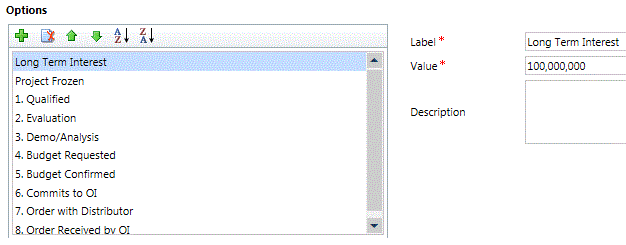
We had a problem previously where the stages were not displaying in the correct order in the chart. We fixed this by firstly changing the name of each stage (adding in 1., 2. before the name so it would sort in that order) and secondly changing the code number (GUID?) of each of the stage values (so that if the chart was using the number of the field value it would order correctly also). This did seem to solve the problem.

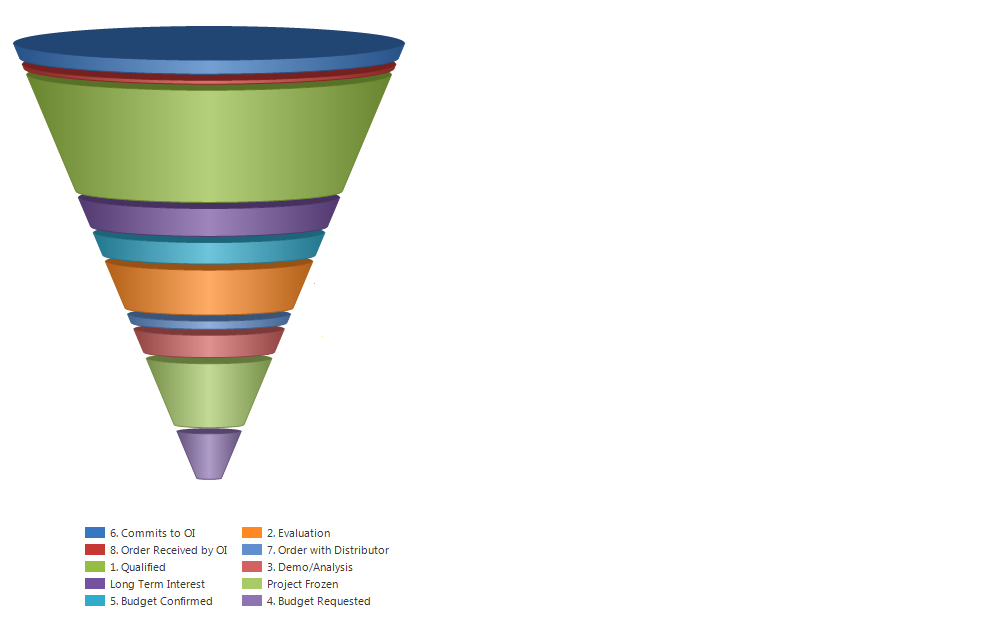
Today I noticed that the chart wasn't displaying the stages in the correct order anymore (not sure for how long). However, I have no idea what the order is based on as it's not alphabetical by stage name, not by stage value number and also not by the revenue value. 

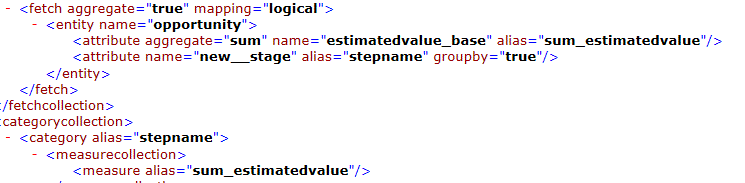
Can anyone tell me how the data is being ordered and how to fix it? I attach images of the chart, the values and the code.
Stage-Number-Values.GIF

Chart-Code.GIF

*This post is locked for comments

I have the same question (0)
  • Verified answer
    James Donohoe Profile Picture
    on at

    Export the chart

    edit the xml:

    add <order alias="stepname" ascending="true" /> just before the closing </entity>

    re-import and it should order correctly

  • Community Member Profile Picture
    on at

    Hi,

    I'm getting this error message:

    Code-edit-1.GIF

    I tried 2x code edits, but maybe both are wrong?

    Code-edit-2.GIF


  • Ulrik Profile Picture
    105 on at

    Use descending instead of ascending. Your second example is the correct setup.

  • Community Member Profile Picture
    on at

    Thanks for the suggestion, but something about what I've added in is still bringing up the import error message.

  • Verified answer
    Community Member Profile Picture
    on at

    In the original XML screenshot you posted you had a line <attribute name = "new_stage" alias="stepname" groupby="true" />

    If you add an "order" clause that refers to this alias, the line must still be there. It looks like you deleted this line by mistake when adding the extra code.

    Also note that option sets sort by the underlying values rather than the text labels, usually.

  • Community Member Profile Picture
    on at

    Thanks - turns out I have a number of pipeline charts with different coding and was using different ones each time. I have gone back to using the original chart and can add the code correctly. It seems to be working. No idea why the other chart isn't working still or how to amend the different coding, but I'll see if I can just use this one.

  • Clint Woods Profile Picture
    1,031 on at

    Hi Adam. I was trying to verify the statement that it would sort by the underlying values instead of the text labels and found that not to be the case. That would be a quite logical way for this to have been implemented, but for some reason, it appears they did not do that. In this example, "inquiry" has the value 1, "meid" has the value 2, "applicant" has the value 948,100,000, and so forth for the remaining Status values. The client is really not keen on updating the string value of the Status to make these sort accordingly and I was wondering if you or anyone else had a good workaround. 

    1780.Capture.PNG

  • Suggested answer
    Clint Woods Profile Picture
    1,031 on at

    Sorry to immediately answer my own question, but this might be helpful. Thanks to this blog by Ledgeview Partners, I have the following slightly different explanation of how to fix this. In my case, there was no Order specified for this funnel chart. The chart definition looked like this:

    4300.after.png

    I extracted the chart definition and made the following slight modification:

    4300.after.png

    I would just note that the order is by the alias already specified as opposed to the attribute name as  you would see it in your FetchXML of an ordered query. The result is the pipeline chart in the numerical order of the Status attribute assigned to the Leads

    2161.chart.png

  • Community Member Profile Picture
    on at

    Glad you fixed it, adding an Order clause was the fix for the first post in this thread too.
    You might want to consider turning off the 3D to make it more effective as a visualisation - funnels are misleading enough in 2D but in 3D they are really easy to misinterpret.
    Without cheating and adding up the numbers, can you tell in less than half a second if the first stage has more Leads in than all the rest put together?
    The first slice is actually smaller than the rest, but we can't help but be distracted by the overwhelming effect of all that colour to either side, and the 3D makes us think of this as a big cone. Once you think of this as a volume, the first part looks huge by comparison to the rest.
    Also see how the elliptical area on the top adds lots more blue pixels that do not represent any data? In your first (incorrectly sorted) screenshot, the first slice is way smaller than the bottom slice but has way more colour on screen.
    A simple column chart would probably give people a much clearer picture of the number of leads in each stage, without distortion, albeit without the (sometime over-used) metaphor of a "funnel".

  • Community Member Profile Picture
    on at

    Hi Everyone,

    I know this is an old thread but I am having a very similar problem. I tried adding the order line in as shown below in red. (I also tried descending)

    <entity name="opportunity">
    <attribute name="stepname" groupby="true" alias="_CRMAutoGen_groupby_column_Num_0" />
    <attribute name="new_totalestimatedrevenue" aggregate="sum" alias="_CRMAutoGen_aggregate_column_Num_0" />
    <order alias="_CRMAutoGen_groupby_column_Num_0" ascending="true" />
    </entity>

    Dynamics accepts the import however it does not change the order of the phases in the funnel chart.  As you can see stage 10 does not follow on linearly from the other phases.  The stage categories are in the correct order within the option set and even numbered linearly as shown below.  What am I doing wrong?

    Thank you for your help :)

    2860.OptionSet.JPG2860.OptionSet.JPG

Under review

Thank you for your reply! To ensure a great experience for everyone, your content is awaiting approval by our Community Managers. Please check back later.

Helpful resources

Quick Links

Responsible AI policies

As AI tools become more common, we’re introducing a Responsible AI Use…

Neeraj Kumar – Community Spotlight

We are honored to recognize Neeraj Kumar as our Community Spotlight honoree for…

Leaderboard > 🔒一 Microsoft Dynamics CRM (Archived)

#1
SA-08121319-0 Profile Picture

SA-08121319-0 4

#1
Calum MacFarlane Profile Picture

Calum MacFarlane 4

#3
Alex Fun Wei Jie Profile Picture

Alex Fun Wei Jie 2

Last 30 days Overall leaderboard

Featured topics

Product updates

Dynamics 365 release plans