web
You’re offline. This is a read only version of the page.
close
Skip to main content

Announcements

Community site session details

Community site session details

Session Id :
Microsoft Dynamics 365 | Integration, Dataverse...
Suggested Answer

Use power automate to populate a look up field with a text field value

(0) ShareShare
ReportReport
Posted on by 15

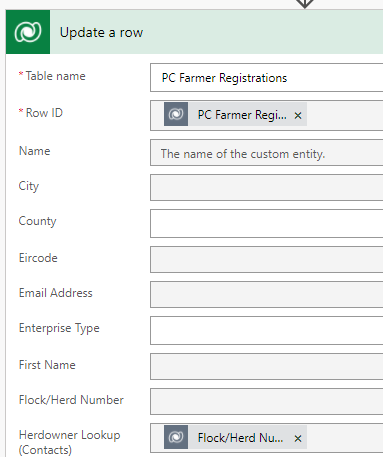
I have a custom entity that has an N:1 relationship with the Contacts entity.  The custom entity captured data from a user through a web form.  

I want to use power automate to update a look field on the custom entity which is linked to the contact entity.  I have a unique identifying number on the custom entity which is also on the contact entity. 

The look-up field will populate when the unique id is entered into the look-up field manually and I have also got it to work using power automate but only when I specify the GUID for the contact record and custom entity record. 

How can I get power automate to populate the look-up field on the custom entity with the data that is entered in the custom entity text field when the record is originally created. 
  pastedimage1642007112214v1.png

I have the same question (0)
  • Suggested answer
    Community Member Profile Picture
    on at

    Hi ahilisa,

    The value of  Herdowner lookup field should be something like this: contacts(4fbf3c8c-4269-ec11-8943-00224809dce9). The 4fbf3c8c-4269-ec11-8943-00224809dce9 is GUID of the contact.

    In your case, if the dynamic content(Flock/Herd Nu...) is the GUID of the contact, you could use this expression: concat('contacts(', Flock/Herd Nu..., ')').

  • ahilisa Profile Picture
    15 on at

    Hi Steve,

    I have updated the flow as you suggested and I am getting this error, any suggestions?

    pastedimage1642071226201v1.png

  • Suggested answer
    Bipin D365 Profile Picture
    28,983 Moderator on at

    Hi,

    You will need to use List Rows to query contact table based on unique id value then map the lookup field on custom entity. Please see below post which is querying User record based on fullname, you will need to do same for contact -

    community.dynamics.com/.../update-a-row-in-power-automate-with-name-rather-than-value

    Please mark my answer verified if this is helpful!

    Regards,

    Bipin Kumar

    Follow my Blog: xrmdynamicscrm.wordpress.com/

  • Suggested answer
    Preeti Sharma Profile Picture
    2,678 on at

    Hi ahilisa,

    If you want to fetch data from some custom entity based on some filter, you have to add a step to get that particular record from the custom entity. Once you get the record, set the fields value from the fetched record.

    Hope this helps!!

Under review

Thank you for your reply! To ensure a great experience for everyone, your content is awaiting approval by our Community Managers. Please check back later.

Helpful resources

Quick Links

Introducing the 2026 Season 1 community Super Users

Congratulations to our 2026 Super Stars!

Congratulations to our 2025 Community Spotlights

Thanks to all of our 2025 Community Spotlight stars!

Leaderboard > Microsoft Dynamics 365 | Integration, Dataverse, and general topics

#1
André Arnaud de Calavon Profile Picture

André Arnaud de Cal... 69 Super User 2026 Season 1

#2
BillurSamdancioglu Profile Picture

BillurSamdancioglu 55 Most Valuable Professional

#2
Abhilash Warrier Profile Picture

Abhilash Warrier 55 Super User 2026 Season 1

Last 30 days Overall leaderboard

Product updates

Dynamics 365 release plans
