web
You’re offline. This is a read only version of the page.
close
Skip to main content

Announcements

No record found.

News and Announcements icon
Community site session details

Community site session details

Session Id :
Small and medium business | Business Central, N...
Suggested Answer

Trouble generating Warehouse Movement using Movement Worksheets

(0) ShareShare
ReportReport
Posted on by 5

I am trying to create Warehouse Movements using the "Calculate Bin Replenishment" and "Create Movement" features in the Movement Worksheet. However, the generated document always seems to have trouble populating the lines correctly. I am using Item Tracking with Lot No., Expiration Date and Package No. (whereas the package no. is assigned during the inbound process), but the first take-place pair of lines will have no Package No.

Should the movement require additional packages, the following lines will have their Package No.-field properly filled out, but some of them have 0.1 of the assigned unit of measure missing from the Quantity. To offset this, one package will provide the missing units, however, this one shares the same Lot No. as the lines without a Package No.

The missing Package No. and what appears to be a rounding error may not be connected, but I can't say for sure. Here is one example. It isn't pictured, but the Lot No. of the first and last line is identical.
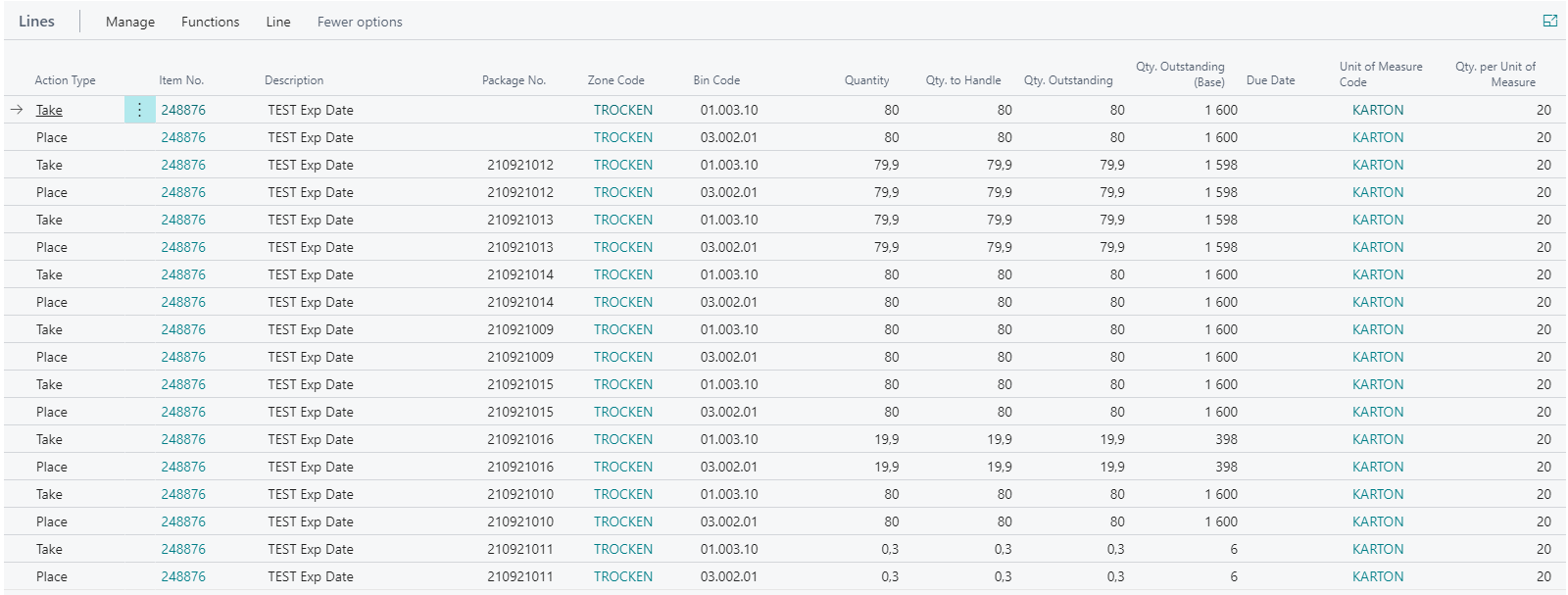
brave_5F00_O5mMGCJIJA.png

If the Lot Numbers are something to go by, the package 210921011 is referenced twice, both in the first and last pair of lines. Following this, this Movement is asking for 80.3x KARTON from this package, and 0.1x KARTON less from 3 different packages. The packages all carry 80 (with the exception of with just 20), as you can see from the Warehouse Entries.

brave_5F00_CzSJVJAs4c.png

  • Suggested answer
    Andy Sather Profile Picture
    Microsoft Employee on at

    Hello,

    If you don't get further responses to this issue, you may want to raise a support request to Microsoft support via your CSP / Partner.

  • Suggested answer
    Community Member Profile Picture
    on at

    Jakob,

    A few questions first, the Package No. is not in my US version nor my other Country version. Is this a customization you created and if so how does it populate and work? Could this be effecting the Calculate Bin Replenishment? I have not come across this issue before, as you describe so I would first wonder if this is a custom field effecting the results.

    Thanks,

    Steve

  • JakobG Profile Picture
    5 on at

    Steve,

    Package No. tracking is an upcoming feature that can be enabled in advance. It is mentioned in this article.

    Thanks,

    Jakob

  • Suggested answer
    Community Member Profile Picture
    on at

    Jakob,

    The Max Qty. set on the Item and Bin is = to ? Now taking this Qty into account, less QOH in the Bin and Item, the Movement Lots of the Item that are being moved how many units are left of the Item/Lot combination not expired? I am wondering if the Quantity for the UOM created a decimal entry.

    So the last line you spoke about shows .3 out of a KARTEN of 20. Not sure of this Lot has only 6 units left or if the Max Qty. when calculating the Movement only needed 6 or .3 of 20.

    Thanks,

    Steve

  • JakobG Profile Picture
    5 on at

    Could you rephrase your first sentence? I'm afraid I don't understand what you mean.

    As you can see in the Warehouse Entries, every package has 80 KARTON, with the exception of the one with only 20. There are no other movements, and the decimal is only created with this document.

Under review

Thank you for your reply! To ensure a great experience for everyone, your content is awaiting approval by our Community Managers. Please check back later.

Helpful resources

Quick Links

Season of Sharing Community Challenge Winners!

Congratulations to our community stars!

Women in Power Builds Momentum

Expanding mentorship, skilling, and AI innovation

Leaderboard > Small and medium business | Business Central, NAV, RMS

#1
OussamaSabbouh Profile Picture

OussamaSabbouh 728 Super User 2026 Season 2

#2
YUN ZHU Profile Picture

YUN ZHU 545 Super User 2026 Season 2

#3
AndrewThomas81 Profile Picture

AndrewThomas81 328 Super User 2026 Season 2

Last 30 days Overall leaderboard

Featured topics

Microsoft Training Manuals

Product updates

Dynamics 365 release plans



