web
You’re offline. This is a read only version of the page.
close
Skip to main content

Announcements

No record found.

News and Announcements icon
Community site session details

Community site session details

Session Id :
Microsoft Dynamics AX (Archived)

Error while excuting work

(0) ShareShare
ReportReport
Posted on by 1,480

Hello everybody,

I'm using Microsoft Dynamics AX R3, the reservation hierarchy is defined like this: 
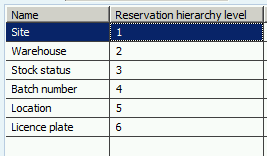
7587.Capture2.PNG

If a wave(1) needs an remplenishement, a wave(2) of replenishement is created

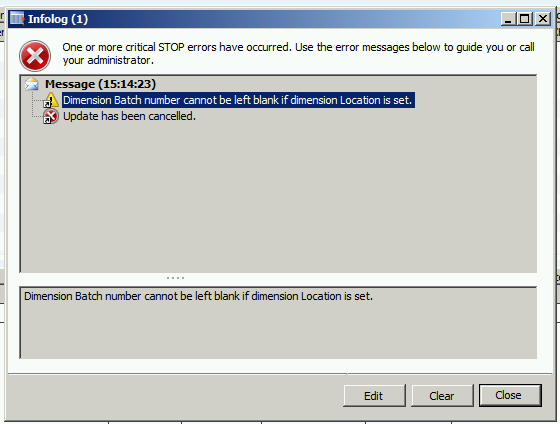
I finished works of the second wave, but when i try to finish the works of the first wave I have always this error even if the batch number is specified correctly on the pick work line, have you any idea about the source of the problem and how to fix it?
Thank you very much,

Best regards.

*This post is locked for comments

I have the same question (0)
  • Fredrik Sætre Profile Picture
    12,644 on at

    AWM is packed with bugs, so is you use Advanced features like this it might me the case.

    Is location sat on the sales line?

    Does it work without replenishment being triggered?

  • Julia Julia Profile Picture
    1,480 on at

    Thank you for your answer :)

    No, the location isn't sat on the sales line

    Yes, it works without replenishement being triggered (when the work doesn't need replenishement).

  • Ivan (Vanya) Kashperuk Profile Picture
    Microsoft Employee on at

    Amina, I'll try to reproduce this tomorrow and will let you know if this is in fact a bug.

  • Julia Julia Profile Picture
    1,480 on at

    Thank you Ivan, that's nice of you! I don't know what to do with this problem

  • Ivan (Vanya) Kashperuk Profile Picture
    Microsoft Employee on at

    Well, I tried the scenario you described. Everything seems to be fine.

    Which build are you on? I was trying to CU8.

    If you are in fact on a recent build, I guess you'll need to give us more info, maybe post screenshots of your setup like location directives, replenishment template, etc.

  • Julia Julia Profile Picture
    1,480 on at

    I'm working on CU7, I asked our technical consultants to update AX (CU8).

    Can you tell me if your products are trucked by the batch number?

    My tracking dimension group:

    6712.Capture2.PNG

    My wave template:

    6471.Capture3.PNG

    My replenishement template:

    3276.Capture4.PNG

    My location directive:

    Capture5.PNG

    My work template:

    Can you tell me if there is any problem in my setup?

    Thank you.

  • Ivan (Vanya) Kashperuk Profile Picture
    Microsoft Employee on at

    Well, the only difference that I noticed compared to my setup is that the replenishment work template is set up to automatically process the work. I'll try that tomorrow (but maybe you in the meantime can try without automatic process)

    I also did not have the "Restrict by unit" setup on my location directives - is that your Replenishment loc.dir? or your shipping (sales order) loc.dir?

  • Julia Julia Profile Picture
    1,480 on at

    Thank you for your answer

    Yes, I tried without "automatically" process but it doesn't work :(

    For the location directive, it's my shipping location directive.

    Best regards.

  • Julia Julia Profile Picture
    1,480 on at

    Yes without "Restrict by unit" it works, but I need to specify a specific unit "Colis" for a specific zone, is there any other manner to restrict unit?

  • Ivan (Vanya) Kashperuk Profile Picture
    Microsoft Employee on at

    Hi Amina

    Restrict by unit functionality works fine.

    Based on your other topics it seems there's something wrong with your unit conversion setup for Coils and this product.

    I would investigate that deeper, see if maybe you have a non-product specific conversion there, or maybe a reverse conversion from "eaches" to Coils, etc.

Under review

Thank you for your reply! To ensure a great experience for everyone, your content is awaiting approval by our Community Managers. Please check back later.

Helpful resources

Quick Links

Introducing the 2026 Season 1 community Super Users

Congratulations to our 2026 Super Stars!

Meet the Microsoft Dynamics 365 Contact Center Champions

We are thrilled to have these Champions in our Community!

Congratulations to the April Top 10 Community Leaders

These are the community rock stars!

Leaderboard > 🔒一 Microsoft Dynamics AX (Archived)

#1
CP04-islander Profile Picture

CP04-islander 24

#2
Michel ROY Profile Picture

Michel ROY 14

#3
Jagadabi Profile Picture

Jagadabi 6

Last 30 days Overall leaderboard

Featured topics

Product updates

Dynamics 365 release plans
